÷
ONE-TOUCH TIMER RECORDING (OTR)
The One-Touch Timer Recording feature provides a simple and convenient way to make a timed recording.
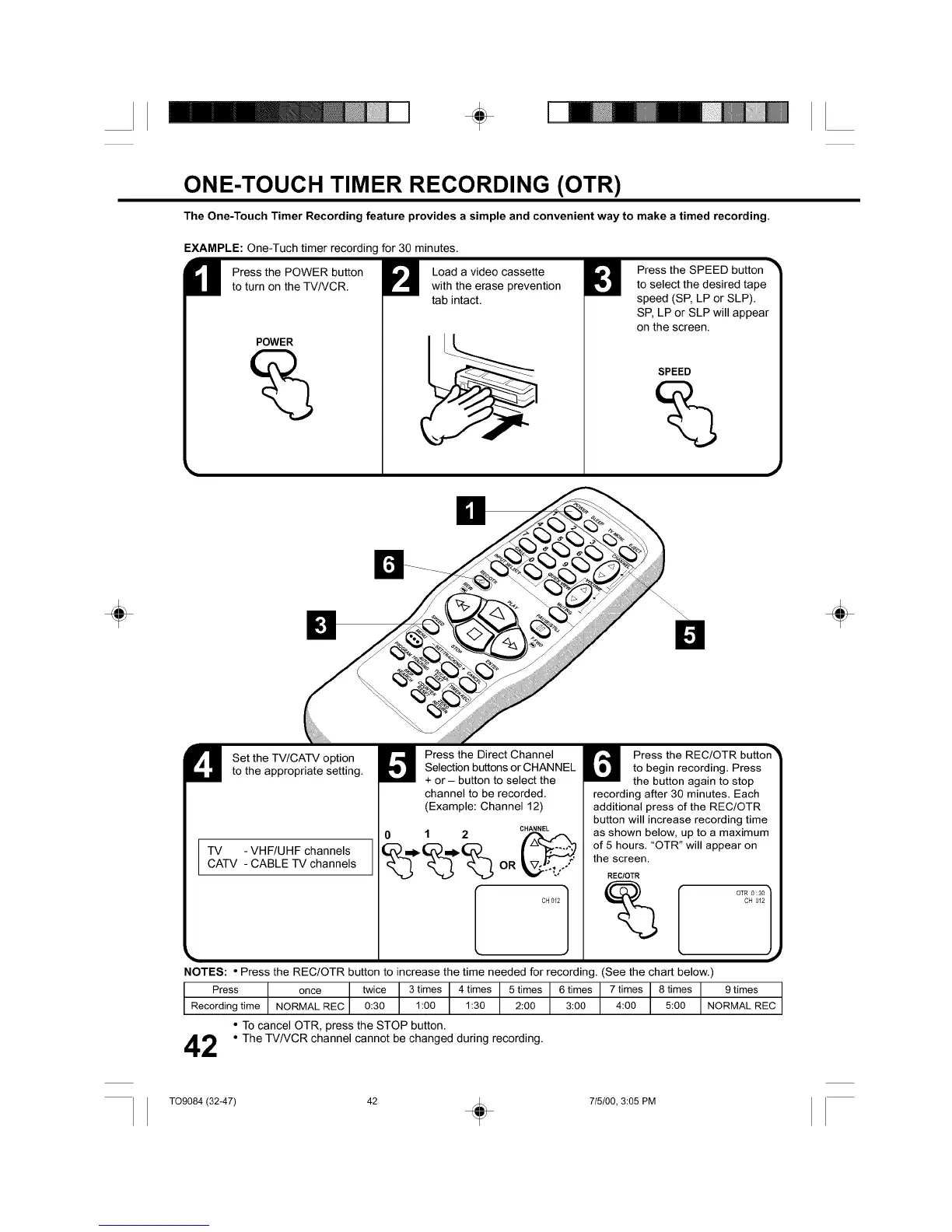
EXAMPLE: One-Tuch timer recording for 30 minutes.
U ress the POWER buttonto turn on the TV/VCR.
POWER
%
Load a video cassette
with the erase prevention
tab intact.
Press the SPEED button
to select the desired tape
speed (SP, LP or SLP).
SP, LP or SLP will appear
on the screen.
SPEED
÷ ÷
U Set the TV/CATV optionto the appropriate setting.
]
TV - VHF/UHF channels I
CATV - CABLE TV channels
1
Press the Direct Channel
Selection buttons or CHANNEL
+ or - button to select the
channel to be recorded.
(Example: Channel 12)
CHANNEL
0 1 2
%-%-%
CH012 I
Press the REC!OTR button _
to begin recording. Press
the button again to stop
recording after 30 minutes. Each
additional press of the REC/OTR
button will increase recording time
as shown below, up to a maximum
of 5 hours. "OTR" will appear on
the screen.
RECtOTR
%
OTR 0 : 30 ]
J,
CH 012
NOTES: • Press the REC/OTR button to increase the time needed for recording. (See the chart below.)
Press once twice 3 times 4 times 5 times 6 times 7 times 8 times 9 times
Recording time NORMAL REC 0:30 1:00 1:30 2:00 3:00 4:00 5:00 NORMAL REC
• TO cancel OTR, press the STOP button.
2 • The TV/VCR channel cannot be changed during recording.
T09084 (32-47) 42 _ 715/00, 3:05 PM



 To Next Page