÷
MANUAL CLOCK SETTING
You must set the date and time manually for Timer Recordings, ON/OFF Timer and Daylight Saving Time if
the Auto Clock process did not set them correctly.
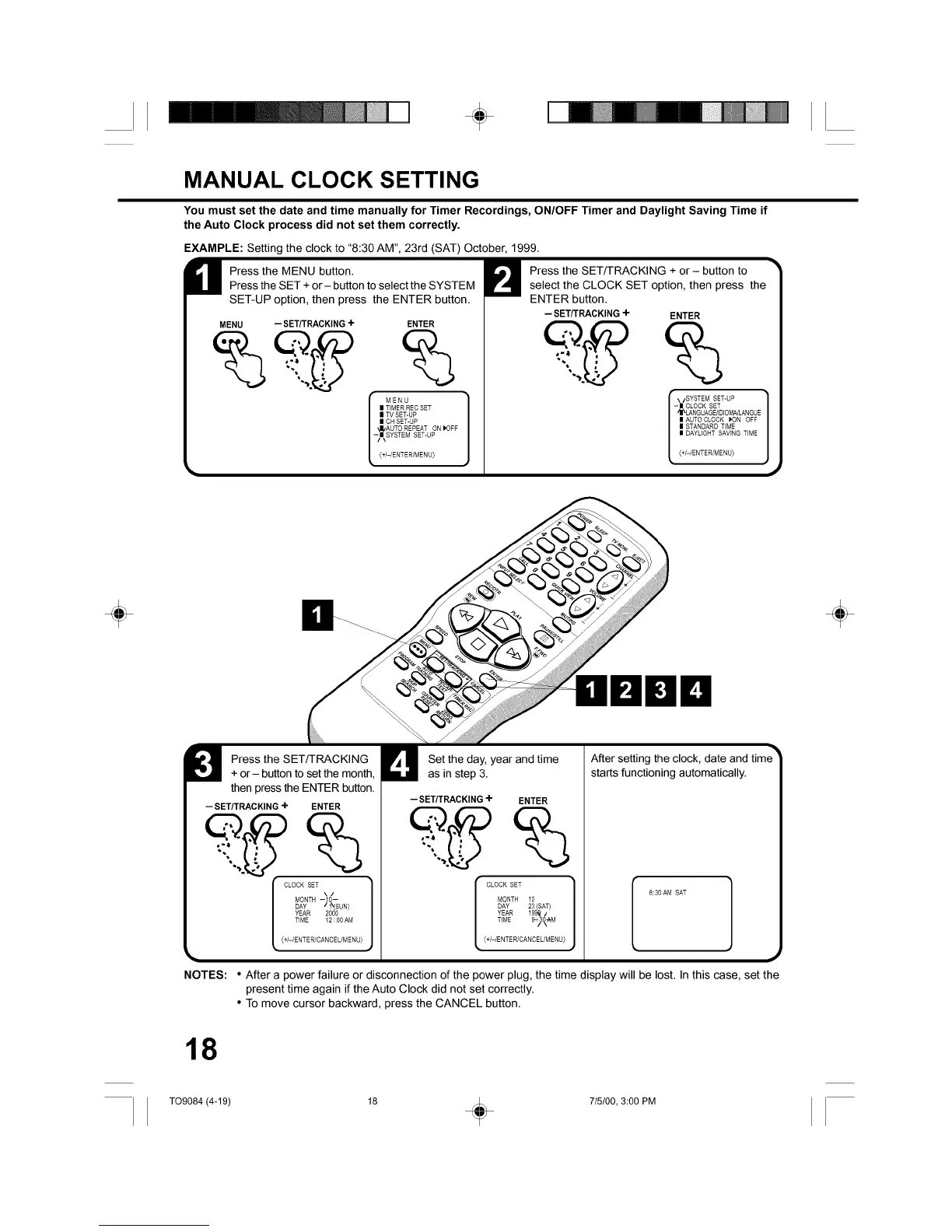
EXAMPLE: Setting the clock to "8:30 AM", 23rd (SAT) October, 1999.
H ress the MENU button.Press the SET + or- button to select the SYSTEM
SET-UP option, then press the ENTER button.
MENU --SET/TRACKING+ ENTER
%
I MENU
m TIMER RES SET
= TV SET-UP
= CH SET-UP
,J/AUTO REPEAT ON _OFF
-/N SYSTEM SET-UP(+/-/ENTER/MENU)
Press the SET/TRACKING + or- button to
select the CLOCK SET option, then press the
ENTER button.
- SET/TRACKING+
ENTER
SYSTEM SET-UP
-m CLOCK SET
/N\LANGUAGE/EDIOM_LANGUE
m AUTO CLOCK _ON OFF
m STANDARD T(ME
m DAYLIGHT SAVING TIME
(+/-/ENTER/MENU)
÷ ÷
Press the SET/TRACKING
+ or- button to set the month,
then press the ENTER button.
- SET/TRACKING+ ENTER
I 1
MONTH -10--
L T_ME_2:00AMJ(+/-/ENTER/CANCEL/MENU)
NOTES:
Set the day, year and time
as in step 3.
-- SET/TRACKING4- ENTER
After setting the clock, date and time
starts functioning automatically.
,[SLOZTEi EAROA ] 0 '0AMSAT
L T_ME%3t_
(+/-/ENTER/CANCEL/MENU)
• After a power failure or disconnection of the power plug, the time display will be lost. In this case, set the
present time again if the Auto Clock did not set correctly.
• To move cursor backward, press the CANCEL button.
18
TO9084 (4-19) 18 _ 715/00, 3:00 PM



 To Next Page