÷
SETTING THE LANGUAGE
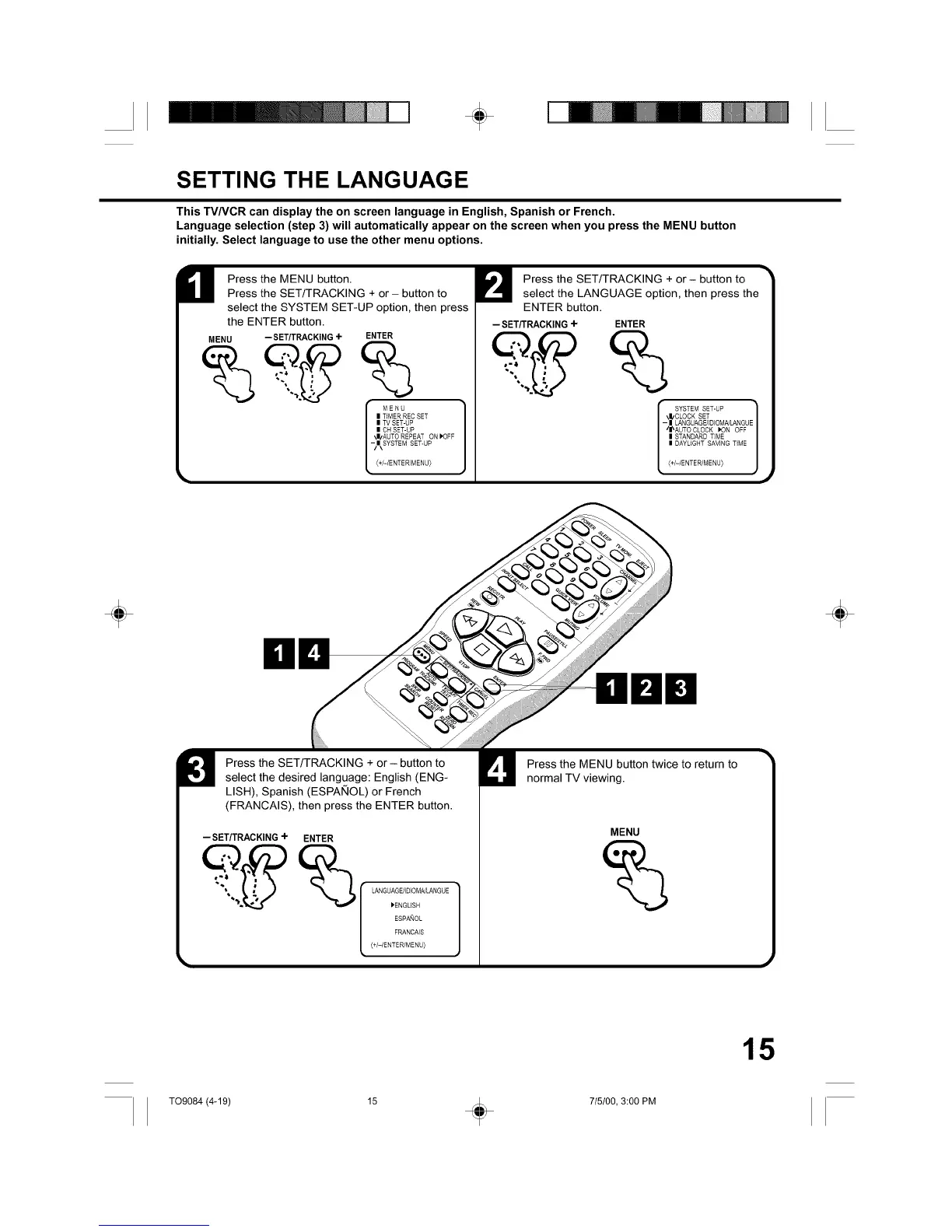
This TV/VCR can display the on screen language in English, Spanish or French.
Language selection (step 3) will automatically appear on the screen when you press the MENU button
initially. Select language to use the other menu options.
Press the MENU button.
Press the SET/TRACKING + or- button to
select the SYSTEM SET-UP option, then press
the ENTER button.
MENU -- SET/TRACKING +
ENTER
%
MENU
| TIMER REC SET
| TV SET-UP
| CHSET-UP
\|!AUTO REPEAT ON P'OFF
-/|\SYSTEM SET-UP
(+/-/ENTER/MENU_
-- SET/TRACKING+
Press the SET/TRACKING + or- button to
select the LANGUAGE option, then press the
ENTER button.
ENTER
SYSTEMSET-UP
\|/CLOCK SET
- | LANGUAGE/IDIOMCdL&NGUE
I /I_AUTO CLOCK IK3N OFF
| STANDARD TIME
| DAYLIGHT SAVING TiME
{+/-/ENTER/MENU_
÷ ÷
Press the SET/TRACKING + or - button to
select the desired language: English (ENG-
LISH), Spanish (ESPAKIOL) or French
(FRANCAIS), then press the ENTER button.
-- SET/TRACKING÷ ENTER
__ _ LANGUAGE/]D]OMNLANGUE
_ENGUSH
ESPANOL
FRANCAIS
(+/-/ENTER/MENU)
Press the MENU button twice to return to
normal TV viewing.
MENU
15
T09084 (4-19) 15 _ 715100, 3:00 PM



 To Next Page