÷
TO SET THE ON TIMER
This feature allows you to have the TV/VCR automatically turn "ON" at a predetermined time. If you program the
"ON" timer once, the TV/VCR will turn "on" on the programmed day (daily/a weekly) at the same time to the
same channel.
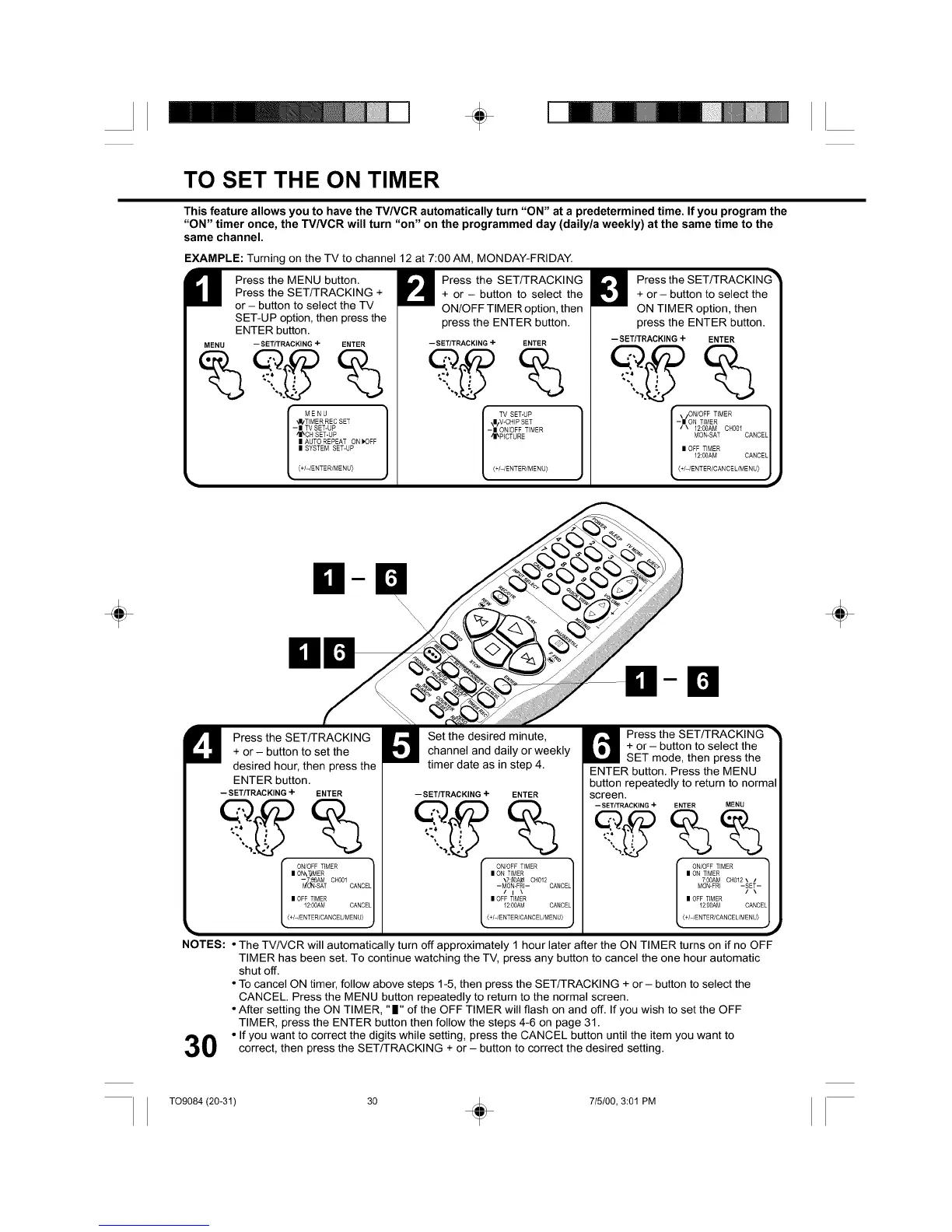
EXAMPLE: Turning on the TV to channel 12 at 7:00 AM, MONDAY-FRIDAY.
H ress the MENU button.
Press the SET/TRACKING +
or - button to select the TV
SET-UP option, then press the
ENTER button.
MENU -- SET/TRACKING + ENTER
MENU
_I/TIMER REC SET
- II TV SET-UP
iI_CH SET-UP
L I AUTO REPEAT ON _OFF
II SYSTEM SET-UP
<+I-IENTERIMENU)
Press the SET/TRACKING
+ or - button to select the
ON/OFF TIMER option, then
press the ENTER button.
-- SET/TRACKING + ENTER
TV SET-UP
\II/V-CHIP SET
-II ON/OFF TIMER
41_EICTURE
(+/-/ENTER/MENU)
Press the SET/TRACKING _
+ or - button to select the
ON TIMER option, then
press the ENTER button.
-- SETITRACKING + ENTER
\/ON/OFF TIMER
-II ON TIMER /
/ \ 12:00AM CH001
J
MON-SAT CANCEL
| OFF TIMER
12:00AM CANCEL
<+/-/E NTE R/CAN CEL/ME NU)
÷ ÷
D
U ress the SET/TRACKING
+ or - button to set the
desired hour, then press the
ENTER button.
-- SET/TRACKING + ENTER
ONIOFF TIMER L7
| ON\T_MER
-@AM CliO01
_fTO_-SAT CANCE
| OFF TIMER /
12:00AM CANCEL
J
• <÷/-/ENTER/CANCEUMENU)
Set the desired minute,
channel and daily or weekly
timer date as in step 4.
-- SET/TRACKING + ENTER
ON/OFF TIMER ]
| ON TIMER
\7:_]0AJe CH012
-MON-FRI- CANCEL
/ i \
| OFF TIMER
12:00AM CANCEL
(+/ /ENTER/CANCEL/MENU)
_el_ ress the SET/TRACKING "_
+ or- button to select the
SET mode, then press the
ENTER button. Press the MENU
button repeatedly to return to normal
screen.
-- SET/TRACKING + ENTER MENU
ON/OFF TIMER ]_
| ON TIMER
7:00AM 0H012 \ /
MON-FR] -SET-
/ \
| OFF TIMER
12:00AM CANCEL
• (+/ /ENTER/CANCEUMENU)
NOTES: • The TV/VCR will automatically turn off approximately 1 hour later after the ON TIMER turns on if no OFF
TIMER has been set. To continue watching the TV, press any button to cancel the one hour automatic
shut off.
• To cancel ON timer, follow above steps 1-5, then press the SET/TRACKING + or- button to select the
CANCEL. Press the MENU button repeatedly to return to the normal screen.
• After setting the ON TIMER, "11" of the OFF TIMER will flash on and off. If you wish to set the OFF
TIMER, press the ENTER button then follow the steps 4-6 on page 31.
0 • If you want to correct the digits while setting, press the CANCEL button until the item you want tocorrect, then press the SET/TRACKING + or - button to correct the desired setting.
T09084 (20-31) 30 _ 715/00, 3:01 PM



 To Next Page