÷
÷
DUPLICATING A VIDEO TAPE
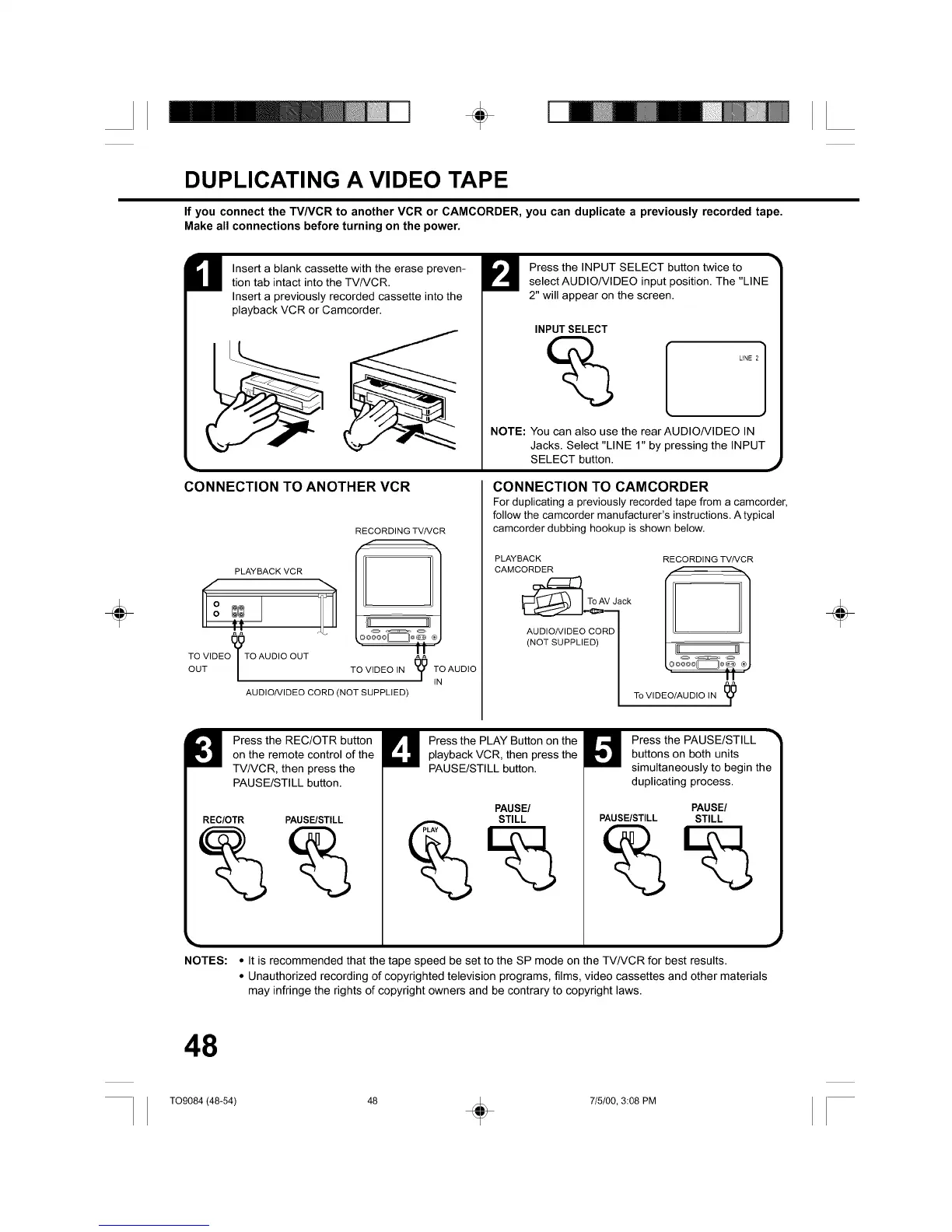
If you connect the TVNCR to another VCR or CAMCORDER, you can duplicate a previously recorded tape.
Make all connections before turning on the power.
Insert a blank cassette with the erase preven-
tion tab intact into the TV/VCR.
Insert a previously recorded cassette into the
playback VCR or Camcorder.
CONNECTION TO ANOTHER VCR
PLAYBACK VCR
66
TO VIDEoyTo AUDIO OUT
/
OUT
RECORDING TV/VCR
II
AUDIO/VIDEO CORD (NOT SUPPLIED)
Press the INPUT SELECT button twice to
select AUDIO/VIDEO input position. The "LINE
2" will appear on the screen.
INPUT SELECT
NOTE: You can also use the rear AUDIONIDEO IN
Jacks. Select "LINE 1" by pressing the INPUT
SELECT button.
CONNECTION TO CAMCORDER
For duplicating a previously recorded tape from a camcorder,
follow the camcorder manufacturer's instructions. A typical
camcorder dubbing hookup is shown below.
PLAYBACK RECORDING TV/VCR
CAMCORDER f_
To va°k[il 1
AUDIO/VIDEO CORD I
(N°TSUPPL'ED)I _lltl__===__IJll''
TO VIDEO/AUDIO iN I_
Press the REC/OTR button
on the remote control of the
TV/VCR, then press the
PAUSE/STILL button.
REC/OTR PAUSE/STILL
NOTES:
Press the PLAY Button on the
playback VCR, then press the
PAUSE/STILL button.
PAUSE/
STILL
Press the PAUSE/STILL
buttons on both units
simultaneously to begin the
duplicating process.
PAUSE/
PAUSE/STILL STILL
• It is recommended that the tape speed be set to the SP mode on the TV/VCR for best results.
• Unauthorized recording of copyrighted television programs, films, video cassettes and other materials
may infringe the rights of copyright owners and be contrary to copyright laws.
÷
48
TO9084 (48-54) 48 (_ 7/5/00, 3:08 PM



 To Next Page