÷
÷
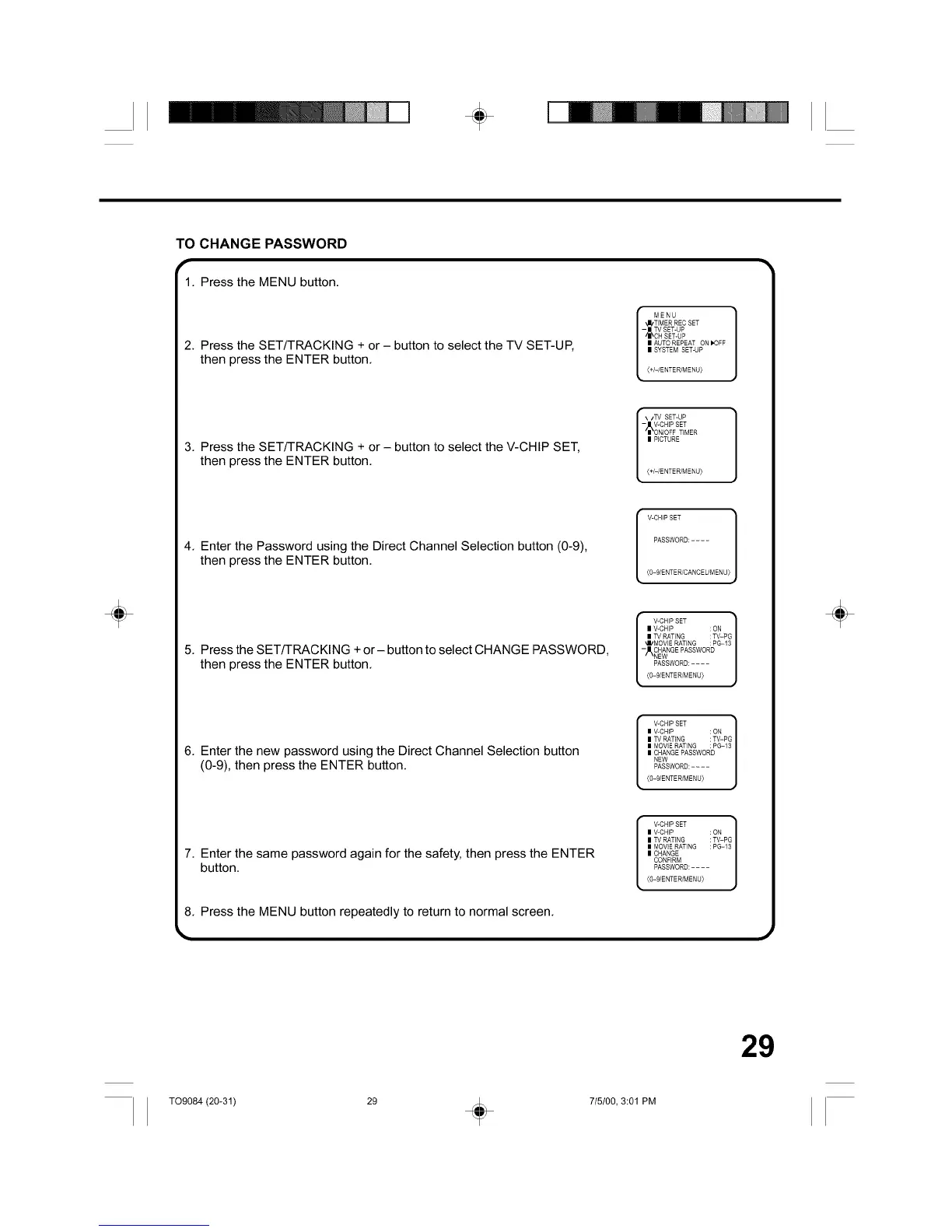
TO CHANGE PASSWORD
1. Pressthe MENU button.
2. Press the SET/TRACKING + or - button to select the TV SET-UP,
then press the ENTER button.
MENU
_I/TIMER REC SET
- | TV SET-UP
_I_CH SET-UP
II AUTO REPEAT ON I'0FF
II SYSTEM SET-UP
(+/-/ENTER/MENU)
'_/TV SET-UP
{+/-/ENTER/MENU}
V-CHIP SET
PASSWORD: ....
3. Press the SET/TRACKING + or - button to select the V-CHIP SET,
then press the ENTER button.
4. Enter the Password using the Direct Channel Selection button (0-9),
then press the ENTER button.
(O-9/ENTER/CANCELIMENU)
5. Press the SET/TRACKING + or- button to select CHANGE PASSWORD,
then press the ENTER button.
[ _IkV-CNIP SET ]
I VICHIP : ON
I TV RATING : TV-PG
_II/MOVIE RATING : PG-13
- CHANGE PASSWORD
NEW
t sswo 0.....j
(0-9/ENTER/MENU}
6. Enter the new password using the Direct Channel Selection button
(0-9), then press the ENTER button.
V-CHIPSET ]
| V-CH_P : ON
| TV RATING : TV=PG
| MOVIERATING : PG-13
| CHANGEPASSWORD
NEW
PASSWORD:....
{O=9/ENTER/MSNU)
7. Enter the same password again for the safety, then press the ENTER
button.
8. Press the MENU button repeatedly to return to normal screen.
V-CHIPSET ]
| V-CHIP : ON
| TV RATING : TV=PG
| MOVIERATING : PG-13
| CHANGE
CONFIRM
PASSWORD:....
_O=9/ENTER/MSNU}
÷
29
TO9084 (20-31) 29 + 715100, 3:01 PM



 To Next Page