÷
DAYLIGHT SAVING TIME SETTING
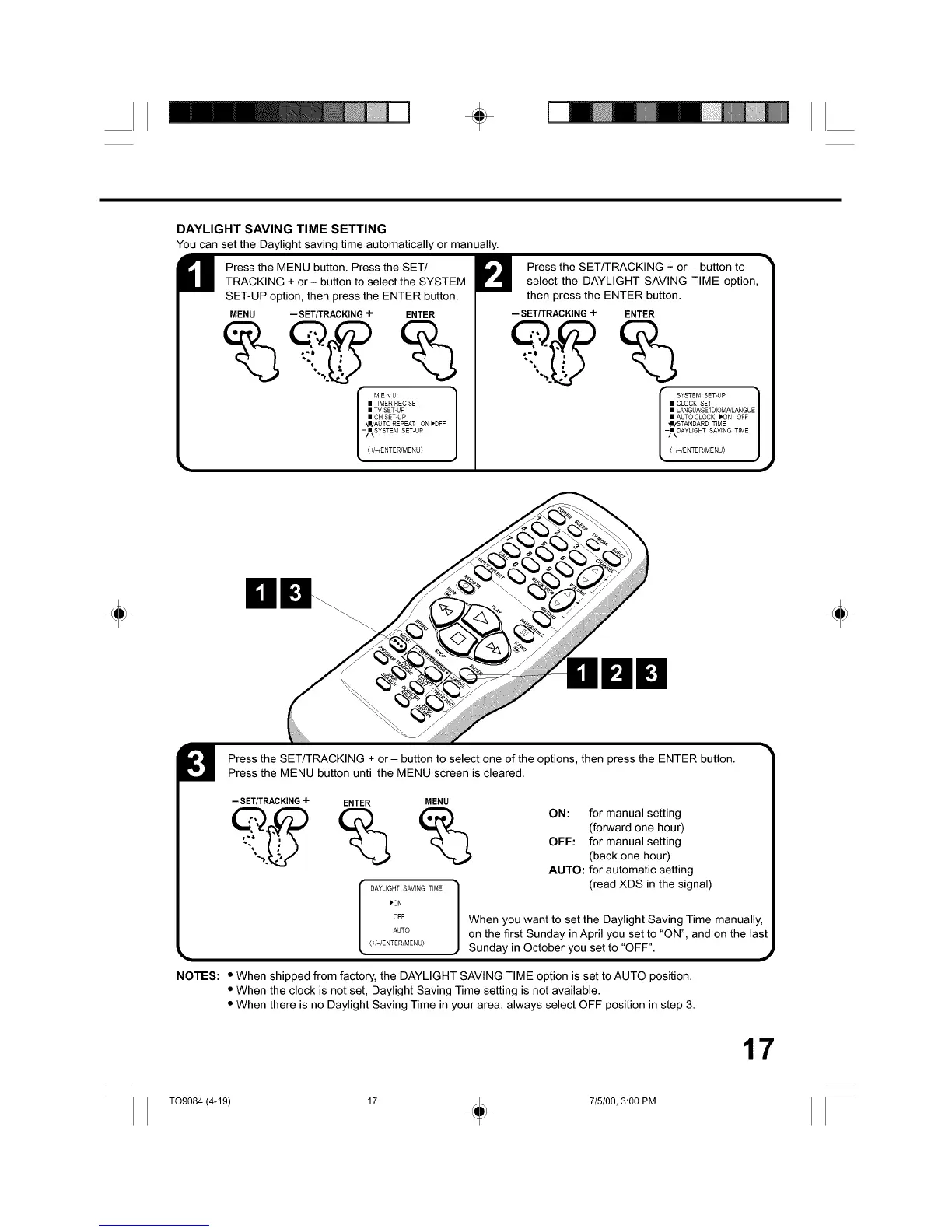
You can set the Daylight saving time automatically or manually.
Press the MENU button. Press the SET/
TRACKING + or- button to select the SYSTEM
SET-UP option, then press the ENTER button.
MENU -- SET/TRACKING-I- ENTER
I MENU
I TIMER REC SET
I TV SET-UP
I OH SET-UP
_I/AUTO REPEAT ON IPOFF
-/NkSYSTEM SET-UP
(+/-/ENTER/MENU)
Press the SET/TRACKING + or- button to
select the DAYLIGHT SAVING TIME option,
then press the ENTER button.
-- SET/TRACKING+ ENTER
r SYSTEM SET-UP
I CLOCK SET
I LANGUAG E/]D(OM/qL_N G U
I AUTO CLOCK )ON OFF
_IzSTANDARDT(ME
-/N\DAYLIGHT SAVING TIME(+/-/ENTER/MENU)
J
÷ ÷
Press the SET/TRACKING + or- button to select one of the options, then press the ENTER button.
Press the MENU button until the MENU screen is cleared.
-- SET/TRACKING 4- ENTER MENU
__ _ _ ON: for manual setting
(forward one hour)
OFF: for manual setting
(back one hour)
AUTO: for automatic setting
(read XDS in the signal)
I_ON
©FF When you want to set the Daylight Saving Time manually,
AUTO on the first Sunday in April you set to "ON", and on the last
{+I-tENTER/MENU)
k ) Sunday in October you set to "OFF". ,_
NOTES: * When shipped from factory, the DAYLIGHT SAVING TIME option is set to AUTO position.
• When the clock is not set, Daylight Saving Time setting is not available.
• When there is no Daylight Saving Time in your area, always select OFF position in step 3.
17
T09084 (4-19) 17 + 715100, 3:00 PM



 To Next Page