÷
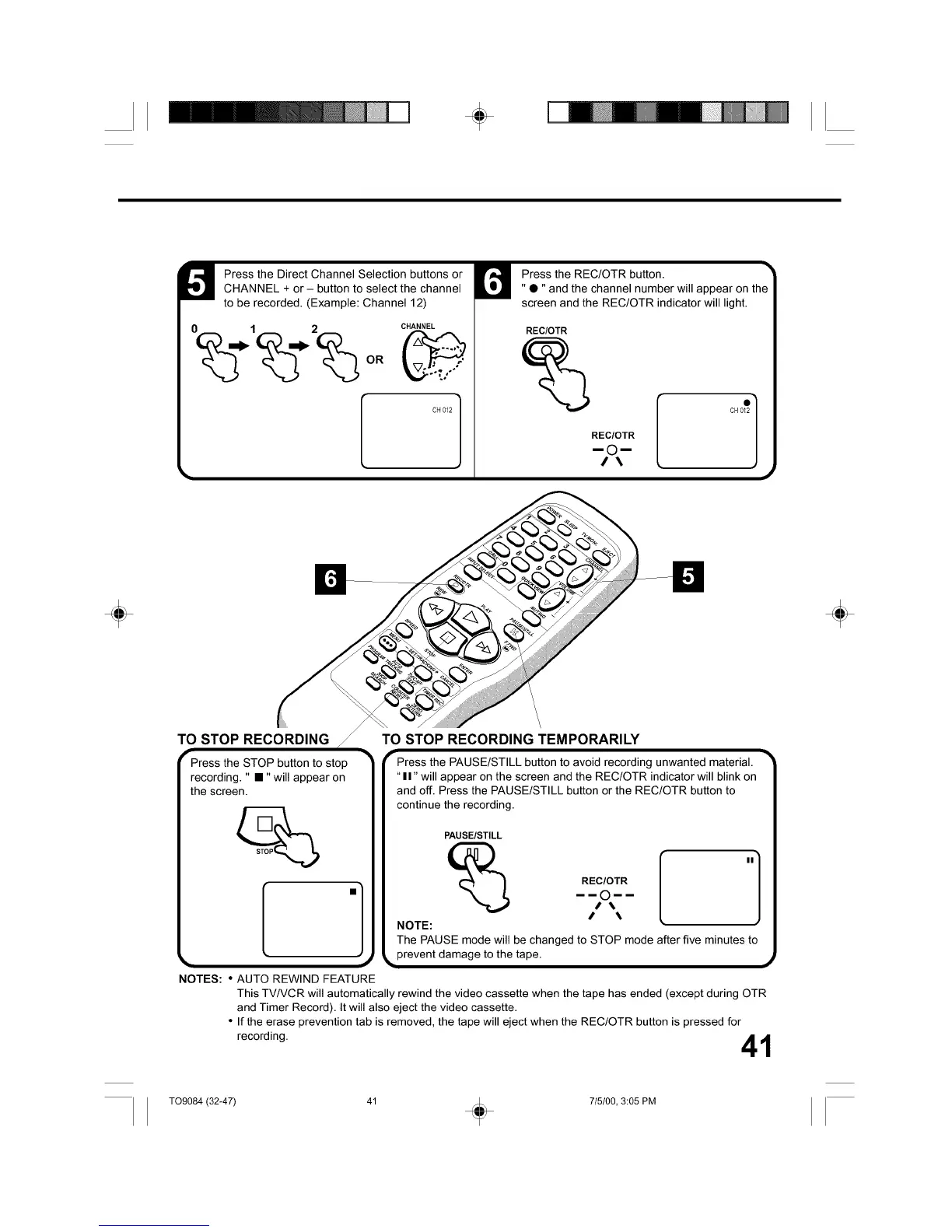
Press the Direct Channel Selection buttons or
CHANNEL + or - button to select the channel
to be recorded. (Example: Channel 12)
0 1 2 CHANNEL
CH012 I
Press the REC/OTR button.
"•" and the channel number will appear on the
screen and the REC/OTR indicator will light.
REC/OTR
REC/OTR
mOrn
/\
÷
TO STOP RECORDING
Press the STOP button to stop
recording. " •" will appear on
the screen.
.]
NOTES: • AUTO REWIND FEATURE
\
\,
TO STOP RECORDING TEMPORARILY
"-Press the PAUSE/STILL button to avoid recording unwanted material.
"II" will appear on the screen and the REC/OTR indicator will blink on
and off. Press the PAUSE/STILL button or the REC/OTR button to
continue the recording.
PAUSE/STILL
NOTE:
REC/OTR
mmOmm
}
The PAUSE mode will be changed to STOP mode after five minutes to
prevent damage to the tape.
This TV/VCR will automatically rewind the video cassette when the tape has ended (except during OTR
and Timer Record). It will also eject the video cassette.
• If the erase prevention tab is removed, the tape will eject when the REC/OTR button is pressed for
recording. 41
÷
T09084 (32-47) 41 _ 715100, 3:05 PM



 To Next Page