÷
TV OPERATION
(CONTINUED)
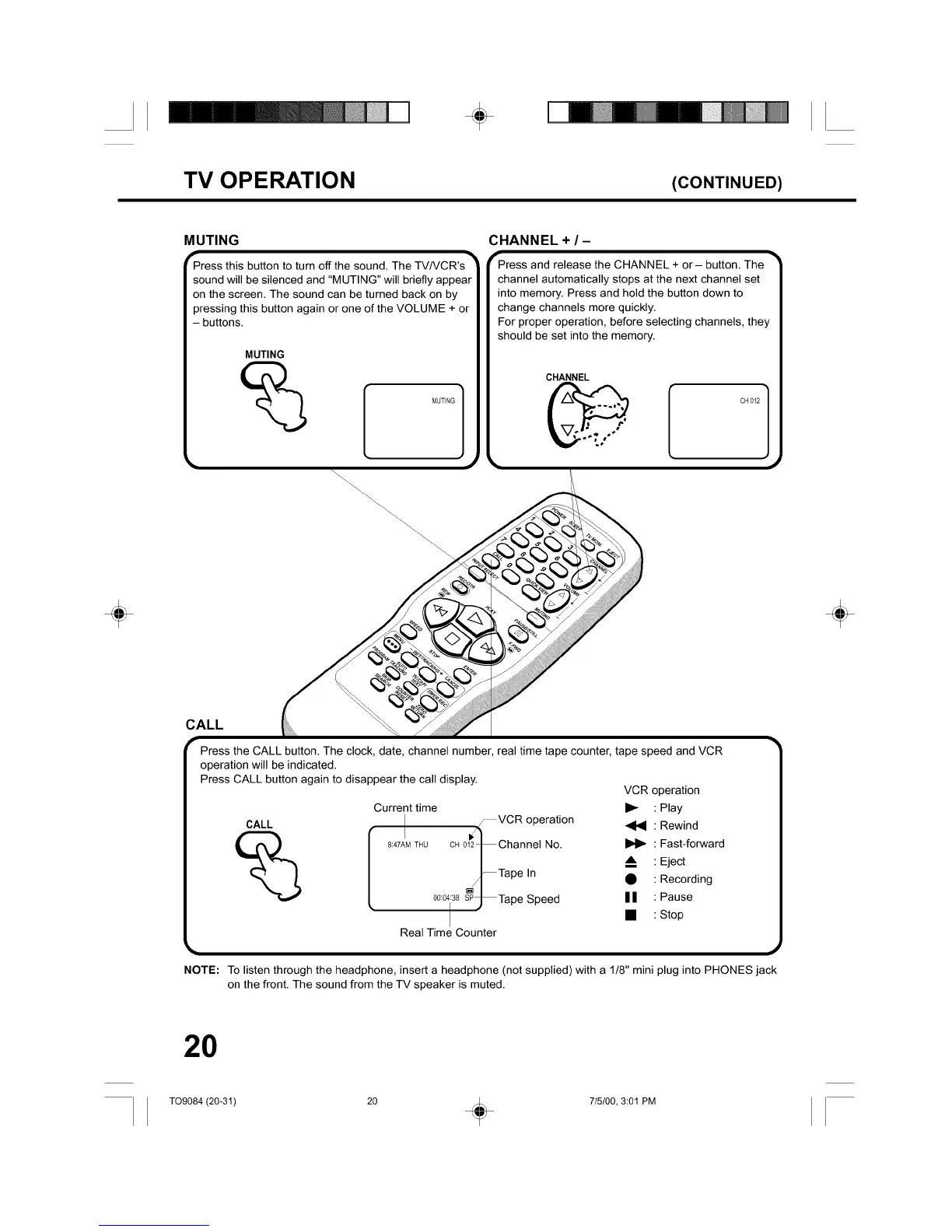
MUTING
"Press this button to turn offthe sound. The TV/VCR's TM
sound will be silenced and "MUTING" will briefly appear
on the screen. The sound can be turned back on by
pressing this button again or one of the VOLUME + or
- buttons.
MUTING
;HANNEL + / -
_Press and release the CHANNEL + or- button. The TM
channel automatically stops at the next channel set
into memory. Press and hold the button down to
change channels more quickly.
For proper operation, before selecting channels, they
should be set into the memory.
CHANNEL
CH012 ]
÷ ÷
CALL
Press the CALL button. The clock, date, channel number, real time tape counter, tape speed and VCR
operation will be indicated.
Press CALL button again to disappear the call display.
CALL
Current time
_VCR operation
8:47AM THU CH Ol_27_Channel No.
-- Tape In
00:0438SP_Tape Speed
Real Time Counter
VCR operation
I_- : Play
Rewind
I1_ Fast-forward
m. Eject
• Recording
I I : Pause
• : Stop
NOTE: To listen through the headphone, insert a headphone (not supplied) with a 1/8" mini plug into PHONES jack
on the front. The sound from the TV speaker is muted.
20
T09084 (20-31) 20 _ 715/00, 3:01 PM



 To Next Page