÷
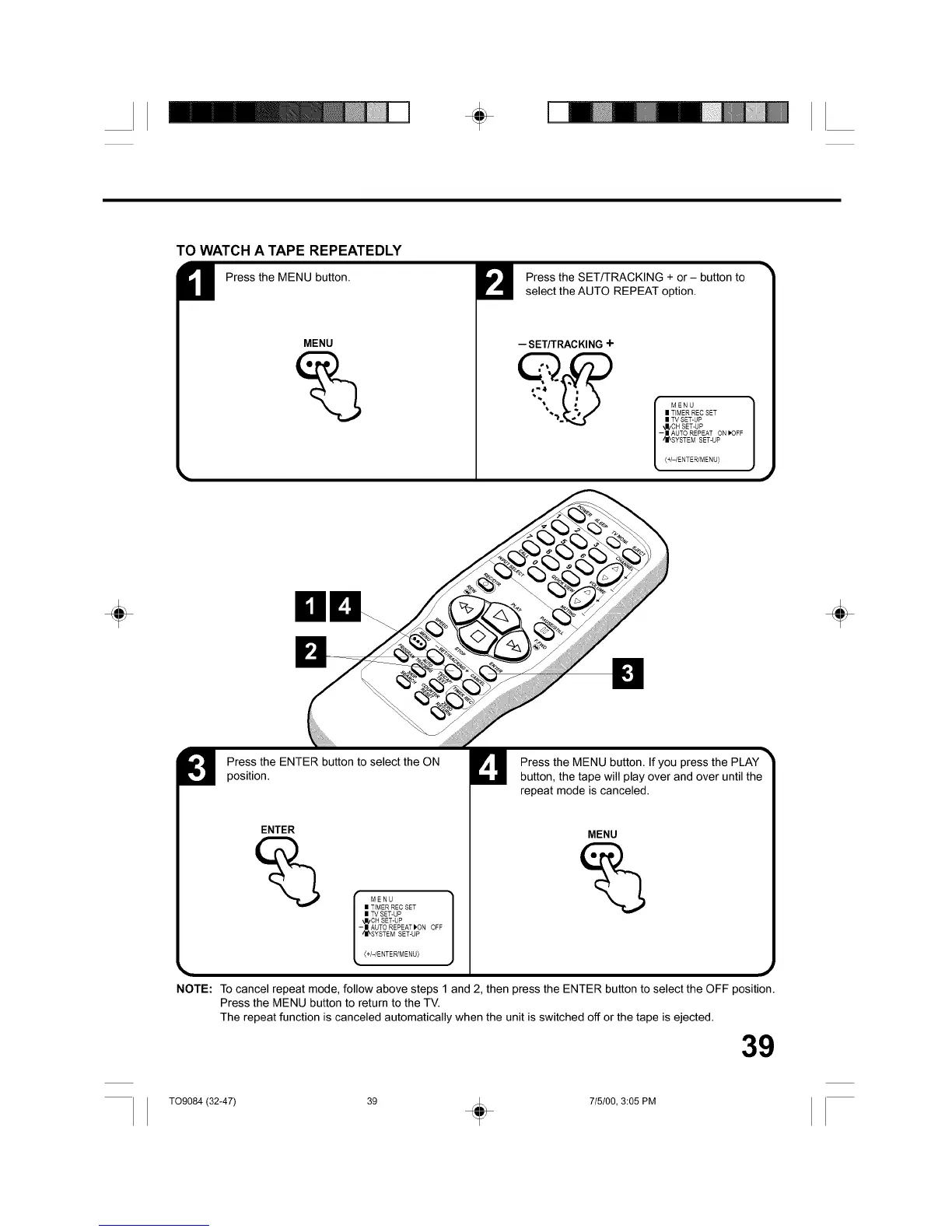
TO WATCH A TAPE REPEATEDLY
Press the MENU button.
MENU
Press the SET/TRACKING + or - button to
select the AUTO REPEAT option.
-- SET/TRACKING +
MENU
II TIMER REC SET
II TV SET-UP
"J/CH SET-UP
-| AUTO REPEAT ON [_OFF
'_I_SYSTEM SET-UP
(+/-/ENTER/MENU)
÷
position.
Press the ENTER button to select the ON
ENTER
MENU
| TIMER REC SET
| TV SET-UP
kl_CH SET-UP
-II AUTO REPEAT _ON OFF
'II_SYSTEM SET-UP
(+/-/ENTER/MENU)
Press the MENU button. If you press the PLAY
button, the tape will play over and over until the
repeat mode is canceled.
MENU
NOTE: To cancel repeat mode, follow above steps 1 and 2, then press the ENTER button to select the OFF position.
Press the MENU button to return to the TV.
The repeat function is canceled automatically when the unit is switched off or the tape is ejected.
39
÷
T09084 (32-47) 39 + 715100, 3:05 PM



 To Next Page