Reach Alpha Integration Manual | V006
+61 (2) 9519 7651 | info@reachrobotics.com www.reachrobotics.com
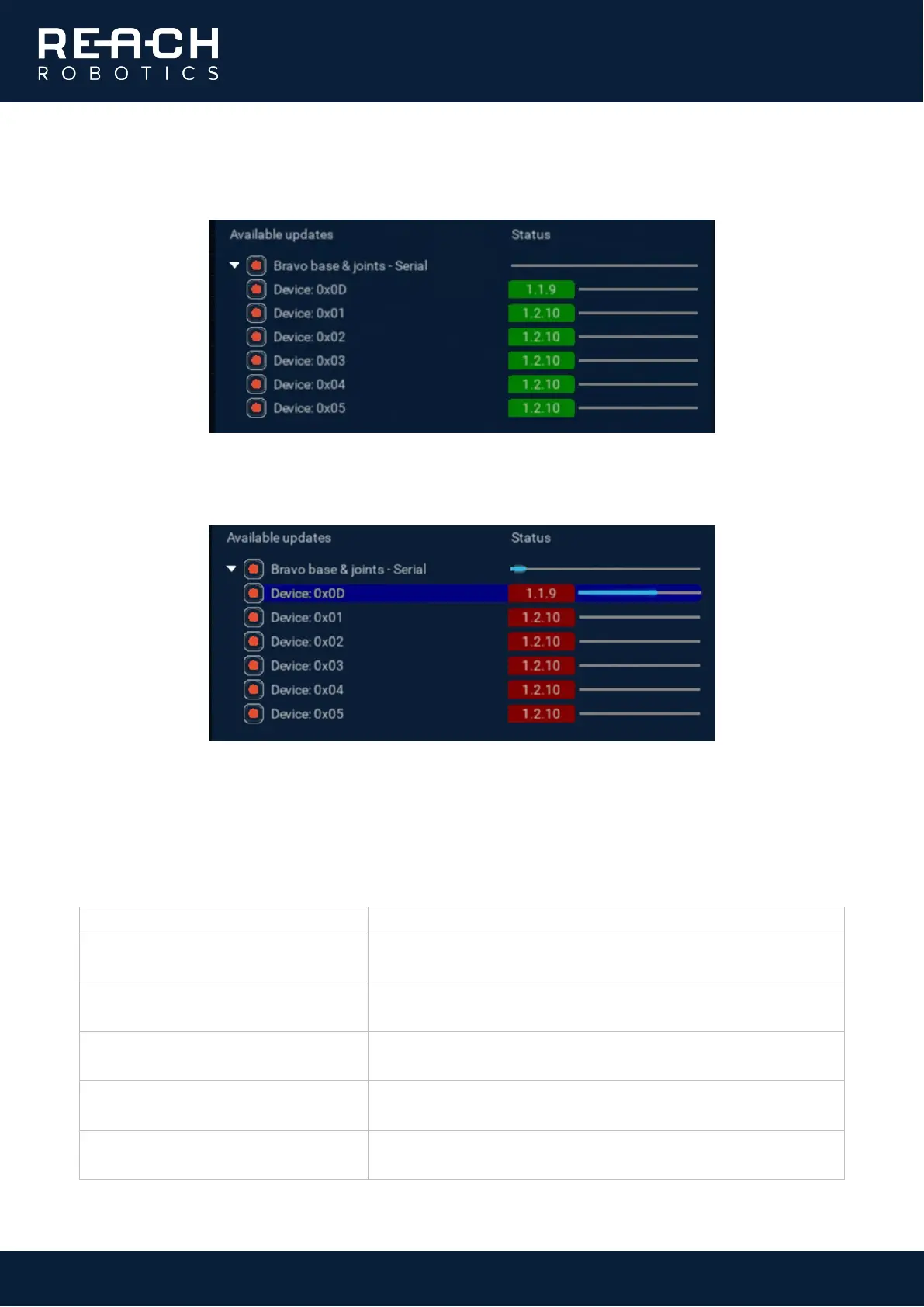
Once you have selected the correct firmware file, ensure that all the joints are selected under the available
updates.
Click “Start update”. Do not disconnect the manipulator during the update. The joints will now update one-by-
one.
When all the joints have updated and you get a success message, you can close the Firmware Update panel.
8.3.1. Firmware update errors
When updating the firmware, you may encounter the following errors:
Error: Connections of type […] are not
supported.
The device port has not been selected. Check that the connection is
secure and try again.
The .zip file selected is empty or corrupted. Download again or
contact Support for assistance.
Error: Unable to get software version
from device 0x1, 0x2, 0x3, 0x4,…
Check that the device is powered. If the device is powered correctly,
contact Support for assistance.
Error: Unable to Update. Select Refresh
to try again.
The update cannot go through. Click Refresh to try again. If
unsuccessful, contact Support.
Warning: No valid software files found.
The .zip file selected doesn’t have valid software files inside it. Check
that the file is complete and uncorrupted.



 To Next Page