22 | Installation — Wiring
WIRING TO SWITCH A REDARC INVERTER
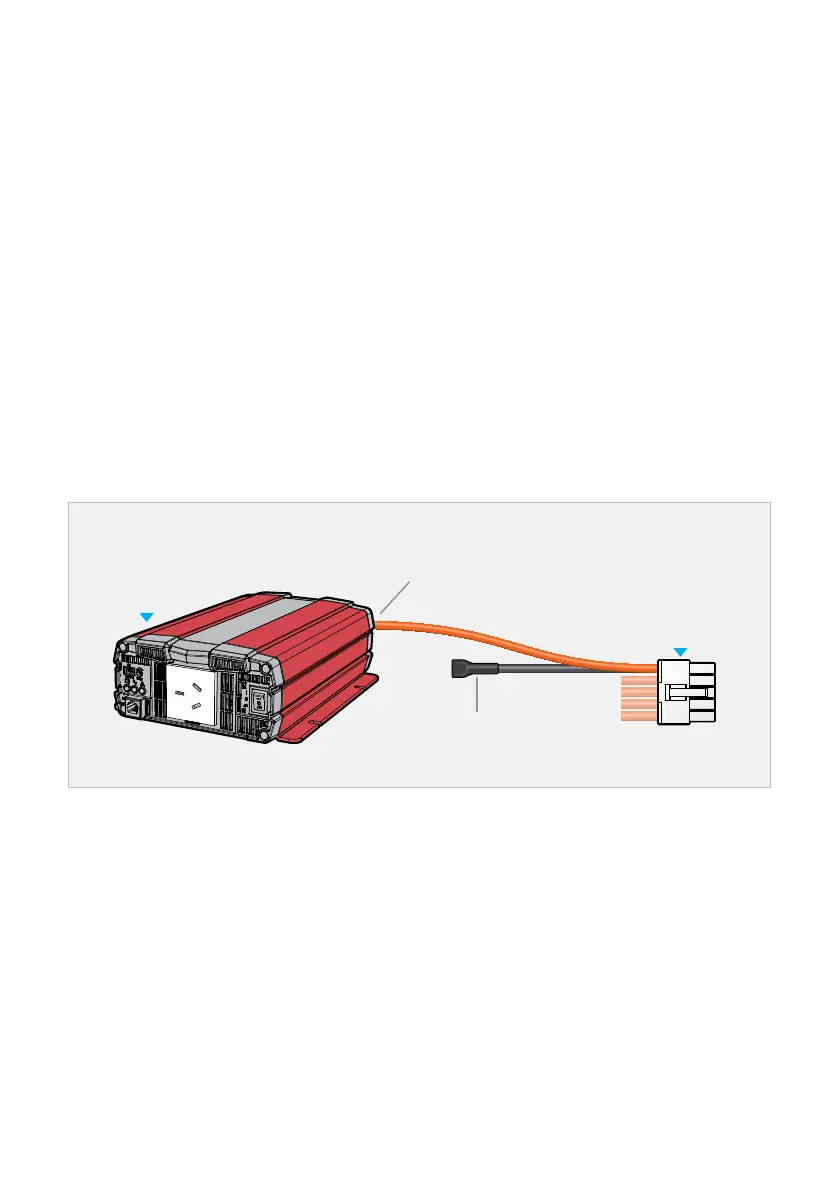
The Remote Control Terminal on REDARC Inverters allows an Output from the TVMSRogue to act
as an On/Off switch for the inverter.
Note: TVMS Rogue DOES NOT power the inverter.
Connecting a positive (Orange) Output wire to the ENB+ terminal on the inverter provides a
switchable +12 V signal to the inverter.
When connecting a REDARC Inverter, read the Instruction Manual supplied with the Inverter before
making any connections, and make sure the TVMS Rogue and the REDARC inverter share a
common ground.
1. Wire the inverter as per the instructions supplied with your inverter. This includes all power
connections which are NOT made to the TVMS Rogue.
2. Connect a wire from the inverter ENB+ to an Orange wire on the Output Wiring Loom
(at C or D).
3. Insulate the end of the unused, like-numbered Black wire to prevent it from shorting.
4. Configure via the REDARC Configurator App.
REDARC Inverter Wiring
Connect
Orange to ENB
+
Output Loom
Inverter
Insulate end of
unused wire


 To Next Page