26 | Installation — Wiring
SWITCHES THAT REQUIRE POWER
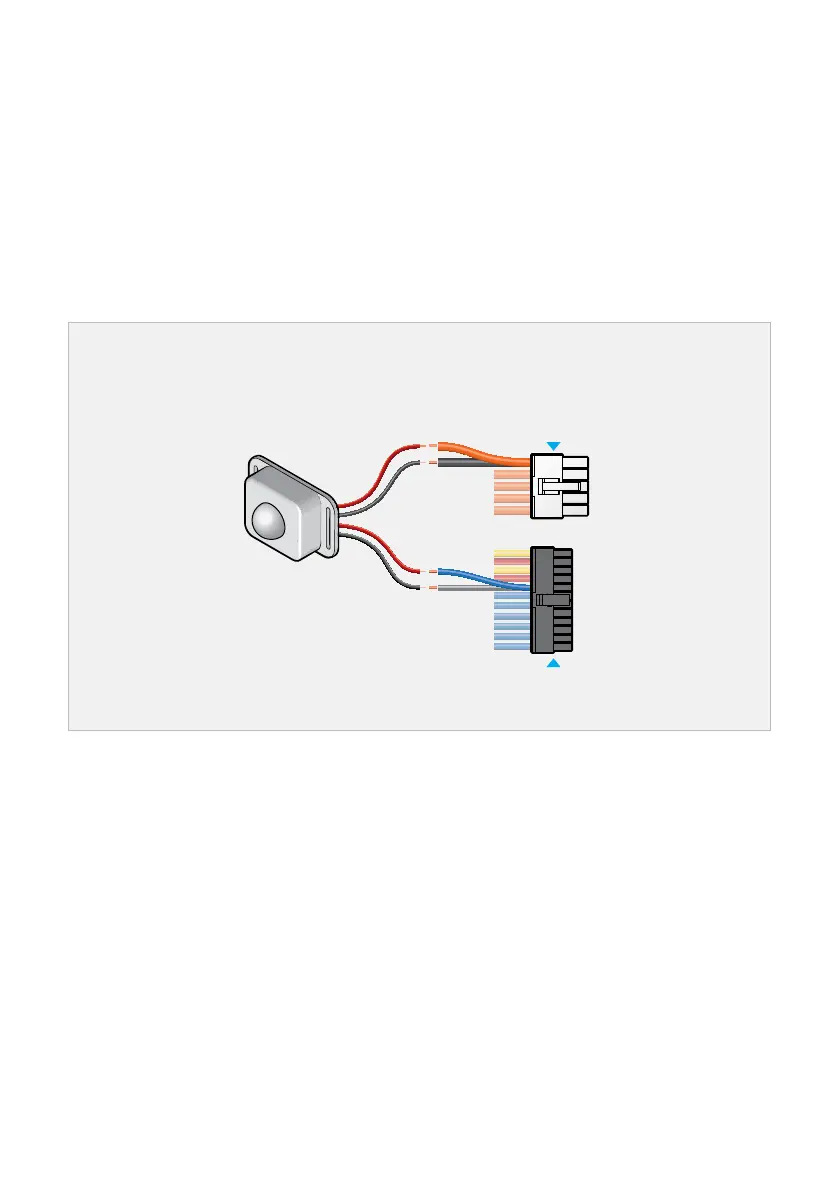
Some switches require a power source (e.g. Illuminated switches or PIR sensor switches). To use
them, you will need to connect the switch power wire/s to an Output at C or D.
1. Connect the wires from the Switch to a numbered pair of Blue and Grey wires on the Output
Wiring Loom.
2. Connect the remaining two wires to a numbered pair on the Output Loom.
3. Insulate the ends of individual unused wires to prevent them from shorting. DO NOT heatshrink/
tape multiple unused wires together as a single bundle.
4. Configure via the REDARC Configurator App.
Powered Switch Wiring (four-wire switch)
Example shows a 12 V PIR sensor switch.
PIR Sensor
Switch
Input
Wires
Output
Wires
Input Loom
Output Loom


 To Next Page