System Testing & Operation | 39
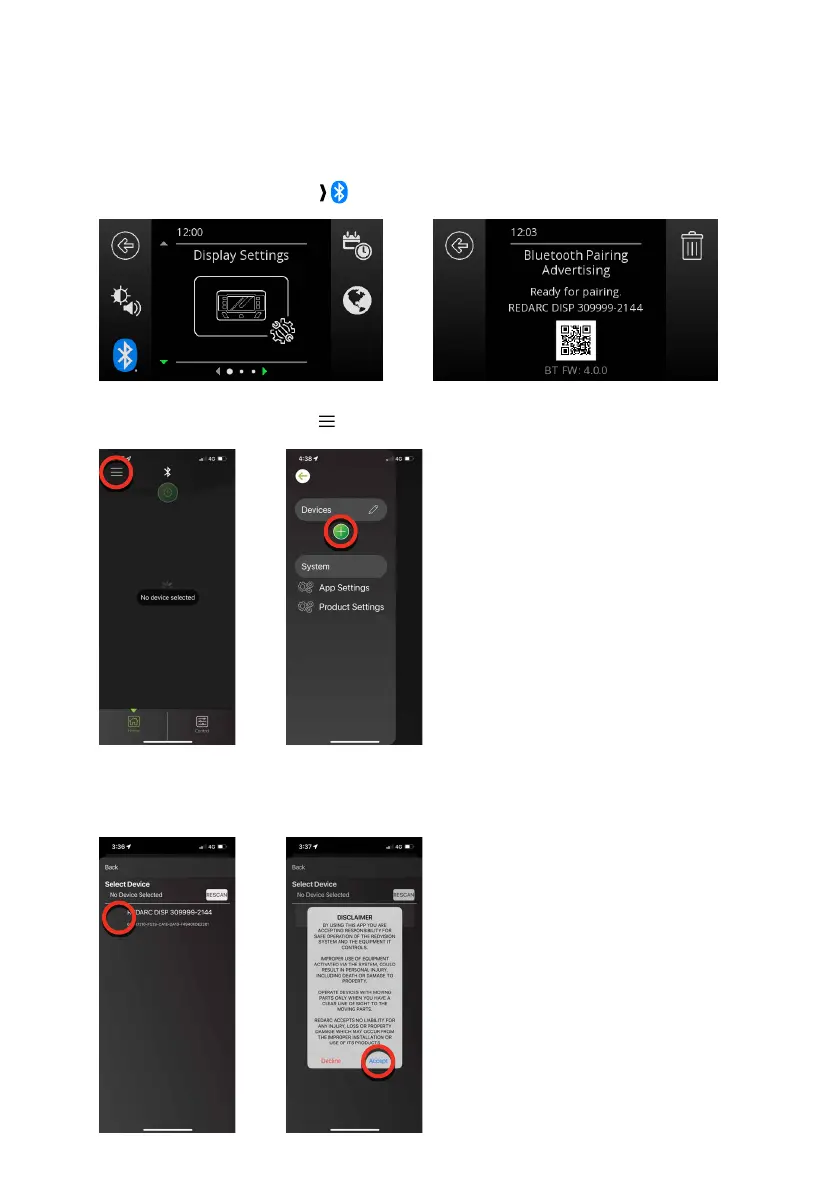
PAIR THE REDVISION
®
APP TO THE DISPLAY
1. Make sure Bluetooth
®
is enabled on your smartphone, then open the RedVision
®
App. Note,
some smartphones also require Location Services to be enabled.
2. On the RedVision Display, navigate to Display Settings.
3. Press the Bluetooth
®
SoftKey ( ) to display the Bluetooth Pairing Advertising screen.
4. In the App, tap the Menu icon ( ). Under the Devices heading, tap the Add icon (+).
5. Nearby Devices will appear in the list. Select the system that matches the number on the
RedVision Display. Read and accept the disclaimer.


 To Next Page