Troubleshooting
16 Owner’s Guide – Redback Smart Hybrid System – v3.8
Inverter operation
Your SH5000 inverter has sophisticated software controls available in the MYRedback app or the Redback portal, however there
are some physical controls or functions at the unit.
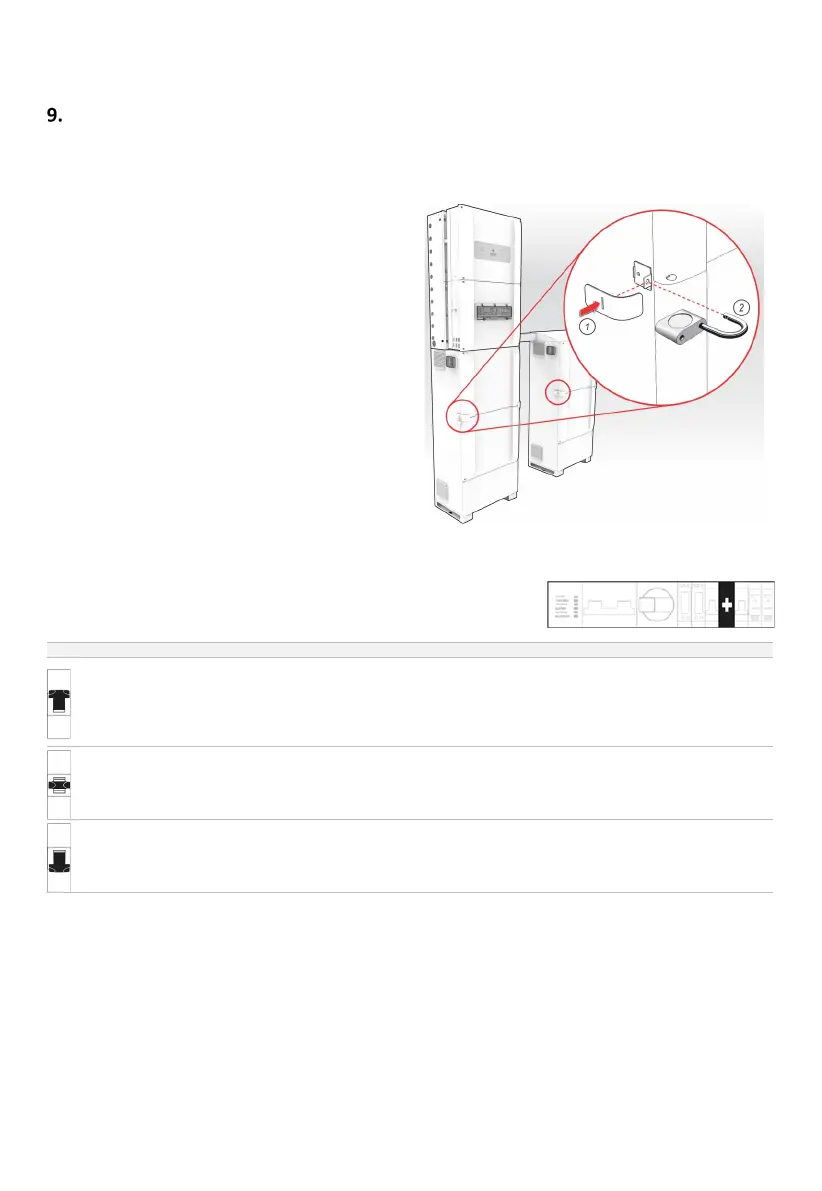
9.1 Locking up the batteries
Secure the battery enclosure to:
• Prevent unauthorised access to the batteries and
cabling.
• Discourage battery theft.
The enclosure is secured by trapping the front covers: clamps
at either side are padlocked in position, restricting access to
front cover fasteners, and resisting forcing of the covers.
Note: The security clamps will discourage a casual or
opportunistic intruder but will not stop a determined thief.
9.2 Inverter – Changing bypass modes
The Bypass switch controls the power to the BACKUP AC isolator and the EMS. Its
primary use is to manually connect the backup circuit directly to grid supply, when
required.
Up
circuit is from the grid
supply only.
The inverter no longer
controls the backup circuit.
This mode ensures grid supply to the backup circuit if the
inverter is not available or not operating reliably.
If grid supply is lost the inverter will not supply the backup
circuit.
Middle
Backup circuit and EMS are
isolated (depowered).
No power is sent to the backup circuit.
Down
circuit is supplied and
managed by the inverter,
This is the recommended operational mode.
If grid supply is lost the inverter will continue to supply the
backup circuit from the batteries and PV- the entire system will
shut down when the batteries reach the minimum SoC.



 To Next Page