EasyManua.ls Logo

ReliOn ultima - Page 50

ReliOn ultima
53 pages
Print Icon
To Next Page IconTo Next Page
To Previous Page IconTo Previous Page
Loading...
46
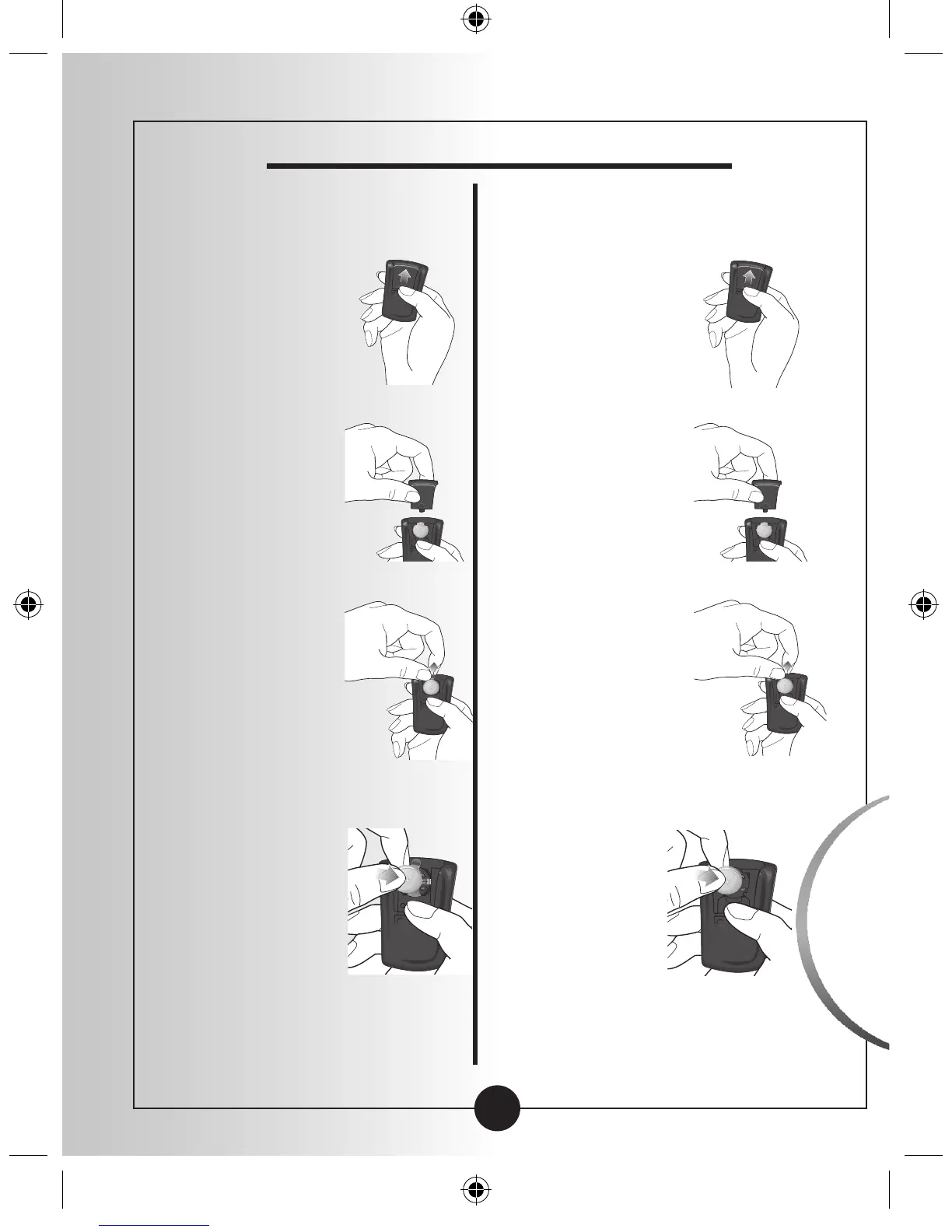
How to Replace Your Meters Battery
If your meter has a plastic tab,
use these directions.
If your meter has no plastic tab
follow these directions.
1
Gently push
the battery
cover in and
up with your
thumb.
1
Gently push
the battery
cover in and
up with your
thumb.
2
Lift the
battery
cover out of
the monitor.
2
Lift the
battery cover
out of the
monitor.
3
Pull on the
plastic tab
sticking out
of the meter
to remove
the old
battery.
3
To remove
the battery,
push the
battery
upward to
release the
battery.
4
Insert a new
CR 2032
Lithium
(coin cell)
battery with
the plus
sign (+)
facing up.
4
Insert a new
CR 2032
Lithium
(coin cell)
battery with
the plus
sign (+)
facing up.
Caring for
Your Monitor
ART21258_Rev-A-Man.indd 49 1/12/10 3:38:58 PM

Table of Contents

Related product manuals