2.2
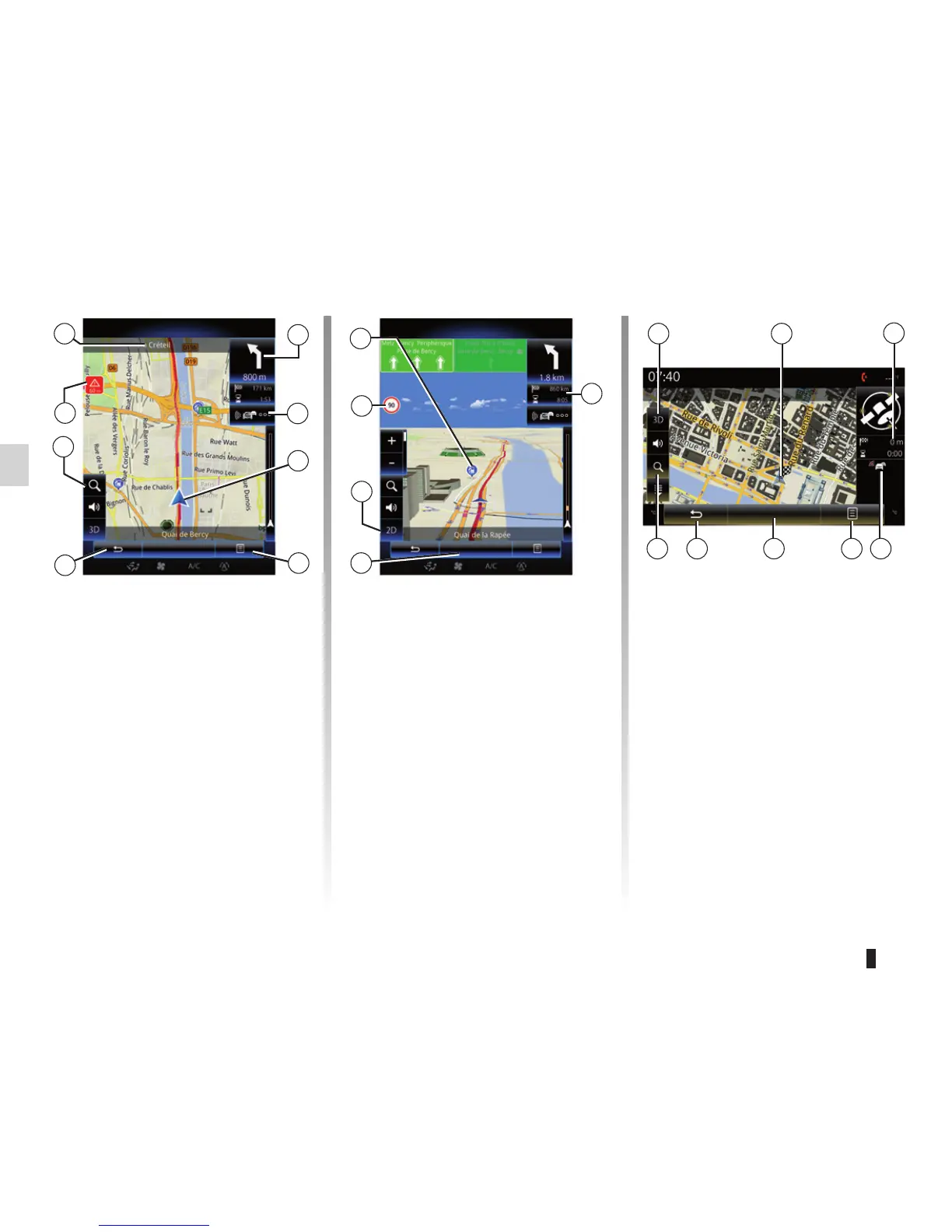
MAP (1/4)
Map key
A Name of the next main road or road
sign information, if applicable.
B Remaining distance to travel and in-
dication of the next manoeuvre.
C Traffic information icon.
D Current location.
E Pop-up menu.
F Back to previous screen or back to
navigation menu.
G Zoom, touch the magnifying glass to
display the zoom in and out buttons.
A
E
B
L Sign giving the speed limit (the speed
given depends on the unit chosen).
For more information on the choice
of units, please see the “System”
section.
Map icons
The navigation system uses icons M to
display points of interest (POI).
D
H Speed limit exceeded sign.
I Journey information such as arrival
time, total distance remaining and,
depending on the vehicle, the acces-
sibility of your destination (green flag
or red flag with lightning symbol) /
Route summary.
J Back to main menu of navigation.
K 2D/3D mode (depending on the vehi-
cle).
I
H
G
K
Menu
Menu
J
M
G
Menu
K
J EF
D
I
C
Guidance map
Guidance map
F
L
C



 To Next Page