TRIP COMPUTER
2
132 - Getting to know your vehicle
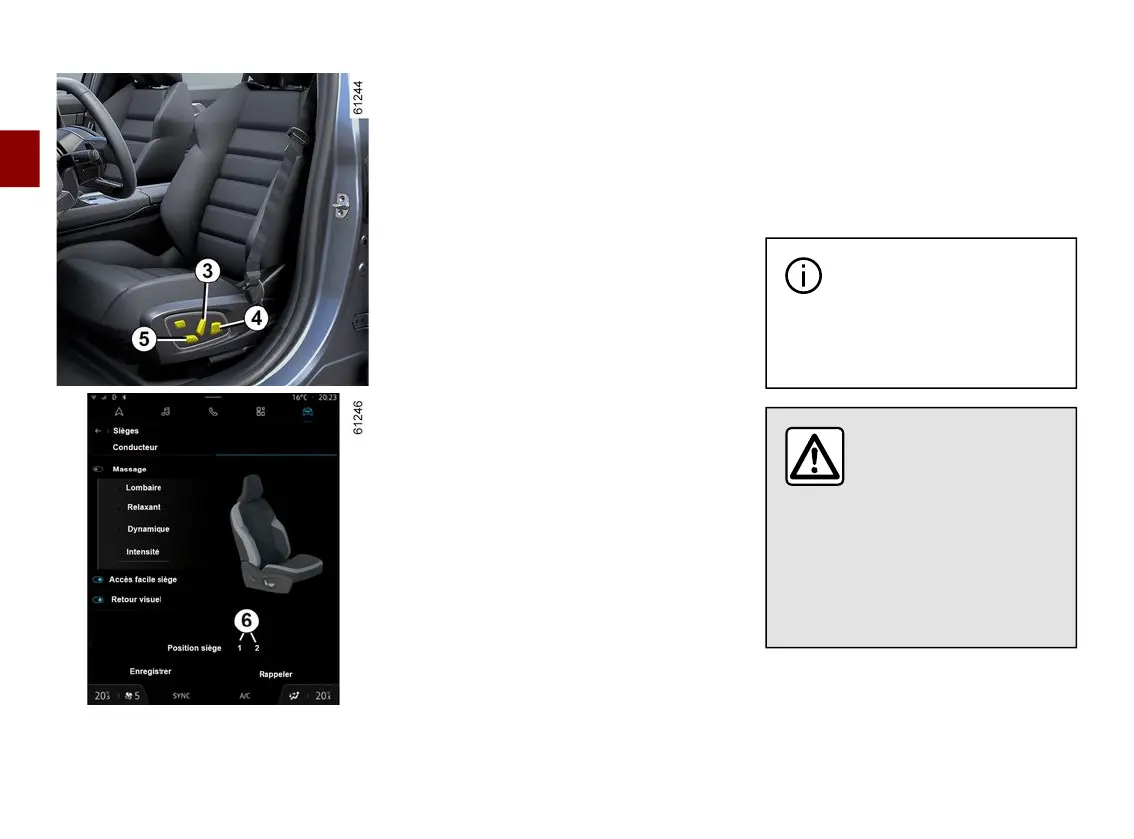
From the multimedia system, you can
store and recall the driving position by
pressing buttons
3
,
4
and
5
(🡺74):
– by changing the user profile;
– by pressing the "Recall" button for
the driver's seat;
– by pressing the buttons
6
for the
passenger seat.
The forward driving position includes
the settings for:
– the seat base;
– the seatback;
– the door mirrors.
Storing your driving position
Withthevehiclestationaryandtheen-
gine on, from the multimedia screen 1
select the "Vehicle" world then the
"Seats" menu.
– Adjust the driver's and/or
passenger's 🡺74 seat;
– adjust the door mirrors 🡺141.
Then press "Save" to store.
Refer to the multimedia instructions for
information on accessing the stored
driving position.
Recalling the driving position
To access the stored driving position,
select "Recall" on the multimedia
screen.
For more information on storing the
driving position, please refer to the
multimedia instructions.
Note: thedrivingpositionrecallisin-
terrupted if a seat adjustment button is
pressed.
Whenthevehicleisstartedbypress-
ing and holding the engine start/stop
button, the driving position is adjusted
according to the last stored profile.
On vehicles that are
equipped with this function,
you can store and recall the
driving position using the facial
recognition system 🡺72.
Whenrecallingaposi-
tion (memorisation,
changing profile), make
sure that no one is near
the moving parts (in particular, in
the rear seats).
For safety reasons, carry out any
adjustments when the vehicle is
stationary.



 To Next Page