SPEED LIMITER
3
250 - Driving
tivated. To manage your subscription,
see the multimedia instructions.)
Usingthecamera,the"Roadsignde-
tection" function 🡺229 and the map
associated with the subscription, the
system automatically limits the vehicle
speed when a speed limit road sign is
identified and passed.
Activation/deactivation
From the multimedia screen, in the
"Vehicle" world, select "Driving aids".
Then, from the "Speed adaptation"
menuviewthe"Adaptivecruisecon-
trol" field and select "To speed limits".
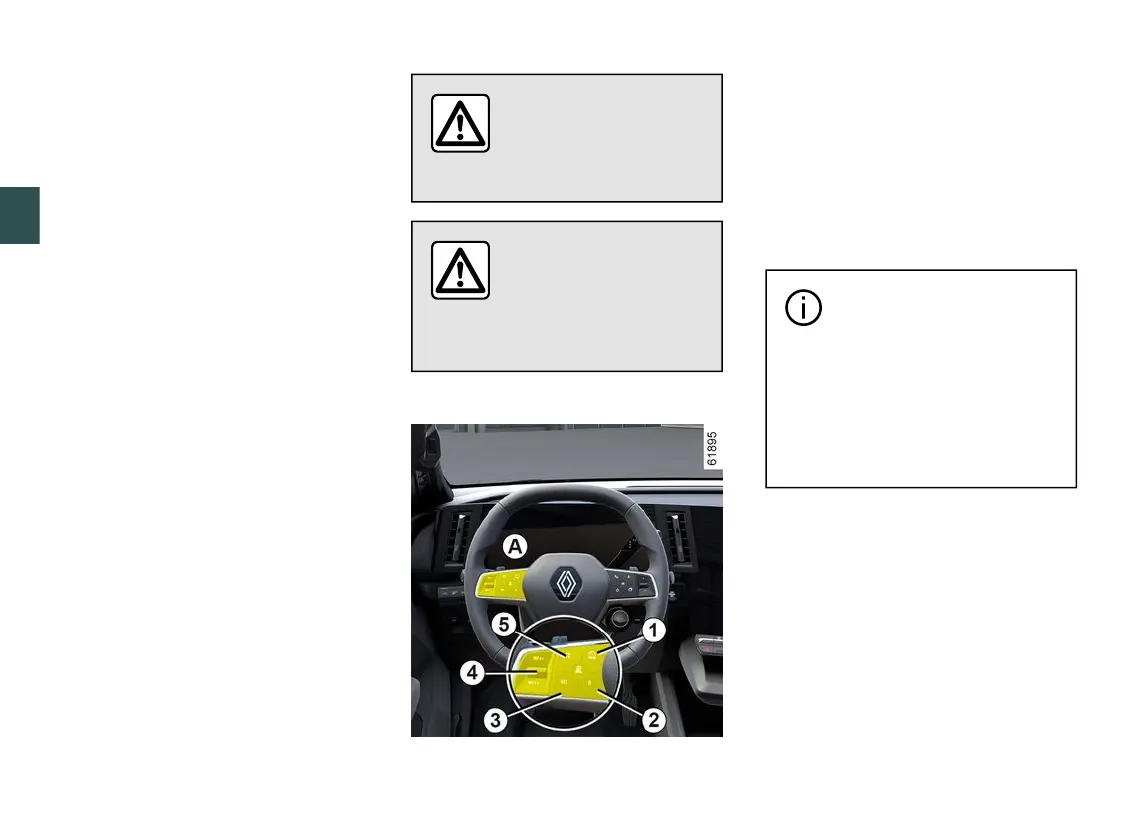
Note: you can also activate/deactivate
by pressing and holding the contextual
button
5
.
Exceeding the limit speed
It is possible to exceed the limit speed
at any moment. To do this, press the
accelerator pedal firmly down beyond
the point of resistance.
While the speed is being exceeded,
thespeedlimiterflashesredonthein-
strument panel.
Then, release the accelerator pedal:
the speed limiter function will return as
soon as you reach a speed lower than
the memorised speed.
You must keep your
feet near the pedals to
be ready to react in an
emergency.
If the speed limiter is not
available (after several
attempts to activate),
contact an approved
dealer.
Putting the function on standby
Thespeedlimiterfunctionissuspend-
ed when you press switch
2
(0).
The limit speed is stored and displayed
in grey on the instrument panel.
Recalling the limit speed
If a speed has been stored, you can
recall it by pressing the switch
3
.
When the speed limiter is
set to standby, pressing the
4
controlupwardsordown-
wards reactivates the function
without taking into account the
stored speed: it is the speed at
which the vehicle is moving that is
taken into account.



 To Next Page