R 17A User’s Manual – Page 91
Touch the screen to start the test.
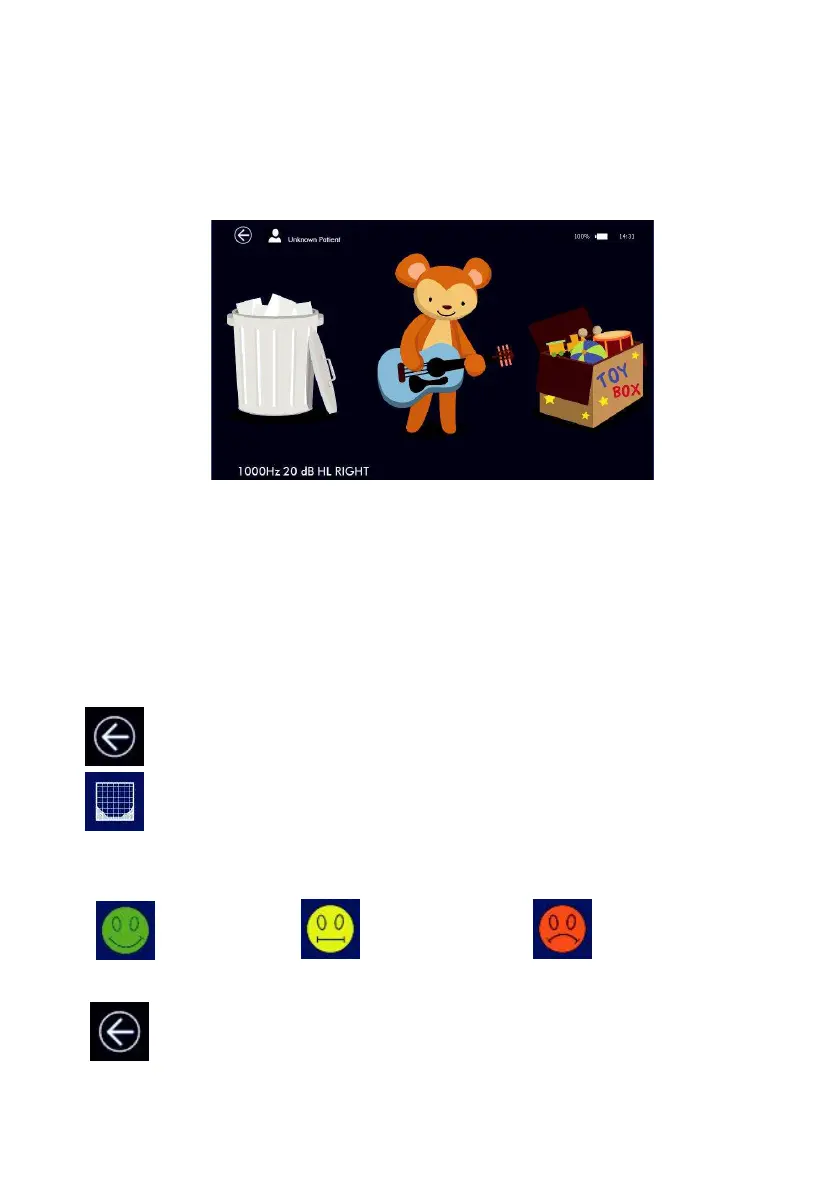
Touch the animal playing an instrument (shown in the center of the display) to emit the stimulus. An
animation will be displayed to entertain the child as a stimulus reinforcement.
At the stimulus presentation, two options are available on screen:
The patient has to touch the toy-box if he has heard the stimulus, otherwise the trash bin if the stimulus
hasn’t been heard.
The test proceeds by changing the stimulus level according to the selected setup settings.
In case of error, the doctor can undo the last response and go back to the previous condition by pressing
the patient pushbutton (connected to the device).
After the first frequency has been tested, the grid displays a new completed tile (animal image), touching
the display, the test will proceed with the next frequency. At the end, an animated image di-splaying all
the animals will be shown as reward and a melody will be played.
Press EXIT button, a dialog window will ask if you wish to save the test. Please, refer to the
other audiometry test sections for more information about results saving.
On the SETUP page, a button to display the audiogram is now visible. Press this button to
show the test results.
Below the audiogram graph, an indicator of the test reliability will be displayed. It is based on response
time and on the response to fake stimuli randomly presented:
Reliable
Partially Reliable
Not Reliable
Exit and Save
Press EXIT button, a dialog window will ask if you wish to save the test. Please, refer to the
other audiometry test sections for more information about results saving.



 To Next Page