EasyManua.ls Logo

Retsch RS 300 - Views of Control Elements and the Display; Summary Table of the Control Elements and the Display; Opening the Device; Closing the Device

Default Icon
49 pages
Print Icon
To Next Page IconTo Next Page
To Previous Page IconTo Previous Page
Loading...
Operating the Device
25
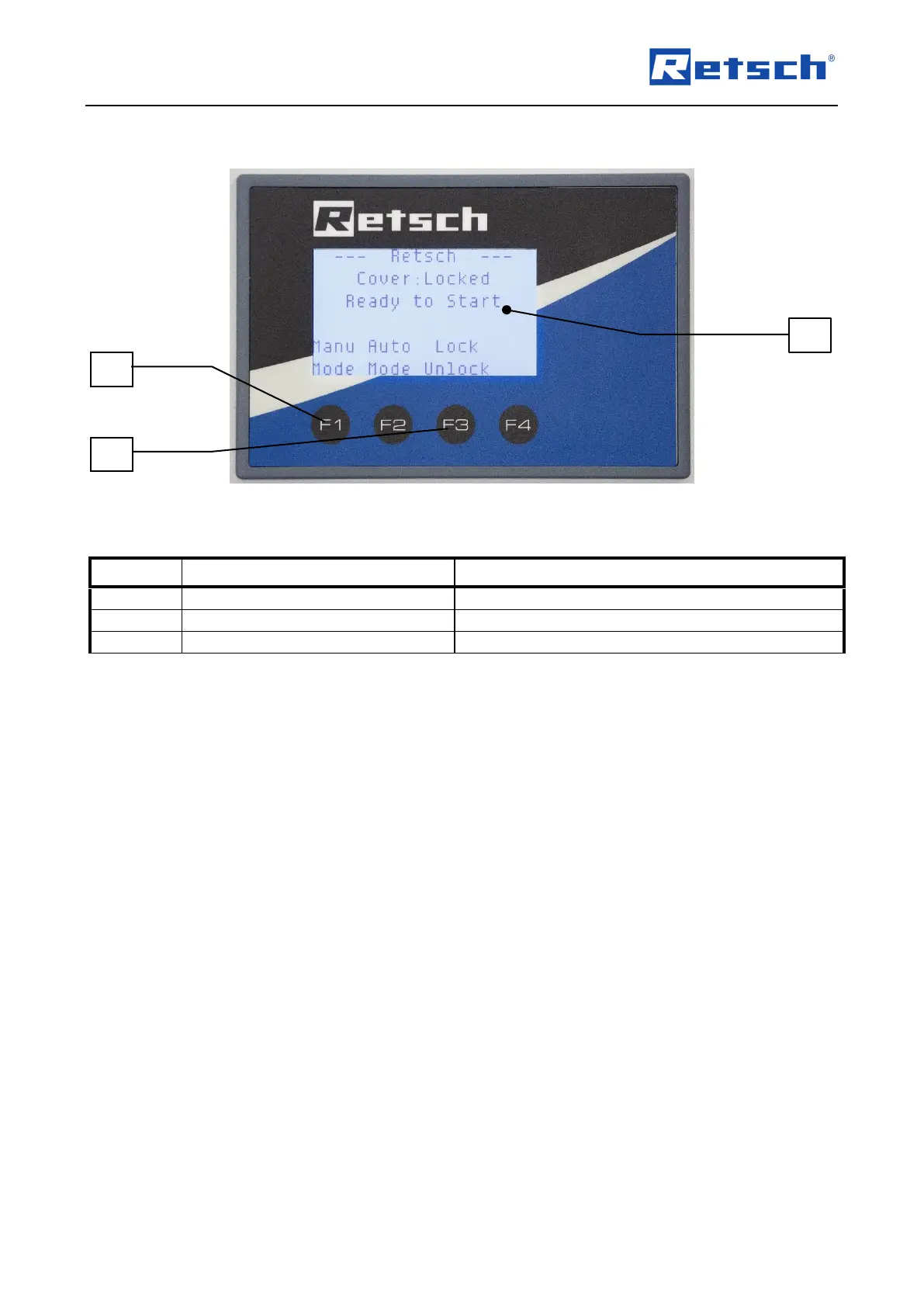
6.3 Views of control elements and the display
Fig. 6: View of the control panel
6.4 Summary table of the control elements and the display
Element
Description
Function
F
Control knob
Operates device settings
G
Button for opening the cover
Unlocks the cover
C
Display
Displays the control functions and parameters
6.5 Opening the device
The following steps are required to be able to insert and clamp the grinding jar.
Connect the device to the power supply.
Switch the main switch on the front on.
Press button F3 (open lid).
The safety lock opens, and the lid can be flipped open.
6.6 Closing the device
Hamber when th e device
It is only possible to look the grinding chamber when the device is connected to the power
supply and the main switch is switched on.
Close the lid on the housing.
A sensor detects the closing pin on the housing lid.
The housing lid can be locked using the controls.

C
F
G

Table of Contents

Related product manuals