14/40 Bosch Rexroth AG A4VG Series 40 | RE 92004-01-S031/08.2015
Controller
4.2 Sealing controller
This section describes how you seal the controller.
There is a wide variety of controllers.
Please note that the sealing of only one such controller is shown here
exemplarily.
@
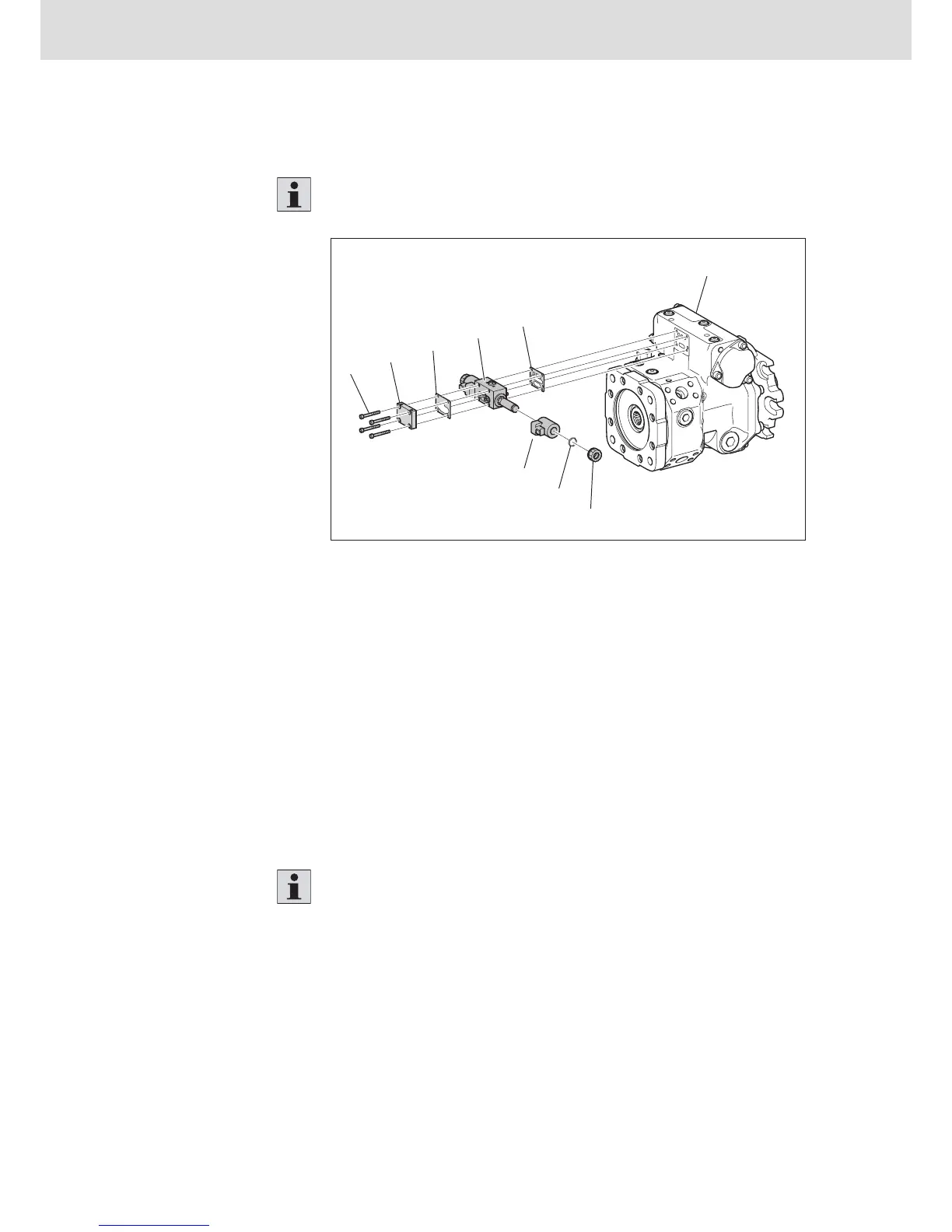
Fig. 4: Controller
1 Fixing screws
2 Cover
3 Seal
4 Controller
5 Seal
6 Pump case
7 Mounting nut
8 O-ring
9 Coil
To replace the seals:
1. Loosen and remove the fixing screws (1) of the controller (4).
2. Remove the cover (2) and the seals (3+5) from the controller (4).
3. Check the seals, the sealing surfaces and the case for damage, wear and
contaminants.
4. Exchange the seals (3+5).
The individual components and the removal/installation of the left-hand and
right-hand solenoids are identical.
5. Loosen and remove the mounting nuts (7) on the coil (9).
6. Check the O-ring and O-ring groove for damage, wear or contaminants.
7. Exchange the O-ring (8) for a new one.
8. Tighten the mounting nuts (7) with 5 Nm.
Procedure


 To Next Page