RE 92004-01-S031/08.2015 | A4VG Series 40 Bosch Rexroth AG 31/40
Filter
7. Screw the filter housing (4) onto the filter head (1).
8. Tighten the filter housing (4) with 45 Nm.
8.2 Seal/replace filter head
This section describes how you seal/replace the filter head.
@@
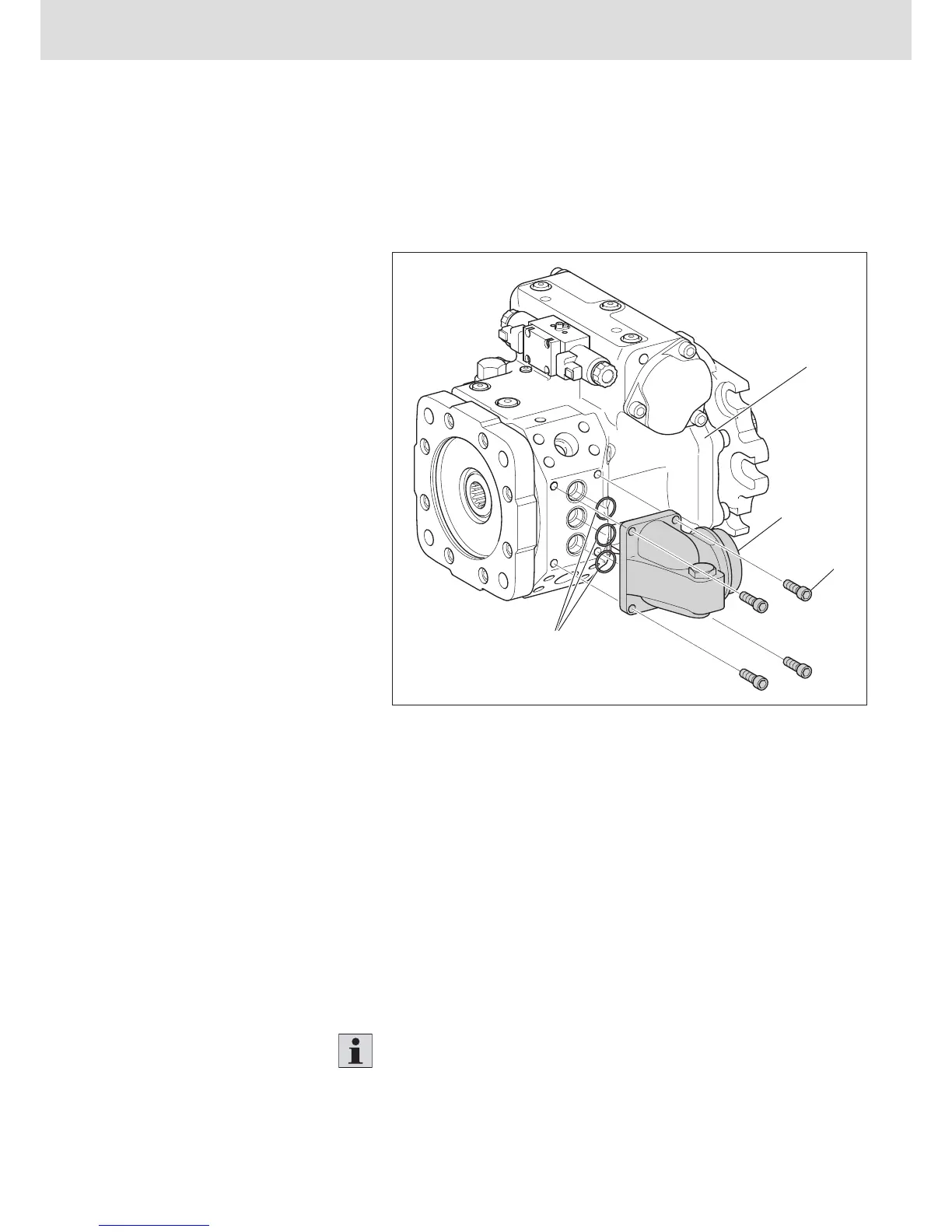
Fig. 19: Filter head
1 Pump case
2 Filter head
3 Fixing screws
4 O-rings
To replace the seals and the filter head:
1. Loosen and remove the fixing screws (3) for the filter head (2) on the pump
case (1).
2. Remove the filter head (2).
3. Check the O-rings and O-ring grooves for damage, wear or contaminants.
4. Exchange the O-rings (4) for new ones.
5. Check the filter head for damage, wear and contaminants.
6. Exchange the filter head (2) for a new one.
7. Fasten the filter head (2) with the fixing screws (3) to the pump case (1).
Tighten the fixing screws crosswise according to the specified tightening
torque - see Chapter "10 Settings".
Procedure


 To Next Page