13/29
Bosch Rexroth Canada ıJune.2016 ı Revision 2.0
9 Material Catch Test
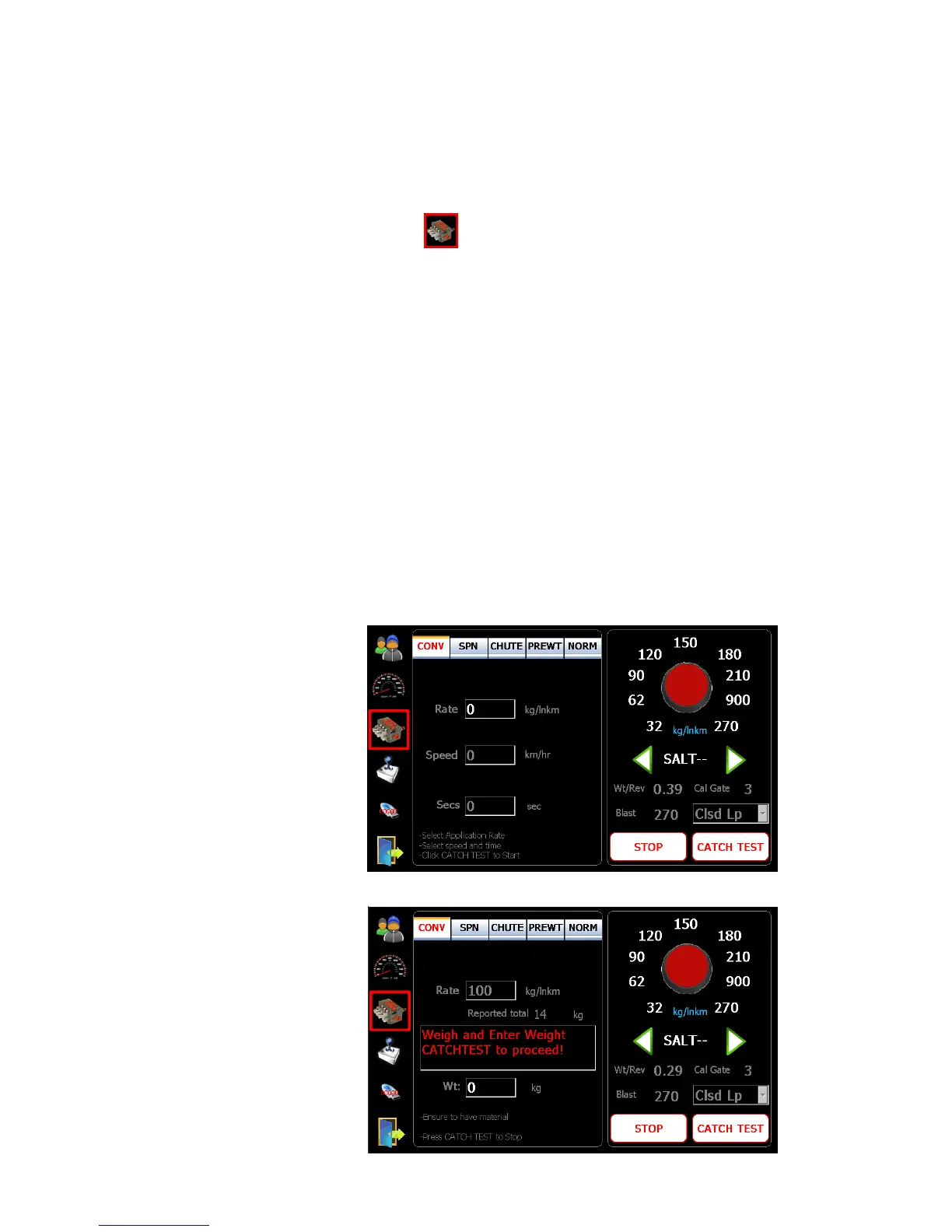
1. Tap on symbol to enter into the material calibration screen.
2. Place an adequate catch container under the spreader discharge chute.
3. Press “CATCH TEST” button to start, and enter the desired rate, speed and
duration (seconds) using on-screen keypad.
4. Press “CATCH TEST” button to begin material dispensing (hydraulics must be
active).
5. When dispensing is stopped, weigh the material and enter the value.
6. Press “CATCH TEST” button again to end.
7. An appropriate weight per revolution will be calculated and displayed on the
bottom right of the screen.
8. Repeat this procedure for all solid materials (use the green left and right arrows
to select material types).
9. The individual rates can be adjusted by tapping the rate and editing the value
with the keypad.
10. These same procedures apply to pre-wet and liquid.
Note: The material names can be changed by tapping on the text “SALT - -” and
using the keypad to edit.



 To Next Page