6/29
Bosch Rexroth Canada ıJune.2016 ı Revision 2.0
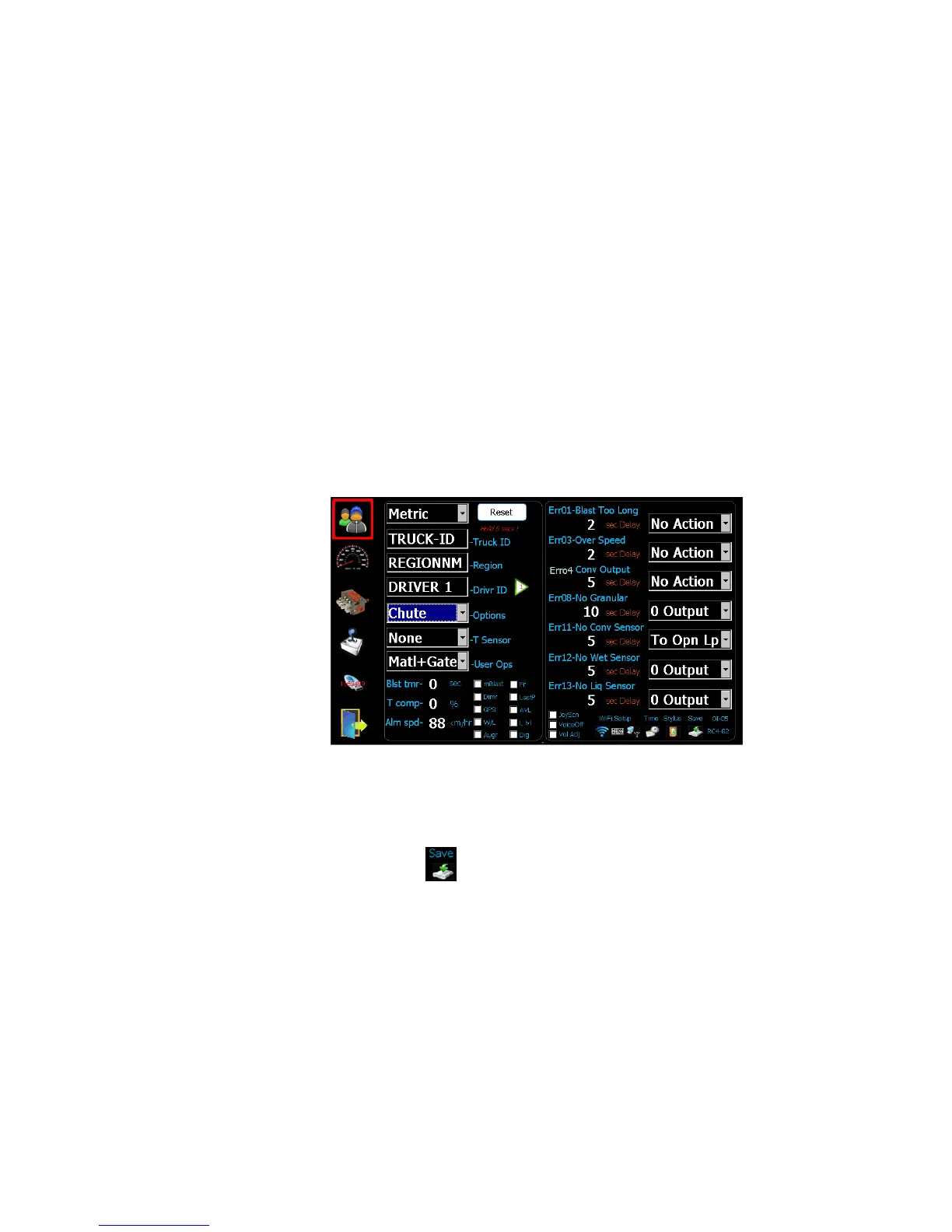
4 Initial Set-up
1. Set the units to imperial (LBS/Mile) or metric (Kg/Km).
2. Set the TRUCK ID.
3. Set the REGION NAME.
4. Set the DRIVER ID (optional), 4 driver IDs allowed.
5. Set the type of Temperature Sensor (optional).
6. Set the Options – see Advanced Features on page 15 (optional).
7. Set the items that the user has access to(optional).
8. Set Blast Timer, 0-timer disabled (optional).
9. Set Temp Compensation % based on 3 degree change (optional).
10. Set the vehicle speed alarm (optional).
11. Select AVL or GPS tracking (optional).
12. Set WIFI/TIME/STYLUS (if required).
The default error configuration values will work well for most applications, no
changes required.
Note: Save only applies to changes to Date/Time/WiFi/Stylus.



 To Next Page