Beijing RuiZhitianhong technology Co.Ltd.
ADD.:A308 jiahua building, 9 Shangdi 3rd Street, Haidian District, Beijing. P.C.:100085.
Dell:+86-10-62970368/82923063 Fax:+86-10-82920078 URL:www.richnc.com.cn 8
1
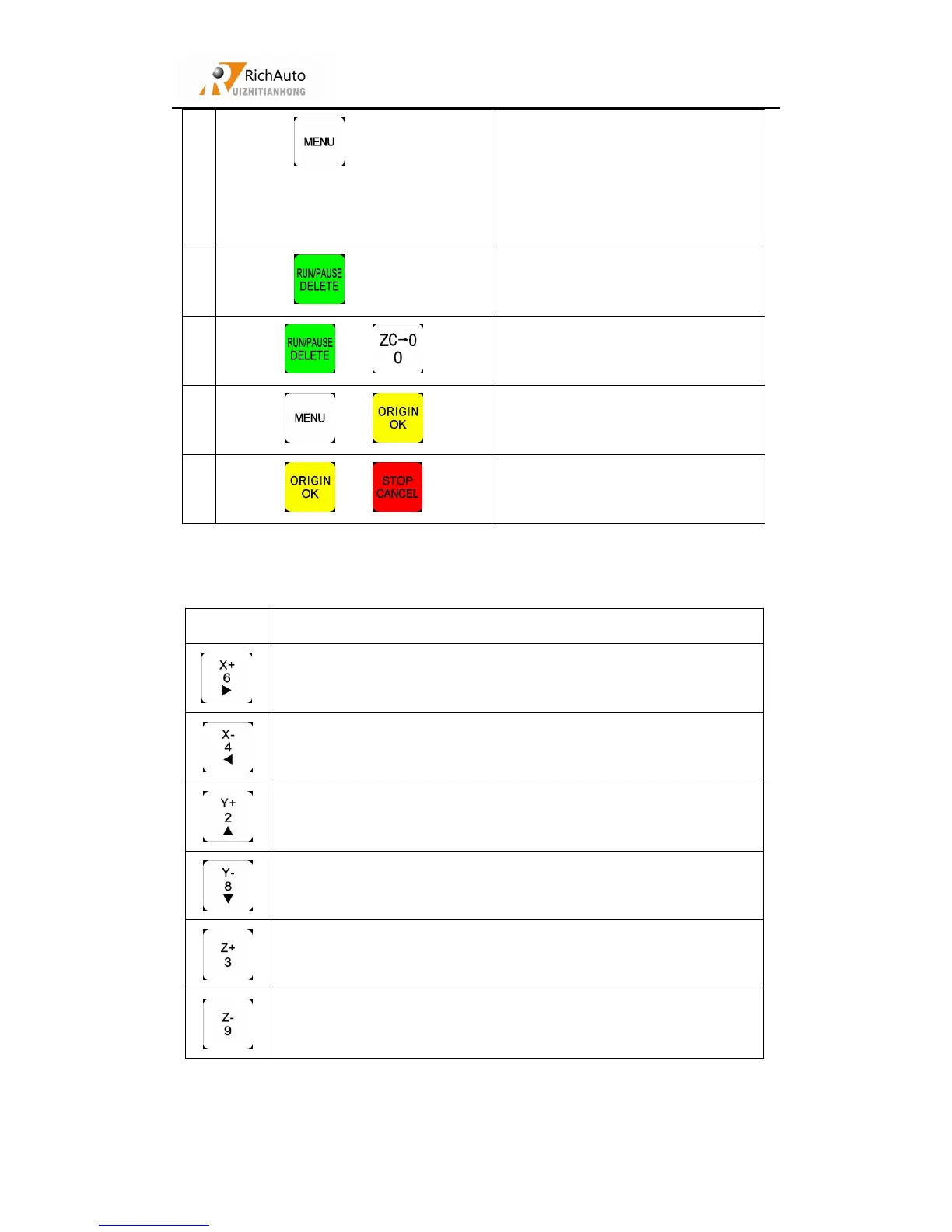
“ ”+“0—9”
Switch the coordinate system (0 for
the mechanical coordinate system ,
1 - 9 for the work coordinate
system)
2
“ ”+“1—8”
Start the breakpoints processing
(support number 1 - 8)
3
“ ”+“ ”
Start advanced processing
4
“ ”+“ ”
System upgrade
6
“ ”+“ ”
Quit buttons check
2.3
Detail information for buttons function
Positive movement of X axis、menu right shift、 figure 6
inputting
Negative movement of X axis、menu left shift、 figure 4 inputting
Positive movement of Y axis、 speed-up processing speed、 figure
2 inputting、menu up shift
Positive movement of Y axis、 solw down processing speed、
figure 8 inputting、menu down shift
Positive movement of Z axis、 figure 3 inputting、 increase
spindle speed during processing
Negative movement of Z axis、 figure 9 inputting、 reduce spindle
speed during processing



 To Next Page