Beijing RuiZhitianhong technology Co.Ltd.
ADD.:A308 jiahua building, 9 Shangdi 3rd Street, Haidian District, Beijing. P.C.:100085.
Dell:+86-10-62970368/82923063 Fax:+86-10-82920078 URL:www.richnc.com.cn 21
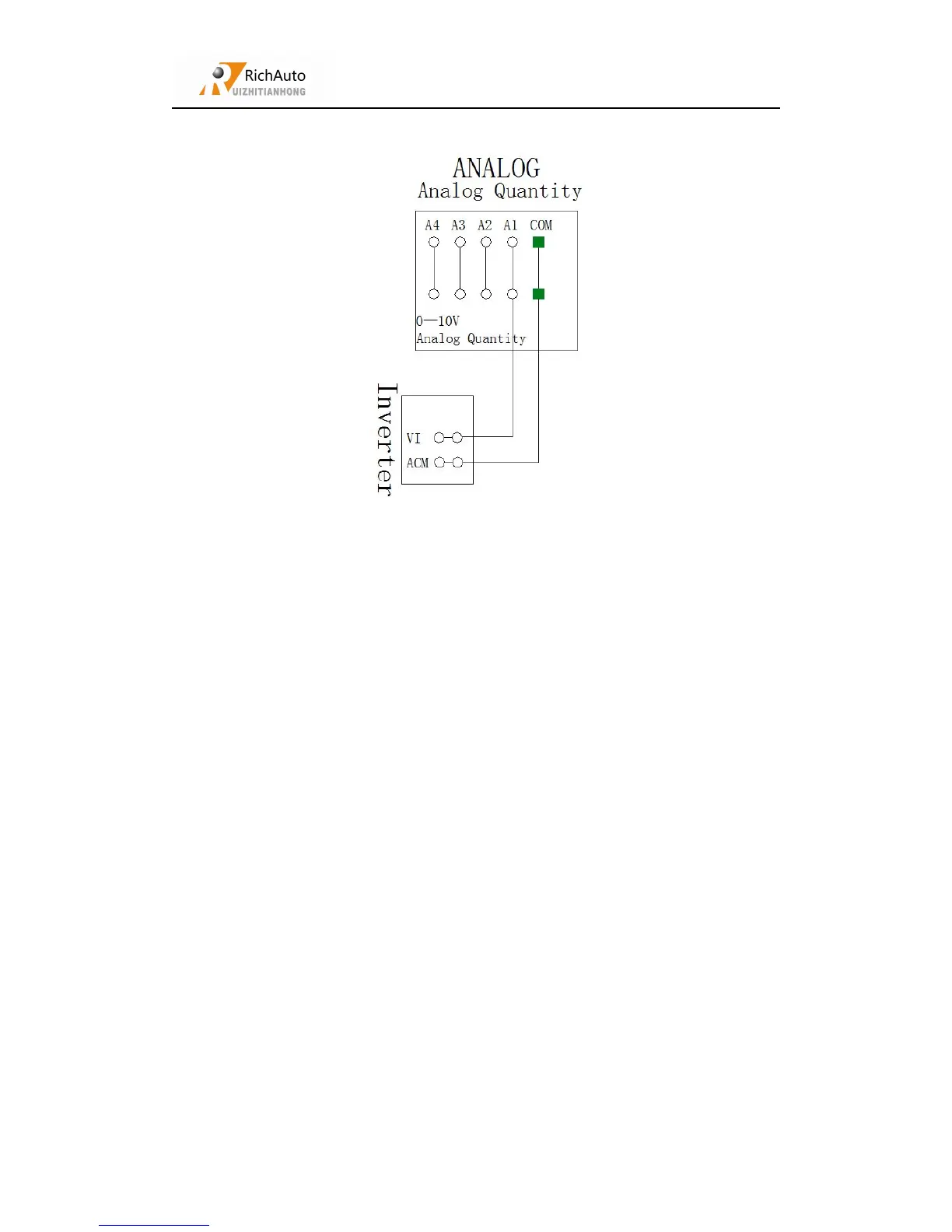
Analog quantity output wiring:
Setting procedure:enter “MENU”- “Menu function user interface”- “MACHINE
SETUP”-“Spindle Setup”- “Spindle MAX Spd”(Spd=speed)
You can connect the machine with the control system when the above setting is over.
3.4
Commissioning of the Machine and Control System
1. After turn on the power, users can manually move each axis and confirm the
direction. If the movement direction and definition direction are opposite, users
can change the motor phase sequence.
2. According to the original location of the machine coordinates, users can enter
menu-menu function user interface-machine setup-home setup- home direction to
reset it.
3. Enter menu-menu function user interface-machine setup-voltage setup,to check
whether the home switch is working ( Manual trigger , signal lamp lights
up({green to red}).
The machine is in good connection if all the above setting is ok.



 To Next Page