Connecting and Setting Up
14
2
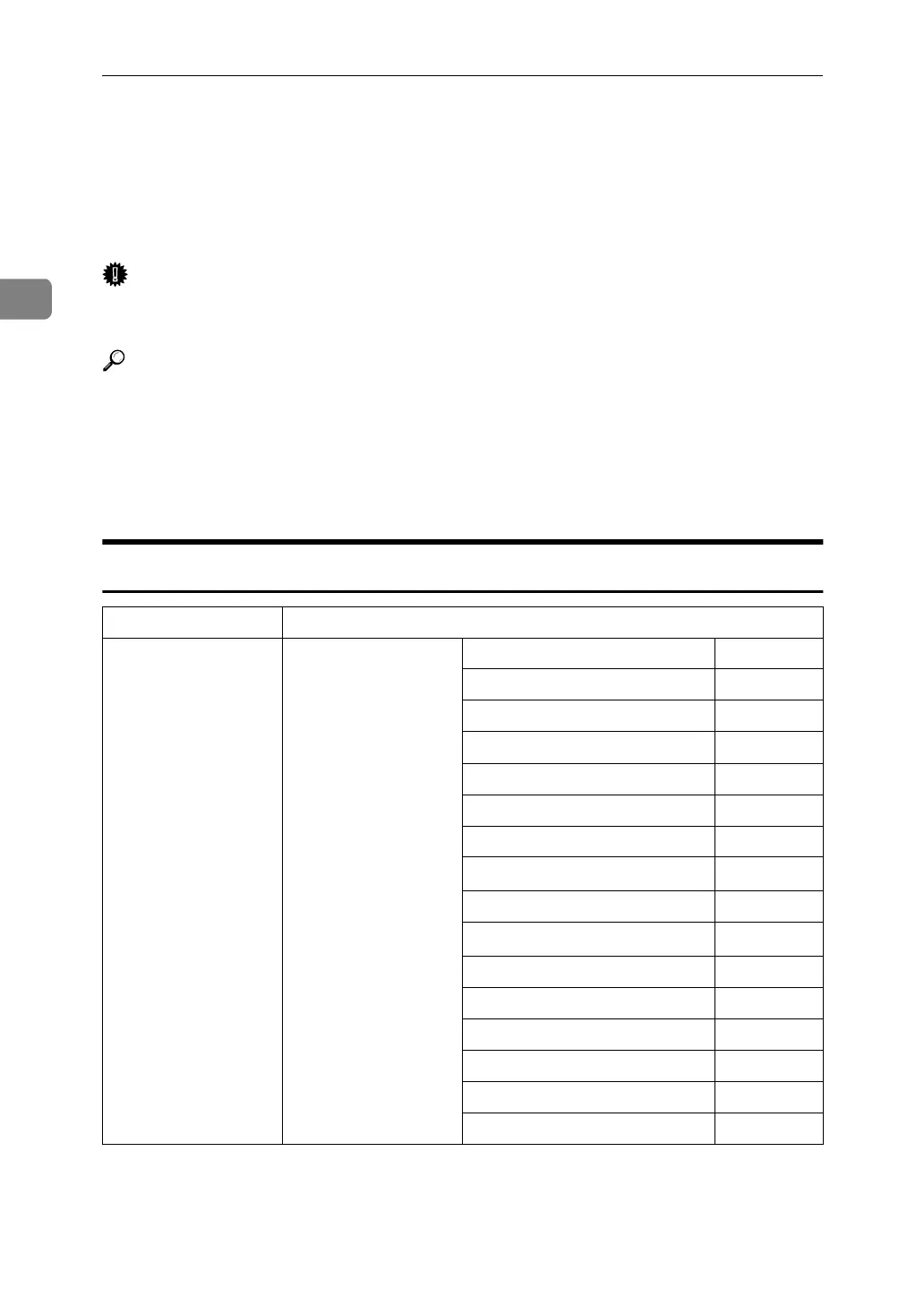
Setting Up the Machine on a Network
This section describes the network settings you can change with User Tools (Sys-
tem Settings). Make settings according to functions you want to use and the in-
terface to be connected.
Important
❒ These settings should be made by the systems administrator, or after consult-
ing with the systems administrator.
Reference
For details about settings, see p.37 “Interface Settings”
❖ Viewing the Information Displayed in the List
$ These items must be set to use the function. Be sure to set them before at-
tempting to use the corresponding function.
❍ These items must be set if required.
Printer/LAN-Fax
Interface Settings
Ethernet Interface Settings/
Network
See p.37 “Network”.
IP Address $
Gateway Address ❍
DNS Configuration ❍
DDNS Configuration ❍
Domain Name ❍
WINS Configuration ❍
NW Frame Type ❍
LAN Type
*2
$
Ethernet Speed ❍
Effective Protocol
*3
$
SMB Computer Name ❍
SMB Work Group ❍
Permit SNMP V3 Communication
❍
Permit SSL / TLS Communication
❍
Host Name ❍
Machine Name ❍





 To Next Page