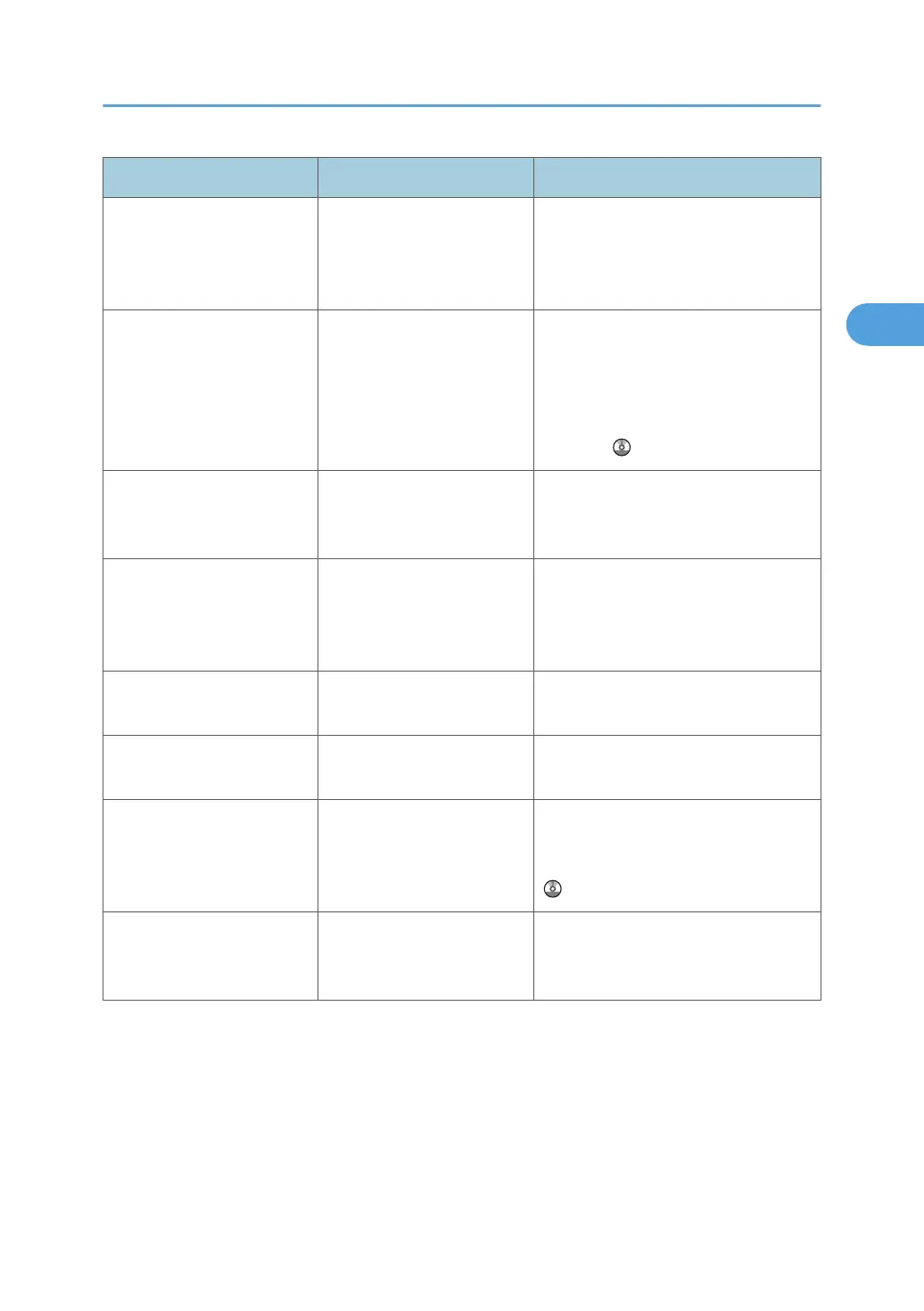
Message Cause Solution
"Problem with Hard Disk.
Please call service."
A hard disk error has
occurred.
Switch the machine's main power off
and then back on. If the message
persists, contact your service
representative.
"Ready to print. Please go
back to the initial screen to
start printing."
The creation of offline print
data is complete. This
message appears when
printing items selected on the
[Test Print] tab.
Press [Exit], then press the [User Tools]
key to switch to the regular printer
screen, and then press [Online] to start
printing. For details about [Test Print],
see "Basic Configuration", Printer
Reference .
"Reset Tray n correctly."
(A figure is placed at n.)
The selected paper tray is not
installed or is installed
incorrectly.
Install the paper tray correctly, or press
[Job Reset] to cancel the print job.
"SD Card authentication has
failed. Press [Cancel] to
cancel mode. Please call
service."
SD card authentication has
failed.
Contact your service representative.
"SD card is not set correctly.
Contact the administrator."
The SD card is not inserted
correctly.
Contact the administrator.
"SDRAM module could not
be recognized."
An error has occurred in the
SD RAM module.
Contact your service representative.
"Selected function cannot be
used with Fold mode. Press
[Job Reset] to cancel
printing."
Selected function cannot be
used with Fold mode.
Press [Job Reset] to cancel the print job.
For details about the fold function, see
"Advanced Printing", Printer Reference
.
"Selected paper size is not
supported. Press [Job Reset]
to cancel the printing."
An unsupported paper size
was specified for a PostScript
print job.
Press [Job Reset] to cancel the print job,
and then set the paper size correctly.
Messages Displayed When Using the Printer Function
29







 To Next Page