RiCOMA (Shenzhen) Co.,Ltd
A Passion for Excellence Visit us at
Add.: Building B, ShenChangGang Science Park, Jinlong Road 1, Baolong Industrial Town,
Longgang District, Shenzhen, P.R.C
Tel.:+86-0755-25857576 Fax: +86-0755-25857773 - 6 -
www.ricoma.cn
5. Design input
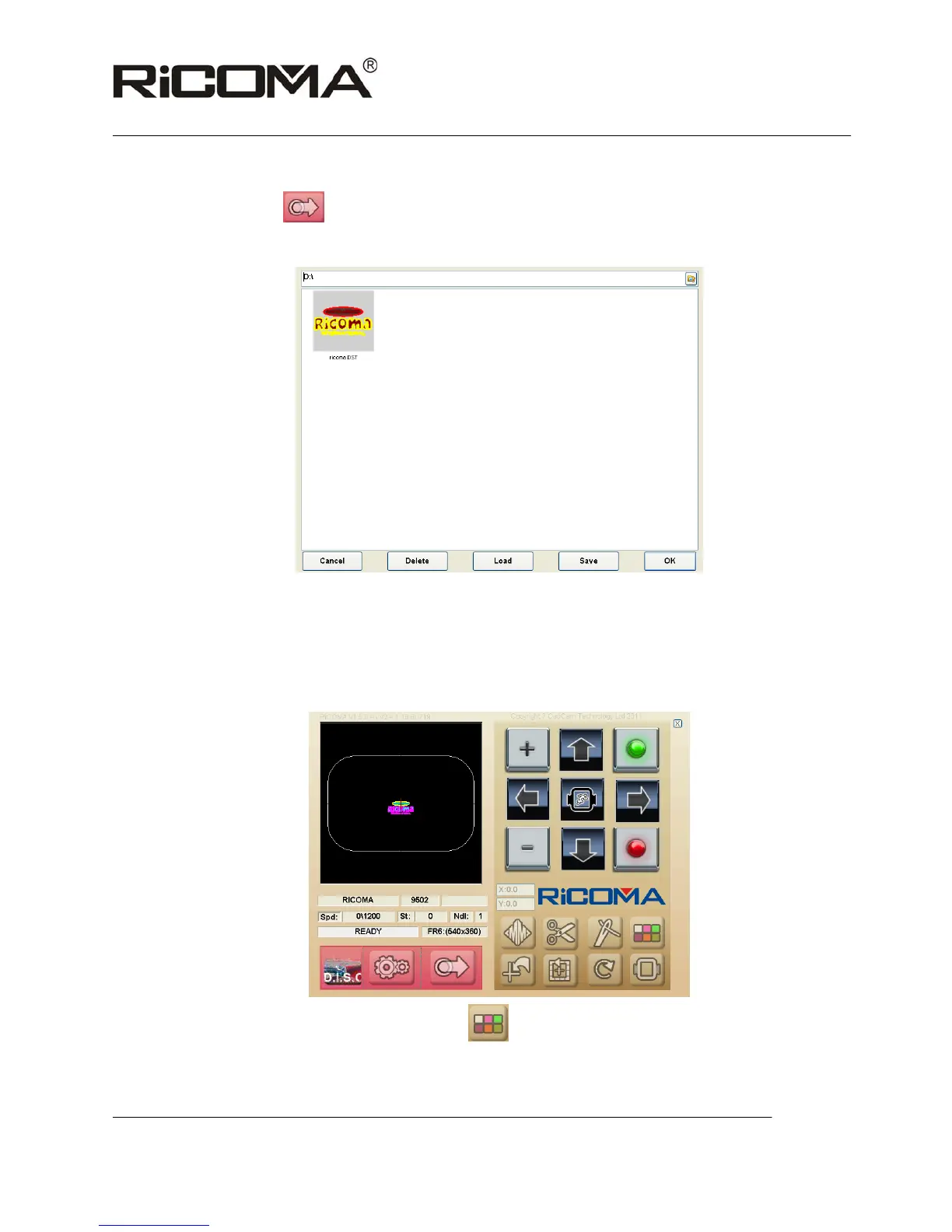
Press the key
to call patterns saved in computer into the machine, as
shown in the following picture:
Select the needed embroidery pattern by clicking on “OK”, waiting for the
pattern information, and operate until the prompt “READY” displayed in the
status bar;
Pattern will be displayed as follows:
6. Set color switch sequence by clicking on
, input the color sequence you need and
click on “OK” to confirm, as shown in the following picture:



 To Next Page