RiCOMA (Shenzhen) Co.,Ltd
A Passion for Excellence Visit us at
Add.: Building B, ShenChangGang Science Park, Jinlong Road 1, Baolong Industrial Town,
Longgang District, Shenzhen, P.R.C
Tel.:+86-0755-25857576 Fax: +86-0755-25857773 - 8 -
www.ricoma.cn
click on to proceed with the embroidery.
The above description is the complete operation process of embroidery.
III Parameter Setting:
With more unique performance and simplified handling, the serial embroidery machine
will bring you a thrilling embroidery experience to your liking.
1. Embroidery parameters:
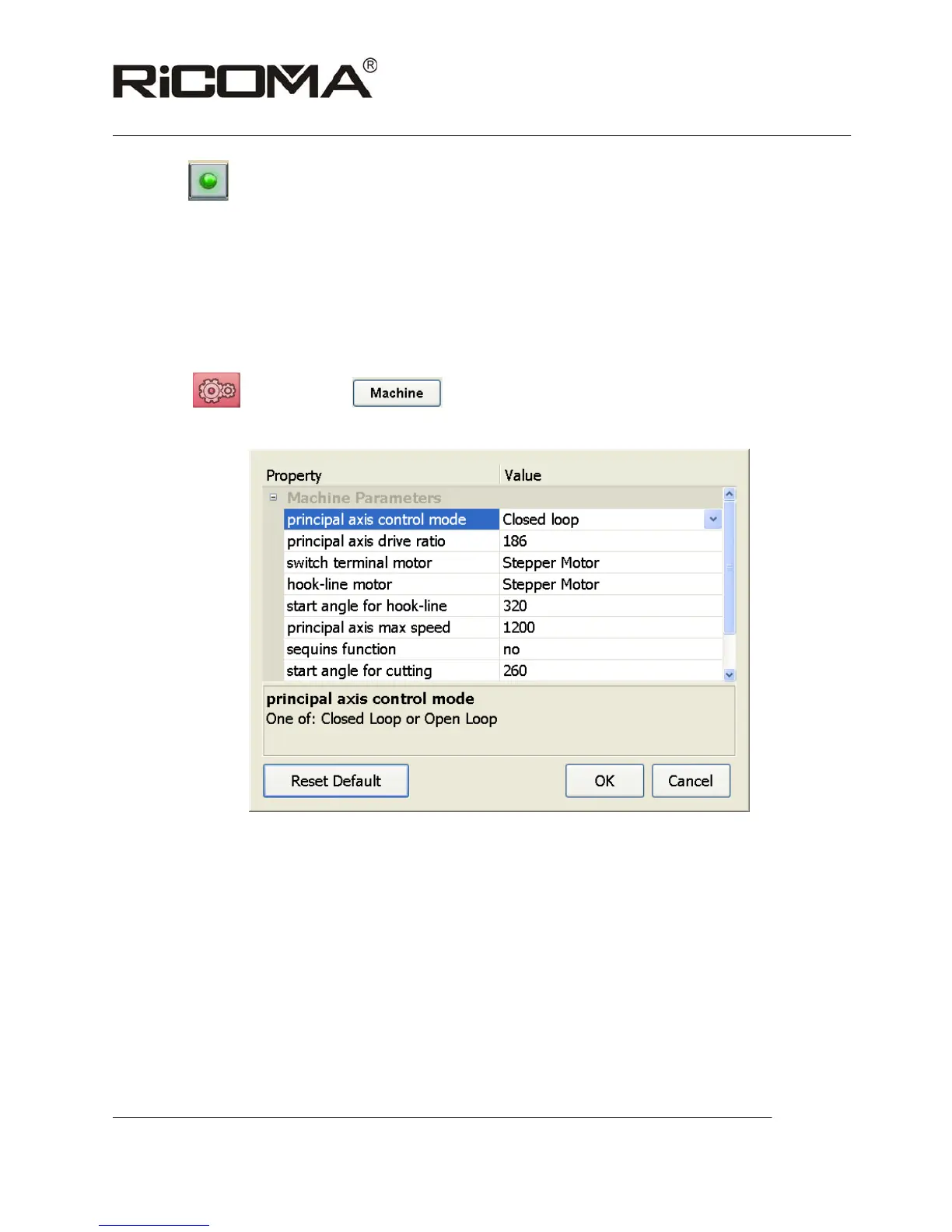
Click on
before start to set parameters with password 11052011,as
shown in the following picture:
Note: two ways to set: A: Click on “Value”to select from options;
B: Click on “Va lue”to enter value in the number box;
Specific implication of each parameter:
Principal axis control mode: Select “Close loop” mode;
Principal axis drive ratio:With default selection 186:100;(Omission of 100)
Switch terminal motor: Select stepping motor;



 To Next Page