RiCOMA (Shenzhen) Co.,Ltd
A Passion for Excellence Visit us at
Add.: Building B, ShenChangGang Science Park, Jinlong Road 1, Baolong Industrial Town,
Longgang District, Shenzhen, P.R.C
Tel.:+86-0755-25857576 Fax: +86-0755-25857773 - 9 -
www.ricoma.cn
Hook-line motor: Select stepping motor;
Start angle for hook-line: With default value 320;
Principal axis max speed: With default setting 1200rmp;
Sequins function: With default setting “Close”;
Start angle for cutting: With default setting degree 260;
Note: after setting, click on OK to save before quit. If any uncertainty about
setting, you can restore the default setting by clicking on
.
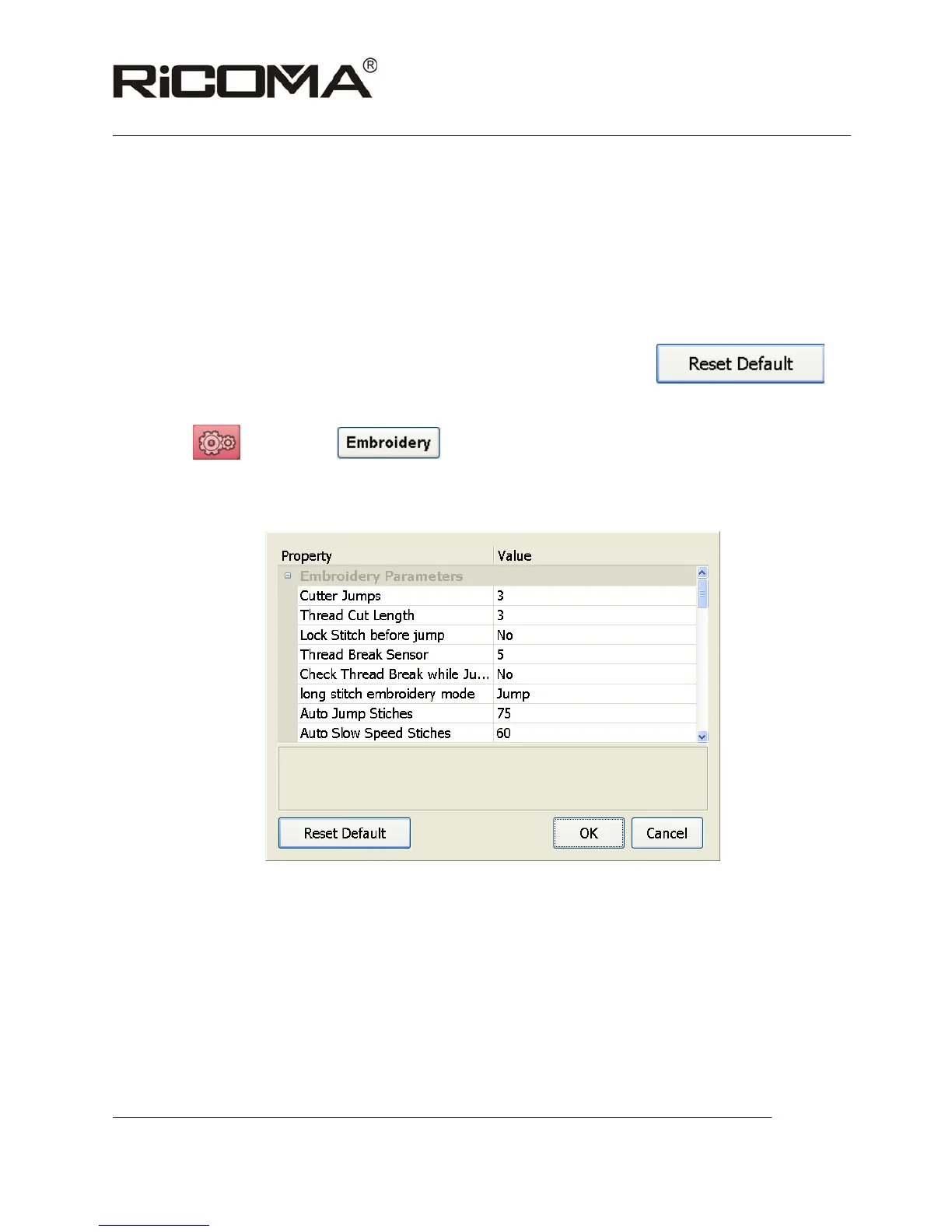
2. Embroidery parameter setting:
Click on
before start , enter embroidery parameter setting interface by
inputting password 11052011, as shown in the following picture:
Cutter Jumps: With default value 3 and setting range 0-9;
Thread cut length: With default value 3 and setting range 0-7;
Lock stitch before jump: With default status No; and recommended status Yes
Thread Break sensor: With default value 5 and setting range 0-9, it can be
modified as 0 when idling embroidery test is required.
Check thread break while jumping: With default status No;
Long stitch embroidery mode:It can be classified as the jump mode and slow
speed mode, with default status Jump;



 To Next Page