Installation
74
EN
2.11.2 Control panel access
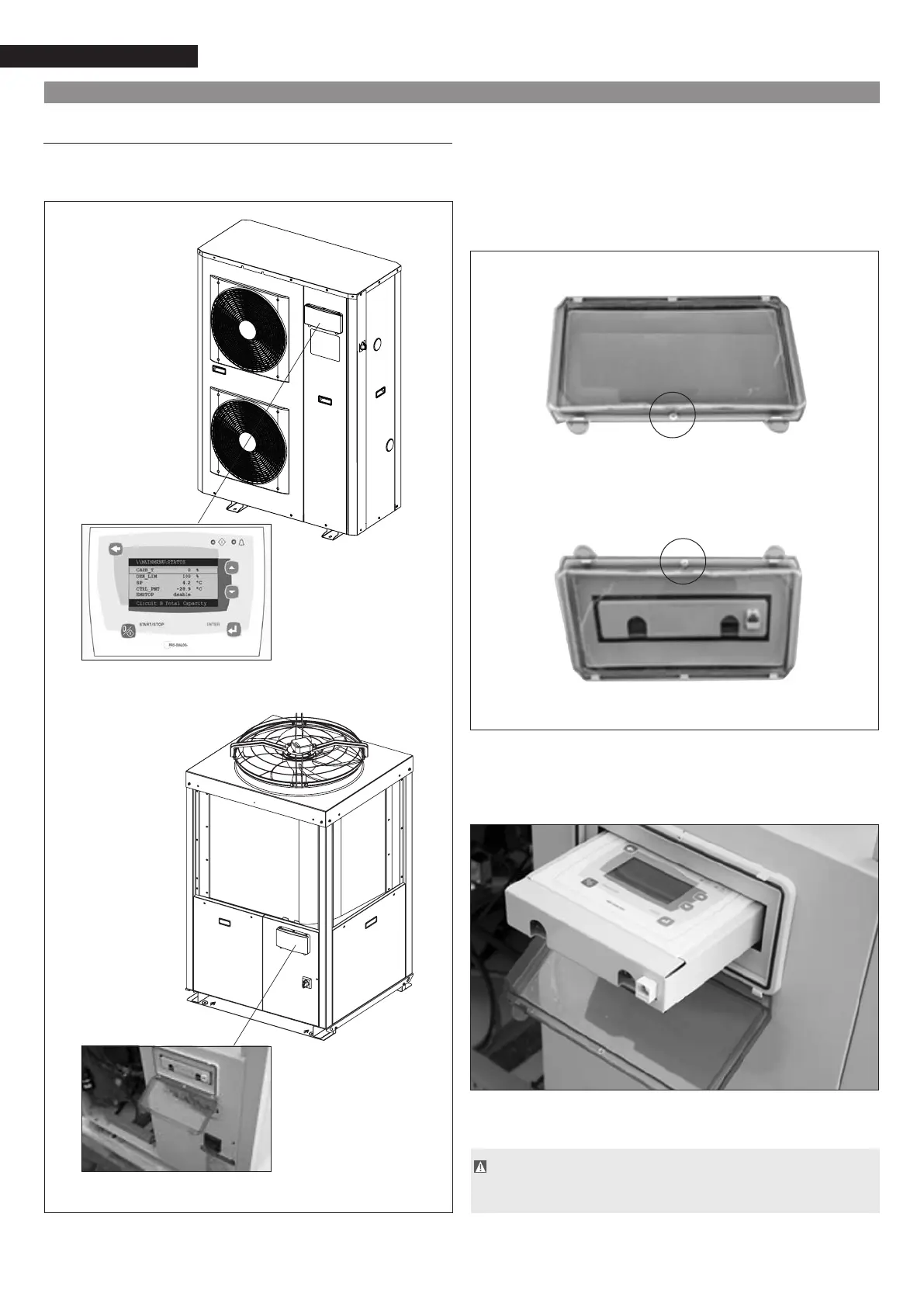
The Pro-Dialog+ control panel is at the front of the machine,
asindicatedinthegure:
NXC 017-021
NXC 026-040
NXH 026-040
Itisalreadywiredtothemachineanddoesnotrequireaddi-
tional connections.
It can be accessed by easily opening the clear front do-
or
paying attention to loosen the screw placed in the lo-
wer
side of the cover, for NXC 017-021 models, and
in
theuppersideofthecover,forNXC026-040andNXH026-040
models.
In
NXC017-021modelsthepanelisclearlyvisiblewhileforNXC
026-040andNXH026-040modelsitisnecessarytoremoveit
fromitscasingasindicatedbelow:
The electric protection of the panel does not allow the
door to be left opened.
Check that it is hermetically closed.
NXC / NXH 026-033-040
NXC 017-021



 To Next Page