91
PRO-DIALOG+
EN
3.5.4 Pump control
The control is able to manage one or two pumps
inside
the unit. The pump is activated if the spe-
cic
parameter is congured (PUMPCONFIG)
and if the unit is in heating or cooling mode.
Thestart-updelayvalueofthecompressor,withrespectto
thepump,issetto1minute(default)butitcanbeextended
to15minutes.Inthiscasethepumpwillworkwithcompres-
sorstoppedforatimeequaltothesetdelayvalue.
If the unit stops the pump stays ON for 20 seconds.
However, if the unit changes mode (heating/cooling), the
pump carries on working. The pump instead stops if the
unitisinlockoutconditionduetoanerror,unlessthean-
ti-freezeprotectionistriggered.Moreover,itcanbestarted
iftheelectricheatingelementoftheplateexchangeristrig-
gered.Refertothespecicparagraphforpumpcontrolde-
tailsincaseofinstallationoftwomachinesinMaster/Slave
conguration.
3.5.5 Control point
The control point is the water temperature value that the
unitmustreach.Theexchangerenteringwatertemperature
isalreadysetwhiletheleavingtemperaturecanbeset,ho-
weveronlybytheTechnicalSupportService.Thecontrolpoint
valueiscalculatedas:
Control point: Active setpoint +Reset
3.5.6 Active setpoint
Uptotwosetpointscanbeselectedincoolingmodeandtwo
inheatingmode.Usually,thesecondvalueismatchedtope-
riodsinwhichtheunitisnotactive.
Thisvaluecanbeselected:
• fromthecontrolpanel(GENUNITmenu).
• fromdrycontacts
• from CCN
• through timer setting
Thetablesbelowlisttheselectionsavailableaccordingtothe
controltype(frompanelorinremote).Theparameterslisted
are:
• Local setpoint selection: the value to be entered
is in the GENUNIT menu, LSP_SEL parameter.
• Timeschedule2:SelecttheSCHEDULEsub-menutoaccess
the CONFIG menu.
• Setpointselectioncontact:thisparameteridentiescon-
tactstatus(openorclose).
Heating / cooling
operation mode
Local
setpoint
selection
Calendar 2
status
Active setpoint
Cooling sp 1 - Cooling setpoint 1
Cooling sp 2 - Cooling setpoint 2
Cooling auto occupied Cooling setpoint 1
Cooling auto unoccupied Cooling setpoint 2
Heating sp 1 - Heating setpoint 1
Heating sp 2 - Heating setpoint 2
Heating auto occupied Heating setpoint 1
Heating auto unoccupied Heating setpoint 2
OPERATING MODE: FROM CONTROL PANEL
PARAMETER STATUS
Heating / cooling
operation mode
Contact setpoint
selection
Active setpoint
Cooling sp1(open) Cooling setpoint 1
Cooling sp2(closed) Cooling setpoint 2
Heating sp1(open) Heating setpoint 1
Heating sp2(closed) Heating setpoint 2
OPERATING MODE: REMOTE PANEL
PARAMETER STATUS
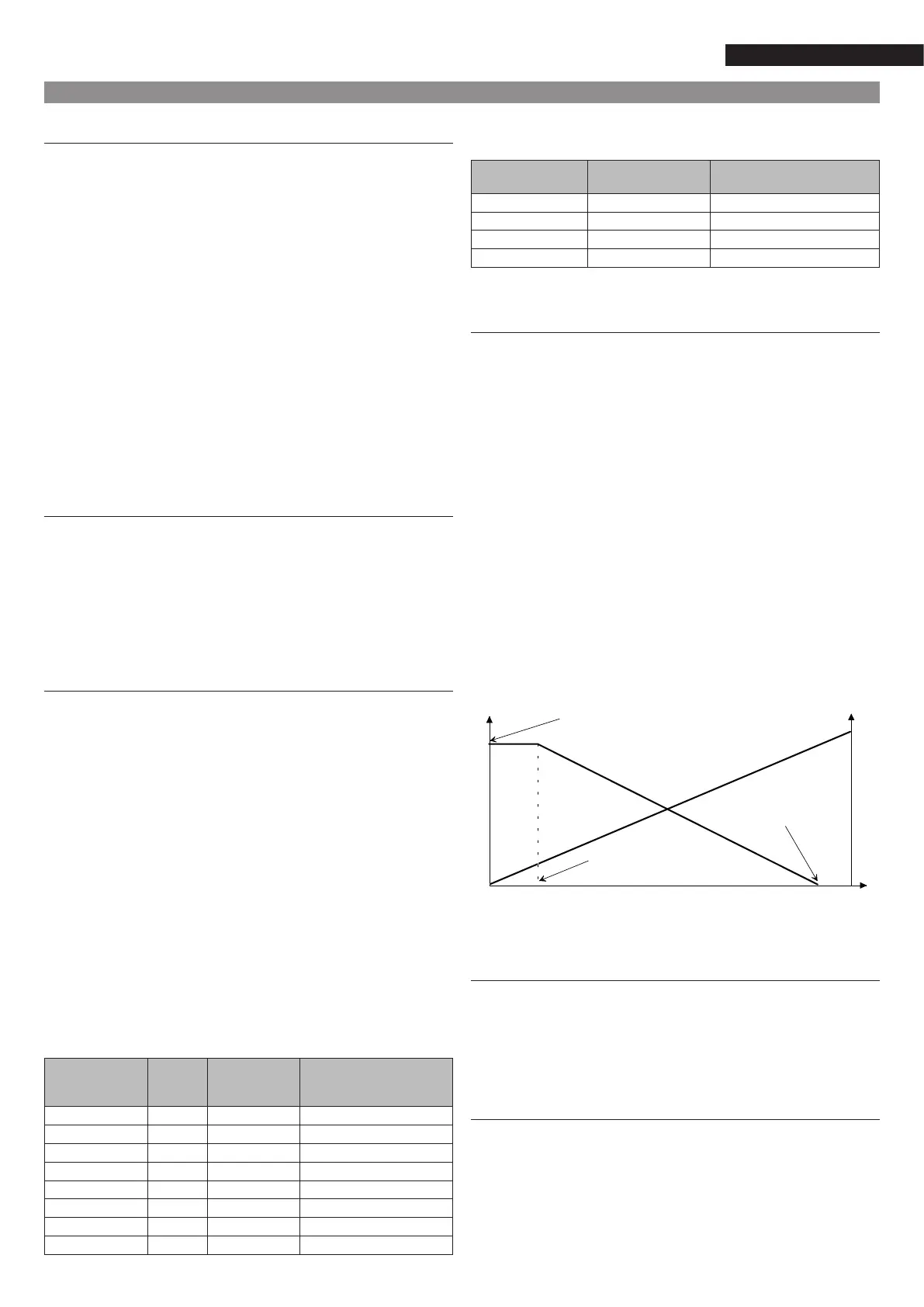
3.5.7 Reset
The Reset parameter aim is to change the active setpoint va-
lue(incoolingmodeitincreasesthevaluewhileinheating
modeitdecreasesit)inordertoreducethecapacityreque-
sted to the machine. The change of this value is a conse-
quenceofadropoftheoutsidetemperaturevalueordrop
of the temperature differential in the plate exchanger and
isaimed atimprovingmachineperformance.As onemight
noticefromthegraphbelow,theresetvalueisacurvewhere
thevaluescanbesetfromthecontrolpanelbyaccessingthe
RESETCFGmenu.Parameterstobesetarethefollowing:
•
Maximumresetvalue(A)
•
Outside temperature value (or variation of
exchangertemperature)forwhichtheresetvalueis=0(B)
•
Outside temperature value (or variation of
exchangertemperature)forwhichtheresetvalueisma-
ximum(C)
Exampleofresetvaluetrendwithunitincoolingmode.
3.5.8 Demand limitation
Thisfunctionisusedtolimitunitpowerconsumption.Basically,
theunitcannotexceedasetpointlimitvaluethatcanbesetfrom
the control panel accessing the SETPOINT menu. In this case,
thedrycontactswillbeused.
3.5.9 Capacity control
With this function, the machine adjusts the compres-
sor so that the temperature of the exchanger leaving wa-
ter is kept to the set value (setpoint). The control pa-
nel constantly measures the temperature of the unit
entering and leaving water as well as the difference
oftemperaturewiththesetpoint.Basedonthereadvalues,
itdecidestochangemachinecapacitybyactingonthecom-
pressor.Ifthecompressorisstartedtoofrequentlyoriskept
Outdoor temperature (OAT)
% Building load
A
°C
3
100
D
B
C
10
3.0
20
5.0
°C0



 To Next Page