37 di 42
10.2 PHOTOCELL CHECK
If errors 004-005-006-
the p
hotocells should be checked
to make sure they are operating
correctly since they may just be
obscured by dust, thus generating
false signals
−
To check the operation of
following:
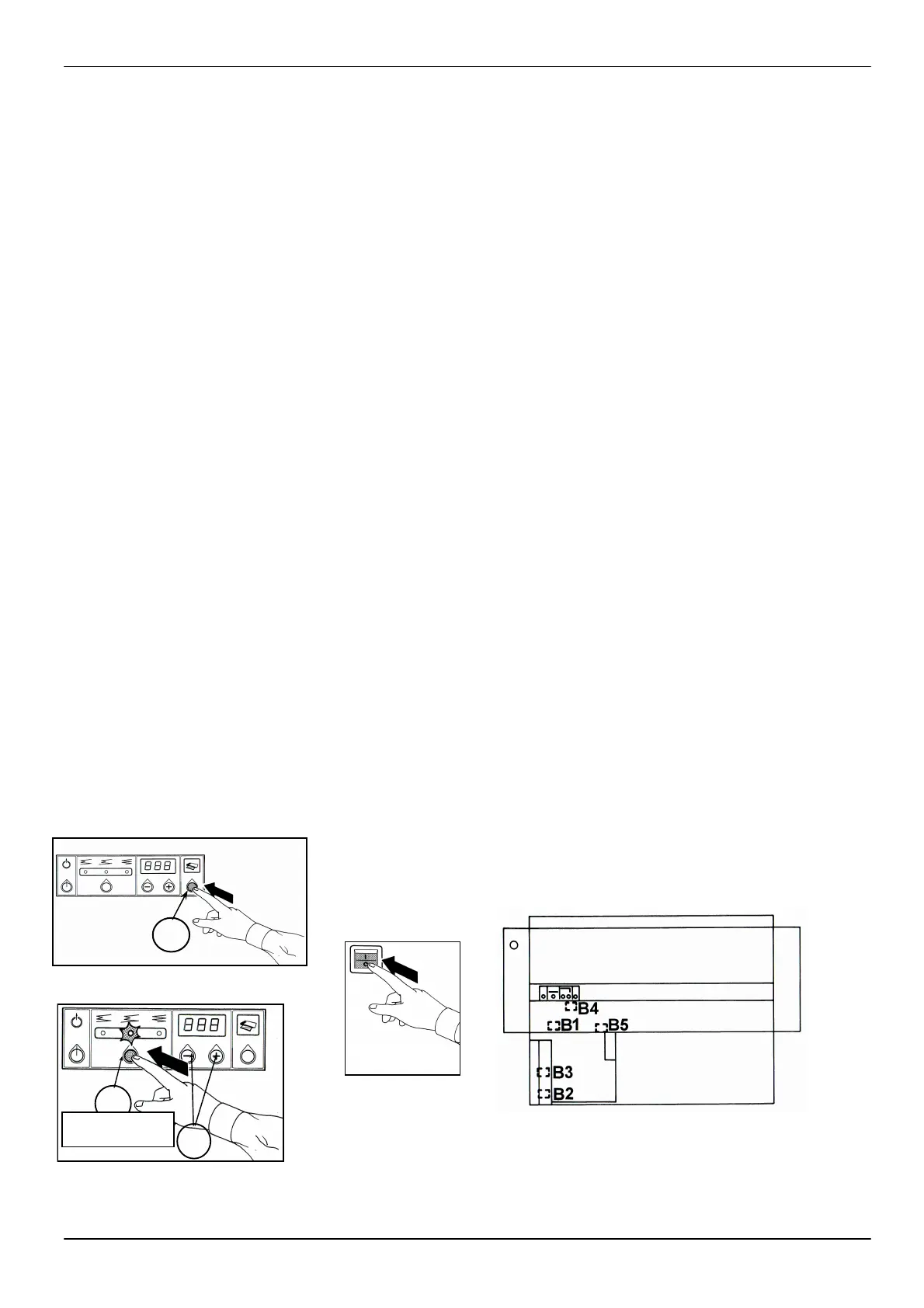
A. Antil at the program 11
(see on dysplay at turn o
the machine)
button (I) for 5 seconds
(fig. 1). Since the progr. 12
push the button (F) and turn
on the machine
B.
checked (fig. 2)
F
10
H
10.2 VERIFICA
FOTOCELLULE
Qualora si manifestassero gli
errori 004-005-006-
ren
de, necessario assicurarsi del
regolare funzionamento delle
fotocellule che potrebbero
an
che essere solo oscurate dalla
polvere dando luogo a falsi
segnali.
-
funziona
fotocellula occorre agi
come segue:
A. Fino al programma 11 (il
numero del prog. Appare
sui display per qualche
secondo all’accensione
della macchina), entrare in
modalità simulazione
tenendo premuto il tasto (I)
per 5 secondi (fig.1).
Dal programma 12 , tenere
premuto il tasto programma
(F) e accendere la macchina
B.
Usufruendo della legenda e
dei disegni, individuare la
fotocellula di cui si vuole
verificarne il fun
(fig.2).
10.2 PHOTOZELLENÜBER-
PRÜFUNG
Wenn die Fehler 004-005-006-
007 auftreten, so ist der regel-
mässige Betrieb der Photozellen
zu überprüfen; wenn sie vom
Staub
falsche Fehlermeldungen geben.
- Um den Betrieb jeder ein-
kontrollieren, muss man wie
folgt vorgehen:
A. Sich in Simulations-
modalität stellen, dazu die
Taste (I) 5 Sekunden lang
gedrückt halten.
B. Mit der Legend
kontrollierende Photozelle
erkennen (Abb.2).
10 TROUBLESHOOTING
10 RICERCA E
SOLUZIONE
GUASTI
10 FEHLERSUCHE
UND
-BESEITIGUNG
I
1
Since prog.12


 To Next Page