Smartcraft PCM
Page 9
1) Locate the engine’s 4 pin (or 2 pin on some models) diagnostic connector
(DLC). e exact location of this connector is specied in the engine manu-
facturer’s service manual and may vary depending upon the engine type.
2) With the engine’s ignition switch in the OFF position, plug the scan tool’s
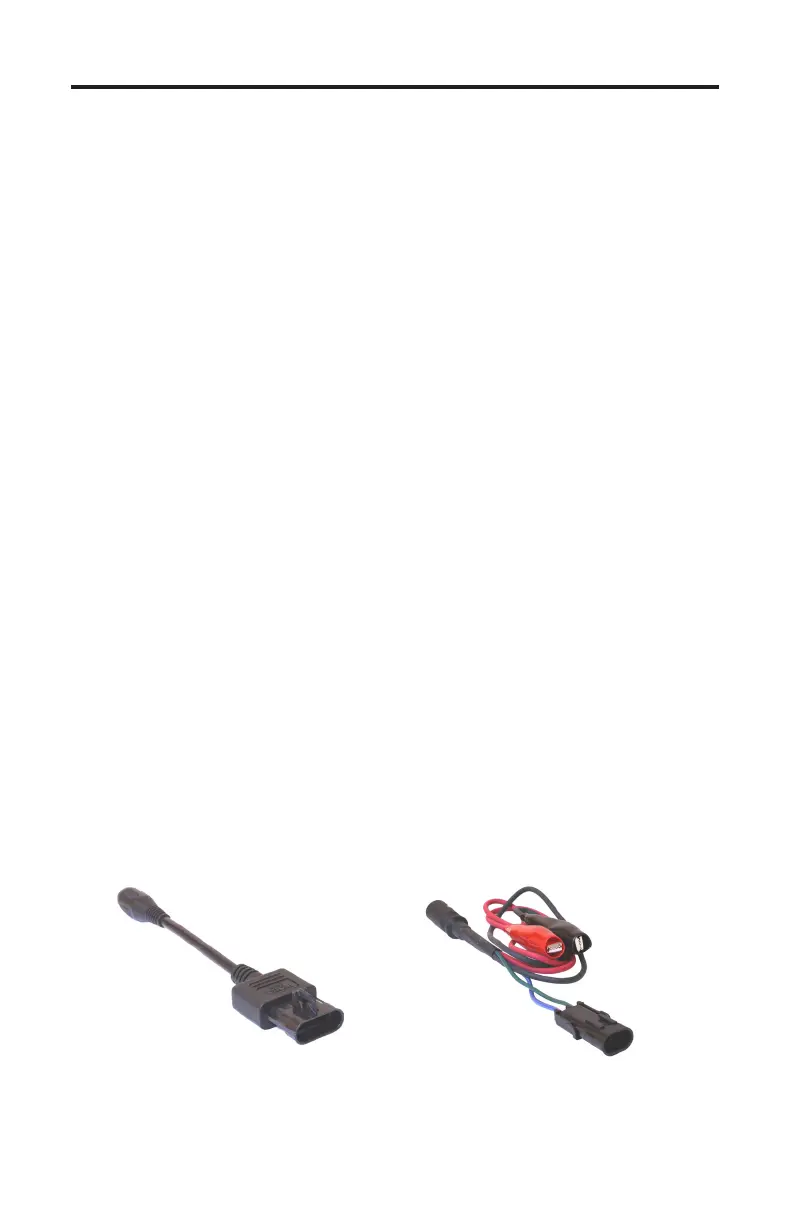
communication cable into the DLC connector. Adapter #94006 is required
for 4-pin applications, adapter #94028 is required for 2-pin applications..
3) Once the tool is connected, turn the ignition switch ON and start the engine
if necessary. Note the #94028 adapter requires a separate battery connection:
Red to +12vdc and Black to engine ground to provide power to the tool.
4-pin Adapter
Rinda Tech P/N 94006
2-pin Adapter
Rinda Tech P/N 94028
Connecting to the PCM-555 / ECM-555 EFI Systems
e TechMate Pro scan tool provides an extensive set of diagnostic and support
functions for troubleshooting engines equipped with the PCM SmartCra engine
control system.
Two types of diagnostic connectors were used on outboard engines equipped
with these EFI systems. As a general rule most outboard engines 2005 and ear-
lier that utilize Smartcra PCMs (PCM-555 or ECM-555) are tted with a 2-pin
diagnostic connector. Starting in 2006 Mercury began using a 4-pin diagnostic
connector on most of their Smartcra PCM equipped engines. One exception
to this is on Verado engines. All Verado engines 2005 and newer use the 4-pin
style connector.
To connect the TechMate Pro scan tool follow the steps below. e two possible
types of diagnostic adapters required for these systems are shown at the bottom
of this page.


 To Next Page