V
x1000
VRY
KVAr
KVArh
IN
Sys
Ph R
KAh
A
x1000
VYB
KVA
Hz
KVAh
Min
Ph Y
Demand
KW
x1000
VBR
Angle
P.F.
KWh
Max
Ph B
Max Demand
V
x1000
VRY
KVAr
KVArh
IN
Sys
Ph R
KAh
A
x1000
VYB
KVA
Hz
KVAh
Min
Ph Y
%THD
KW
x1000
VBR
Angle
P.F.
KWh
Max
Ph B
Demand
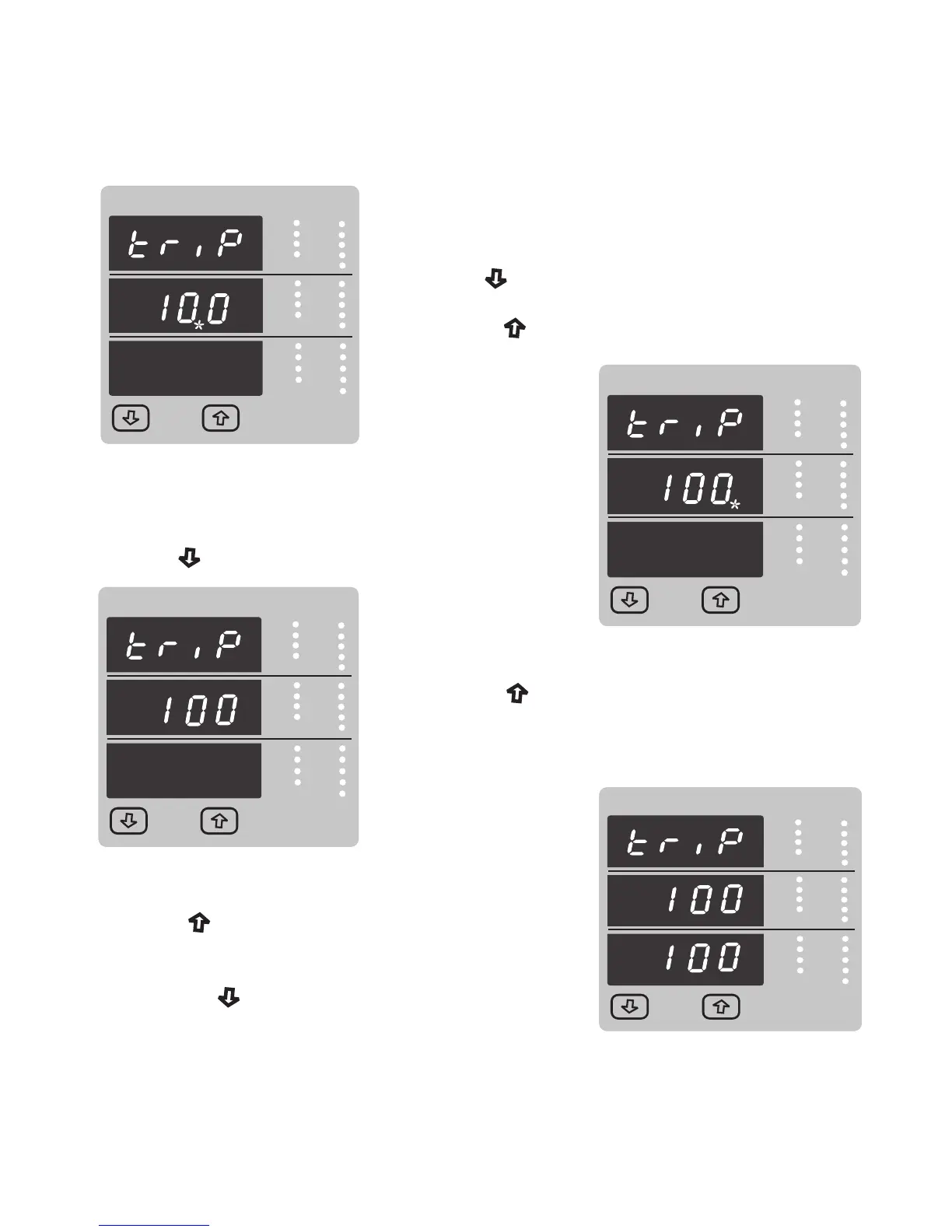
The first digit entered, prompt for second digit
(* Denotes that decimal point will be flashing).
Use the “ Down” key to scroll the value of the second digit
Press the “ Up” key to advance to next digit.
V
x1000
VRY
KVAr
KVArh
IN
Sys
Ph R
KAh
A
x1000
VYB
KVA
Hz
KVAh
Min
Ph Y
Demand
KW
x1000
VBR
Angle
P.F.
KWh
Max
Ph B
Max Demand
V
x1000
VRY
KVAr
KVArh
IN
Sys
Ph R
KAh
A
x1000
VYB
KVA
Hz
KVAh
Min
Ph Y
%THD
KW
x1000
VBR
Angle
P.F.
KWh
Max
Ph B
Demand
The second digit entered, prompt for third digit
(* Denotes that decimal point will be flashing).
Use the “ Down” key to scroll the value of the third digit
V
x1000
VRY
KVAr
KVArh
IN
Sys
Ph R
KAh
A
x1000
VYB
KVA
Hz
KVAh
Min
Ph Y
Demand
KW
x1000
VBR
Angle
P.F.
KWh
Max
Ph B
Max Demand
V
x1000
VRY
KVAr
KVArh
IN
Sys
Ph R
KAh
A
x1000
VYB
KVA
Hz
KVAh
Min
Ph Y
%THD
KW
x1000
VBR
Angle
P.F.
KWh
Max
Ph B
Demand
V
x1000
VRY
KVAr
KVArh
IN
Sys
Ph R
KAh
A
x1000
VYB
KVA
Hz
KVAh
Min
Ph Y
Demand
KW
x1000
VBR
Angle
P.F.
KWh
Max
Ph B
Max Demand
V
x1000
VRY
KVAr
KVArh
IN
Sys
Ph R
KAh
A
x1000
VYB
KVA
Hz
KVAh
Min
Ph Y
%THD
KW
x1000
VBR
Angle
P.F.
KWh
Max
Ph B
Demand
Entered the value for third digit .
Press the “ Up” key to advance to trip point
confirmation Screen.
This Screen confirms the value set by user .
Press the “ Up” key to advance to next Screen
“Hysteresis selection” ( see section 3.2.4.1.1.2.4)
Pressing the “ Down” key will return in edit mode
41



 To Next Page