Loading Paper
Load paper in the feed trays and the standard tray.
We recommend loading the feed trays with types of paper
you will use most often.
Use the standard tray for the following types of paper.
Thick paper and other special paper
Paper with one side already printed
Postcards
Envelopes
•
•
•
•
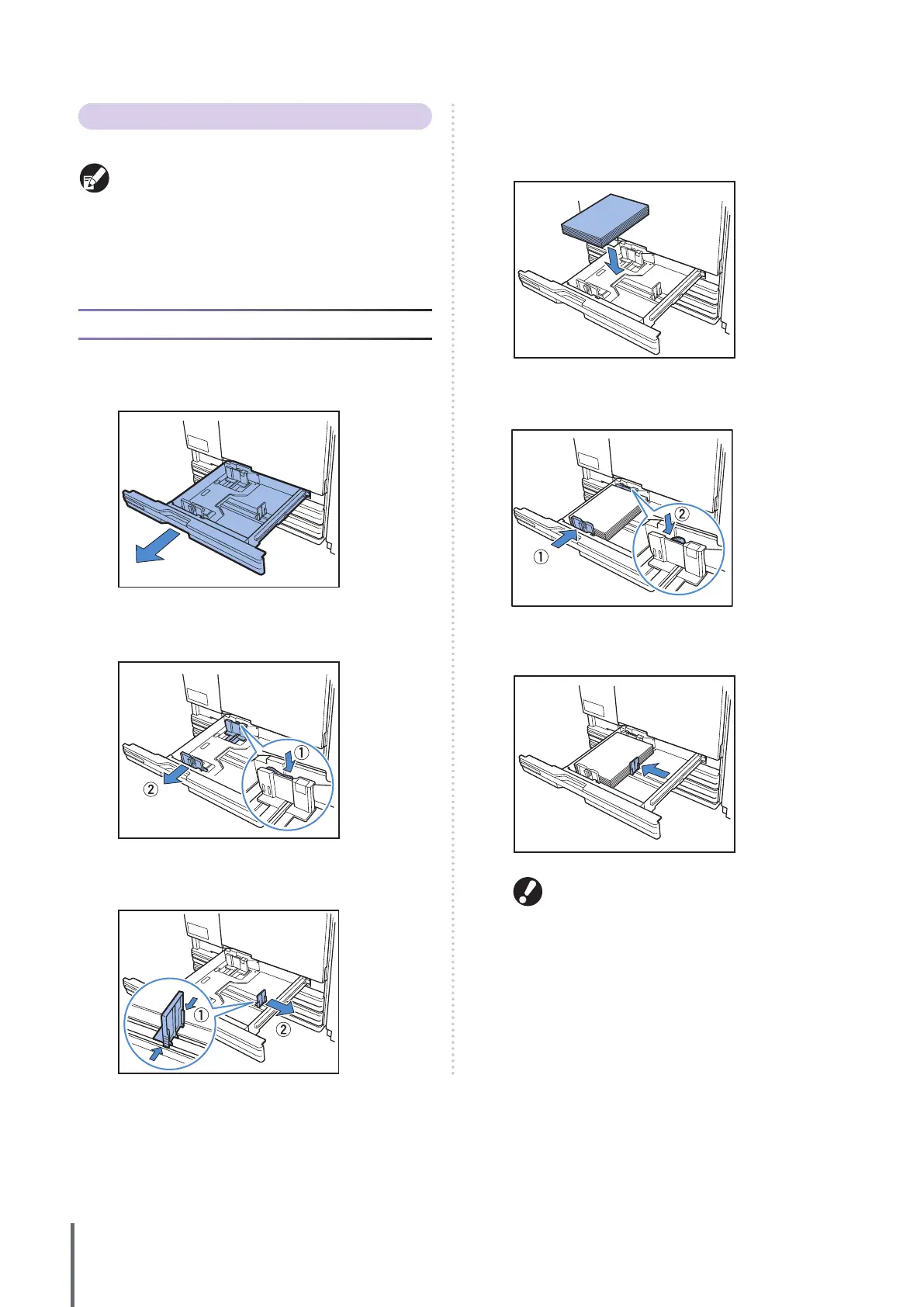
In the Feed Trays
1
Pull a tray out, toward the front.
2
Push the locking lever (in back) to unlock the guides.
Holding the front tab, spread the guides fully apart.
3
Move the stopper to make space.
Hold the stopper from both sides and move it out of the way.
4
Load the paper.
When using paper with dierent characteristics on the front
and back sides, load the printing side face-down. Do not load
too many sheets.
5
Move the guides against the edges of the paper, and
push the lever to lock.
6
Move the stopper against the edge of the paper.
Be sure to align the stopper against the edge of the
paper. The machine determines the size of the
paper based on the stopper position.
7
Return the tray to the original position.
8
On the operation panel, check the tray settings.
When you have switched to a dierent type or size of paper,
update the feed tray settings. For details, see “Feed tray”
(p. 39).
ComColor Series Basic Guide 02










 To Next Page