If you want to send data from a computer to print on this
machine, you must rst install the printer driver onto the
computer. Install by following the procedure below.
Installing the Printer Driver
Log on as a user with administrator privilege.
Close all active applications.
For instructions regarding uninstallation, installing the setup maker, and using the quick installer, ask your administrator.
•
•
•
1
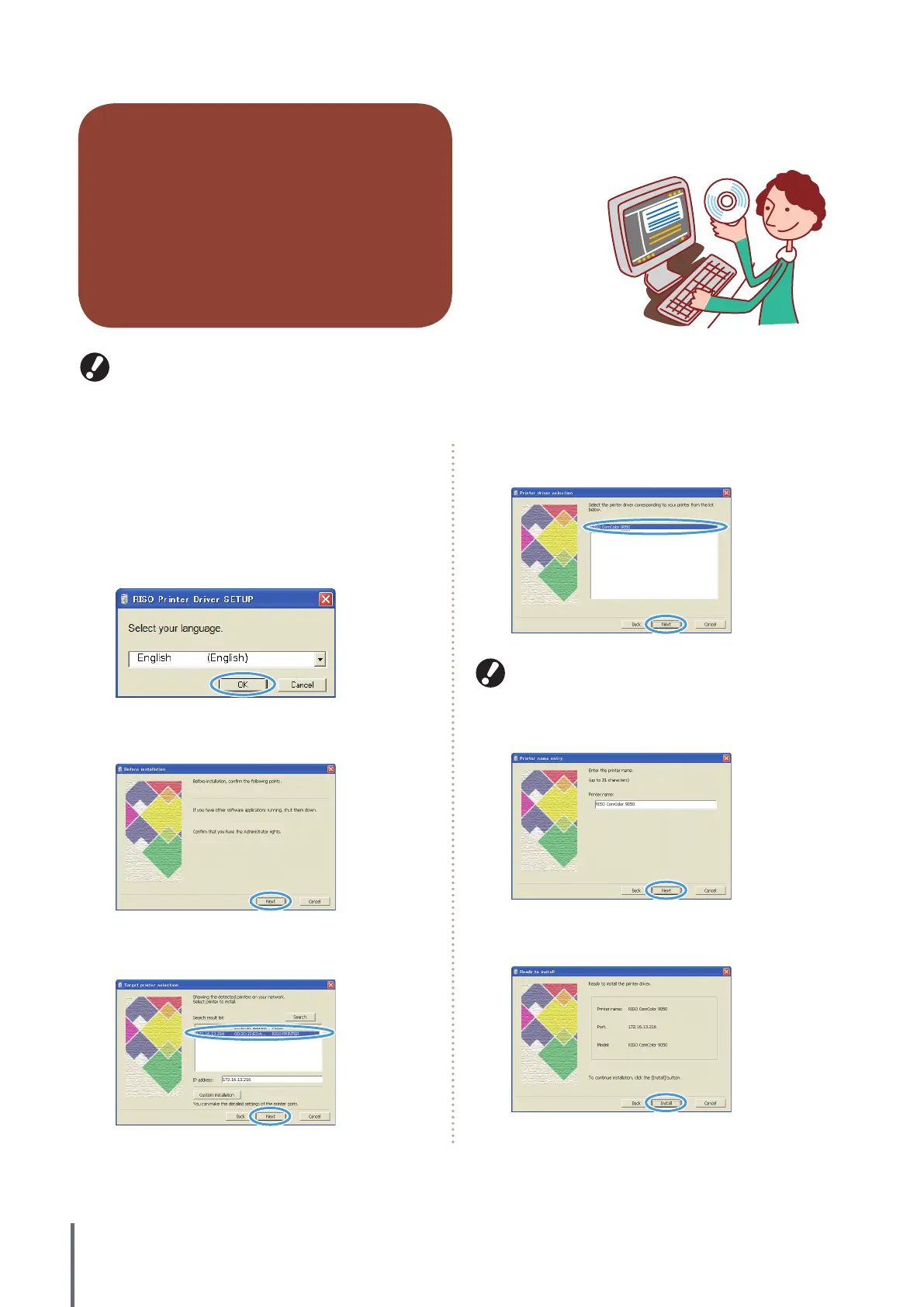
Load the included CD-ROM in the computer’s CD-
ROM drive.
The installation wizard automatically starts up. If the
installation wizard does not start up, double-click the le
“setup. exe” on the CD-ROM.
2
Select [English] in the pull-down menu and click
[OK].
3
Click [Next].
4
In [Search result list], select printer information
about the machine, and then click [Next].
5
Select the printer name for the machine and click
[Next].
If the selected driver is already installed, the [Procedure of
installation] screen is displayed. In this case, click [Next].
6
Click [Next].
7
Click [Install].
Installation now begins.
ComColor Series Basic Guide 02










 To Next Page