53
Copying >> Copying Operations
3
4
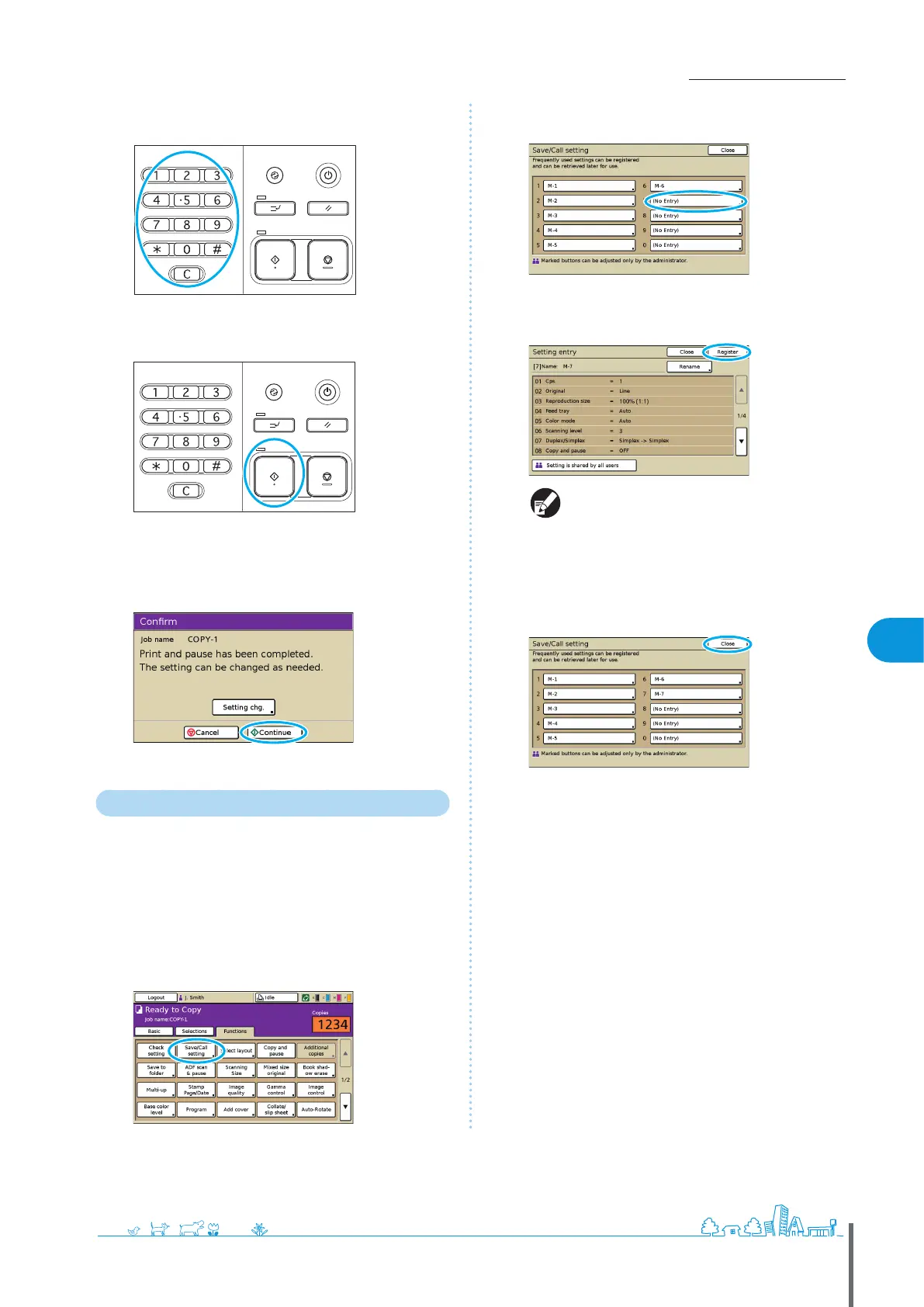
Enter the number of copies.
Use the numeric keys for input.
5
Press the [START] key.
At this point, only one copy is produced. Check how the copy
was made.
6
On the conrmation screen, press [Continue].
To change the settings, press [Setting chg.].
Saving Frequently Used Settings
Frequently used settings information can be saved and
recalled for later use as needed. This eliminates the need
to complete the settings each time.
1
Complete the copy settings.
2
On the [Functions] screen, press [Save/Call setting].
3
Press [No Entry].
4
Check the settings details on the [Setting entry]
screen, and then press [Register].
To rename registered button labels, press
[Rename] and enter the name.
[Setting is shared by all users] is only displayed
when you have logged in as a user with
administrator authority.
•
•
5
Press [Close].
ComColor Series Basic Guide 02
ComColor Series Basic Guide 02










 To Next Page