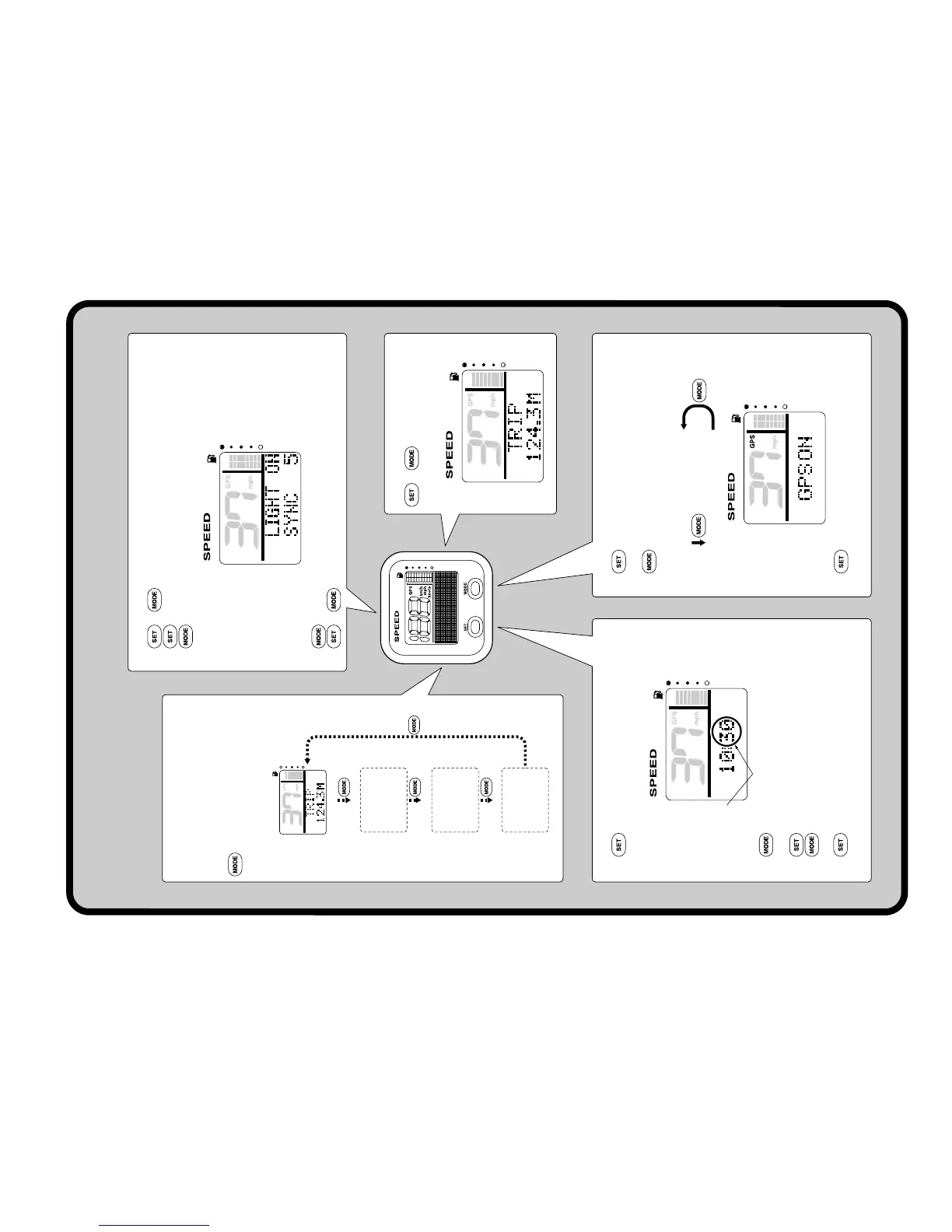
Speedometer Unit (Square) Quick Reference
Display 1
Display 2
Trip
Display 4
Display 3
(not displayed)
(not displayed)
(not displayed)
Blinks
“GPS ON” (ground speed)
“GPS OFF” (water speed)
Changing multifunction display
Since “Display 1” is the only default
display, the display cannot be switched
until additional ones are set.
: Press to switch between the
displays.
Changing backlight settings
1. + : To activate the backlight mode.
2. : To switch between LIGHT ON and LIGHT OFF.
: Press to switch between the five brightness levels (1-5).
3. (1 second): To switch between SYNC and non-sync.
4. + or wait 5 seconds: To return to the normal display.
Trip display
+ (1 second):
To reset the distance traveled.
Switching the speed sensors
1. (4 seconds): To activate the speed sensor
setting mode.
2. : Press to switch between the speed sensor
types.
3. (1 second): To set the speed sensor and
return to the normal display.
Setting the time (GPS has been installed)
1. : To activate the time setting mode and switch
to the time setting display.
2. : To change the minutes. Press and hold to
advance quickly.
3. : To set the hours.
4. : To change the hours. Press and hold to
advance quickly.
5. : To set the time and return to the normal
display.



 To Next Page