Speed & Fuel meter Unit (Square) Quick Reference
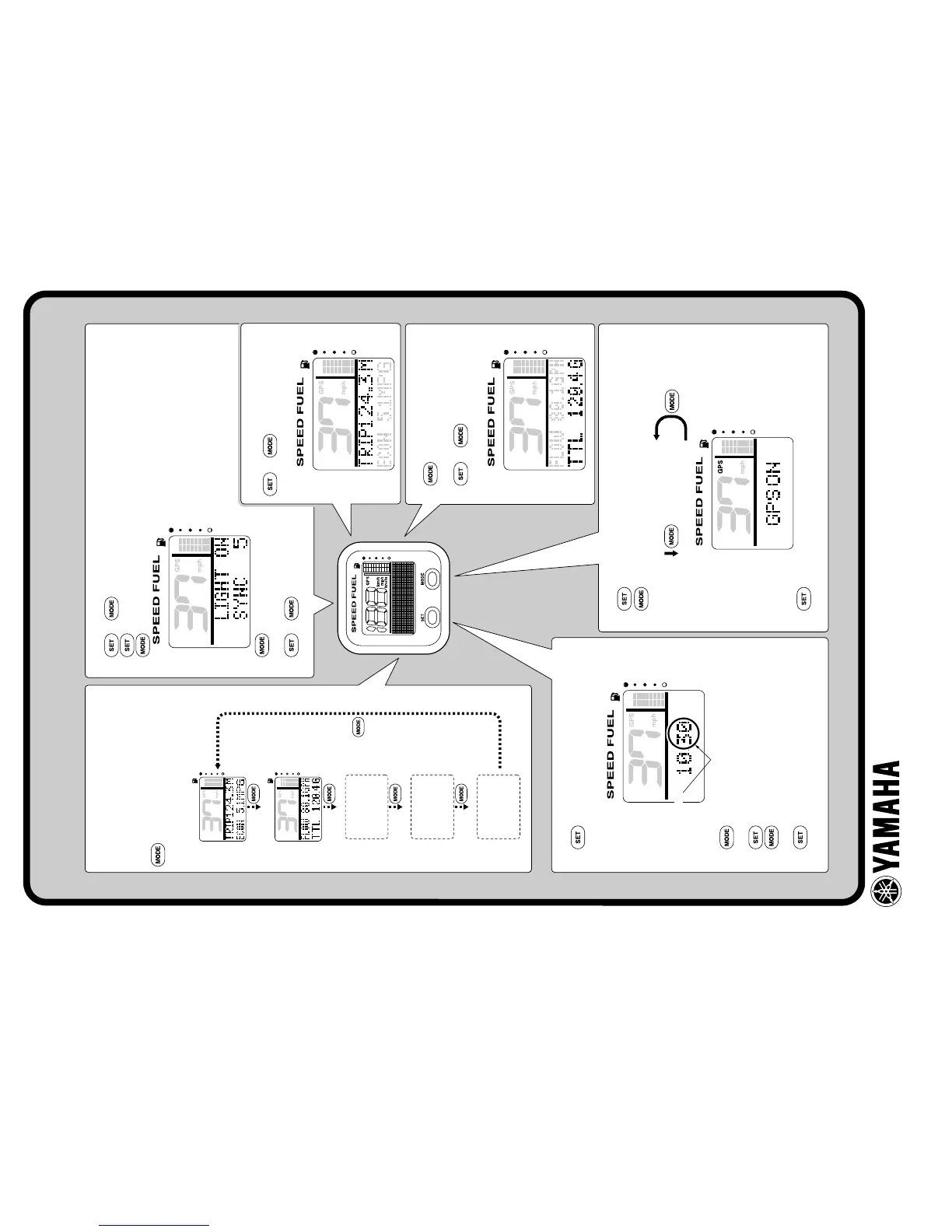
Display 1
Display 2
Display 3
(not displayed)
(not displayed)
(not displayed)
Display 4
Display 5
Trip
+ Fuel economy
Fuel flow
+ Total fuel
consumption
Blinks
“GPS ON” (ground speed)
“GPS OFF” (water speed)
Changing multifunction display
Since “Display 1 and 2” are the only
default displays, the display cannot be
switched until additional ones are set.
: Press to switch between the
displays.
Changing backlight settings
1. + : To activate the backlight mode.
2. : To switch between LIGHT ON and LIGHT OFF.
: Press to switch between the five brightness levels (1-5).
3. (1 second): To switch
between SYNC and non-sync.
4. + or wait 5 seconds:
To return to the normal display.
Total fuel consumption display
1. : To switch FLOW/TTL
display.
2. + (1 second):
To reset the TTL display.
Trip display
+ (1 second):
To reset the distance traveled.
Switching the speed sensors
1. (4 seconds): To activate the speed sensor setting mode.
2. : Press to switch between the speed sensor types.
3. (1 second): To set the speed sensor and return to the
normal display.
Setting the time (GPS has been installed)
1. : To activate the time setting mode and
switch to the time setting display.
2. : To change the minutes. Press and hold
to advance quickly.
3. : To set the hours.
4. : To change the hours. Press and hold
to advance quickly.
5. : To set the time and return to the
normal display.
YAMAHA MOTOR CO., LTD.
Printed in USA
Jun. 2007 – 0.0 × 1 CR
(E)



 To Next Page