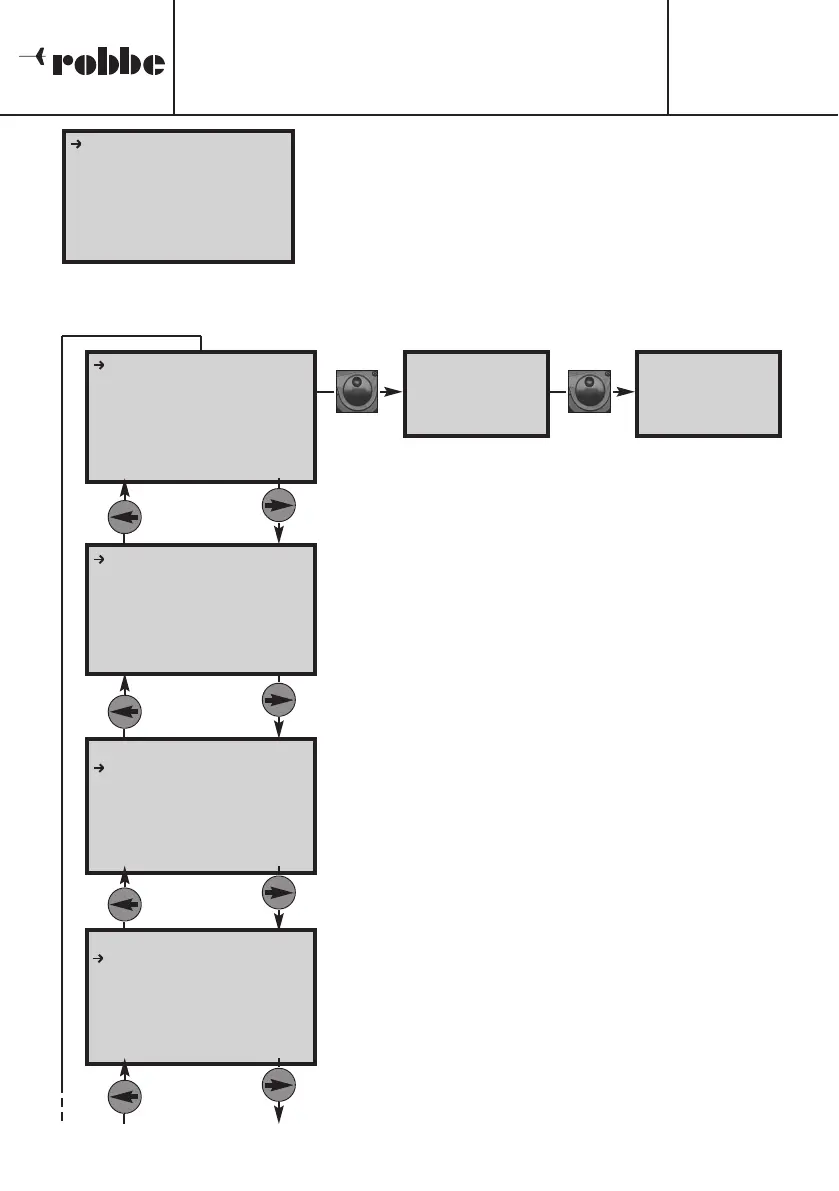
A continuación aparece brevemente el display de inicio y
después el menú para la selección de la memoria y la
programación de los parámetros de carga o descarga en
el idioma recién seleccionado.
5.2 ESTRUCTURA DEL MENU SALIDA 1
En el menú en el display ‘BATTERY NAME’ se asigna
un nombre a la memoria activa (0 – 9). Aquí se prefi
jan también los parámetros de carga / descarga.
En el segundo menú principal ‘SETUP USUARIO’ se
seleccionan, aparte del nombre del usuario, todos los
valores predeterminados básicos.
En el menú VISTA FECHA se indican todos los datos
de la batería antes y después del proceso de carga –
descarga. El display dispone de otra línea ‘FORMA-
GRAFICA’, la cual se puede seleccionar y activar con
el ‘3-D-Hotkey’. Los datos de esta indicación se refle-
jan también en el display de trabajo de un proceso.
En el display DATOS CICLO se indica la capacidad
cargada y descargada, así como la tensión corre-
spondiente de todos los ciclos en curso. Se pueden
consultar los datos de hasta 10 ciclos, seleccionán
dolos girando el ‘3-D-Hotkey’.
Manual de Uso
POWER PEAK Infinity 3
No.
8429
9
[
[
1
1
]
]
B
B
A
A
T
T
T
T
E
E
R
R
Y
Y
N
N
A
A
M
M
E
E
.
.
.
.
T
T
I
I
P
P
O
O
B
B
A
A
T
T
.
.
:
:
L
L
i
i
P
P
o
o
E
E
L
L
E
E
M
M
.
.
B
B
A
A
T
T
.
.
:
:
2
2
S
S
7
7
,
,
4
4
V
V
C
C
A
A
P
P
A
A
C
C
I
I
D
D
A
A
D
D
:
:
3
3
2
2
0
0
0
0
m
m
A
A
h
h
C
C
O
O
R
R
R
R
.
.
C
C
A
A
R
R
G
G
A
A
:
:
3
3
.
.
2
2
A
A
C
C
O
O
R
R
R
R
.
.
D
D
E
E
S
S
C
C
.
.
:
:
3
3
.
.
2
2
A
A
V
V
O
O
L
L
T
T
.
.
D
D
E
E
S
S
C
C
:
:
3
3
.
.
0
0
V
V
/
/
Z
Z
S
S
E
E
N
N
S
S
I
I
B
B
.
.
P
P
E
E
A
A
K
K
:
:
5
5
5
5
o
o
C
C
[
[
1
1
]
]
B
B
A
A
T
T
T
T
E
E
R
R
Y
Y
N
N
A
A
M
M
E
E
.
.
.
.
T
T
I
I
P
P
O
O
B
B
A
A
T
T
.
.
:
:
L
L
i
i
P
P
o
o
E
E
L
L
E
E
M
M
.
.
B
B
A
A
T
T
.
.
:
:
2
2
S
S
7
7
,
,
4
4
V
V
C
C
A
A
P
P
A
A
C
C
I
I
D
D
A
A
D
D
:
:
2
2
0
0
0
0
m
m
A
A
h
h
C
C
O
O
R
R
R
R
.
.
C
C
A
A
R
R
G
G
A
A
:
:
3
3
.
.
2
2
A
A
C
C
O
O
R
R
R
R
.
.
D
D
E
E
S
S
C
C
.
.
:
:
3
3
.
.
2
2
A
A
V
V
O
O
L
L
T
T
.
.
D
D
E
E
S
S
C
C
:
:
3
3
.
.
0
0
V
V
/
/
Z
Z
S
S
E
E
N
N
S
S
I
I
B
B
.
.
P
P
E
E
A
A
K
K
:
:
5
5
5
5
o
o
C
C
Display de inicio
para pr
ocesos de
carga, descarga y
ciclos.
Display de trabajo
para procesos de
carga, descarga y
ciclos.
[
[
S
S
E
E
T
T
U
U
P
P
U
U
S
S
U
U
A
A
R
R
I
I
O
O
]
]
M
M
O
O
D
D
O
O
T
T
E
E
M
M
P
P
.
.
:
:
o
o
C
C
B
B
O
O
T
T
O
O
N
N
S
S
O
O
N
N
I
I
D
D
O
O
:
:
O
O
N
N
S
S
O
O
N
N
I
I
D
D
O
O
F
F
I
I
N
N
A
A
L
L
:
:
5
5
s
s
e
e
k
k
M
M
E
E
L
L
O
O
D
D
I
I
A
A
:
:
2
2
C
C
O
O
N
N
T
T
R
R
A
A
S
S
T
T
L
L
C
C
D
D
:
:
8
8
F
F
O
O
N
N
D
D
O
O
L
L
C
C
D
D
:
:
O
O
N
N
<
<
U
U
S
S
E
E
R
R
N
N
A
A
M
M
E
E
.
.
.
.
>
>
Tecla 'Mode' y
tecla 'ESC'
[
[
V
V
I
I
S
S
T
T
A
A
F
F
E
E
C
C
H
H
A
A
]
]
E
E
N
N
T
T
R
R
A
A
D
D
A
A
:
:
1
1
2
2
.
.
7
7
8
8
1
1
V
V
S
S
A
A
L
L
I
I
D
D
A
A
:
:
0
0
.
.
0
0
0
0
0
0
V
V
T
T
E
E
M
M
P
P
.
.
B
B
A
A
T
T
.
.
:
:
2
2
4
4
.
.
2
2
o
o
C
C
T
T
E
E
M
M
P
P
.
.
P
P
E
E
A
A
K
K
:
:
4
4
5
5
.
.
0
0
o
o
C
C
R
R
E
E
S
S
I
I
S
S
T
T
.
.
B
B
A
A
T
T
.
.
:
:
0
0
m
m
O
O
T
T
I
I
E
E
M
M
P
P
O
O
C
C
A
A
R
R
G
G
:
:
0
0
:
:
0
0
0
0
:
:
0
0
0
0
T
T
I
I
E
E
M
M
P
P
O
O
D
D
E
E
S
S
C
C
:
:
0
0
:
:
0
0
0
0
:
:
0
0
0
0
[
[
D
D
A
A
T
T
O
O
S
S
C
C
I
I
C
C
L
L
O
O
]
]
N
N
O
O
C
C
A
A
P
P
A
A
C
C
I
I
T
T
Y
Y
V
V
O
O
L
L
T
T
A
A
G
G
E
E
1
1
C
C
:
:
0
0
m
m
A
A
h
h
0
0
.
.
0
0
0
0
0
0
V
V
D
D
:
:
0
0
m
m
A
A
h
h
0
0
.
.
0
0
0
0
0
0
V
V
2
2
C
C
:
:
0
0
m
m
A
A
h
h
0
0
.
.
0
0
0
0
0
0
V
V
D
D
:
:
0
0
m
m
A
A
h
h
0
0
.
.
0
0
0
0
0
0
V
V
3
3
C
C
:
:
0
0
m
m
A
A
h
h
0
0
.
.
0
0
0
0
0
0
V
V
D
D
:
:
0
0
m
m
A
A
h
h
0
0
.
.
0
0
0
0
0
0
V
V
>pulsar
2 seg.
>pulsar
2 seg.
Tecla 'Mode'
y tecla 'ESC'
Tecla 'Mode'
y tecla 'ESC'
T
ecla 'Mode'
y tecla 'ESC'




 To Next Page