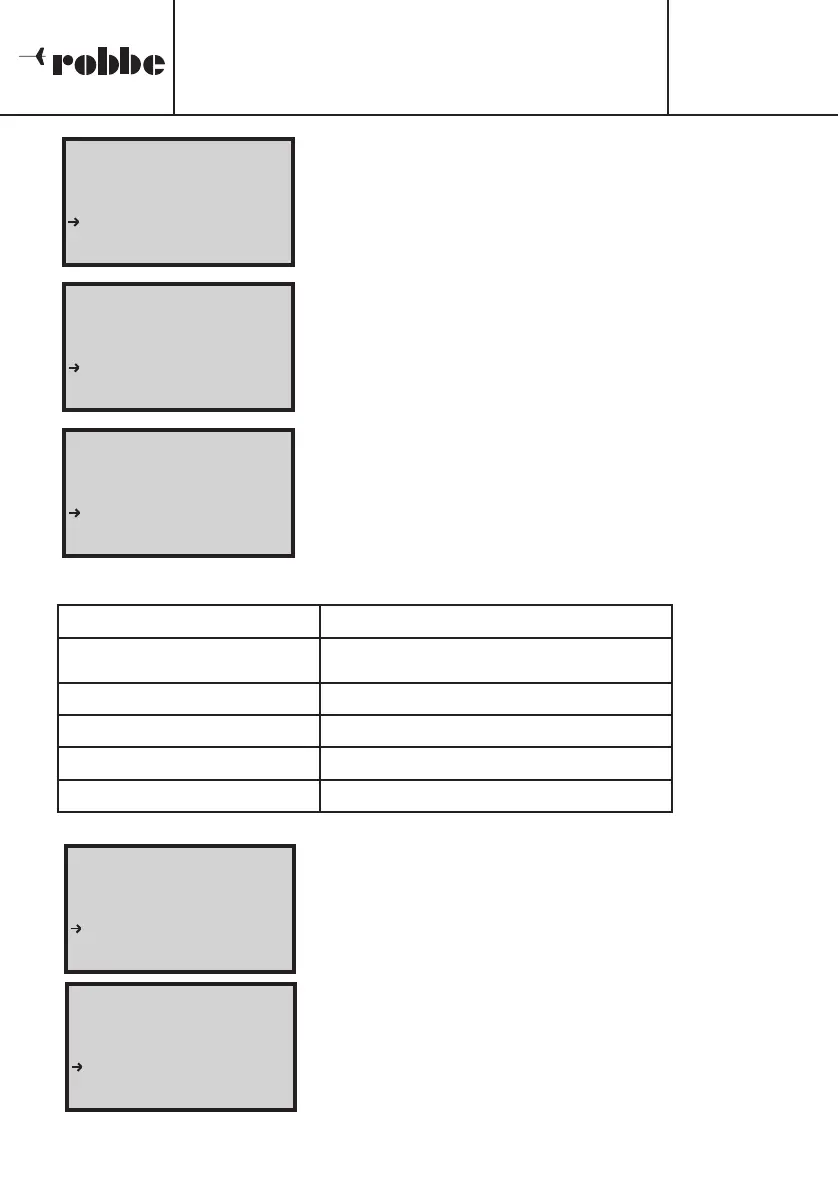
You can switch between the two charge outputs using
the 'OUT1/2' button. When you press the button, the dis-
play changes and looks as shown in the screen shot prin-
ted here. If no battery is connected, the voltage displayed
at Output 2 is slightly below the input voltage.
This value is displayed in the appropriate line. As soon as
a battery is connected, this line of the screen displays the
actual battery voltage (see screen shot).
To program the charge current you wish to use, you must
first rotate the ‘3-D hotkey’ to mark the appropriate line,
then activate it. The numeric value is now shown in inver-
se video (dark background), and you can vary it within the
limits of 0.1 A to 2 A in increments of 0.1 A. If you select
the ‘AUTO’ setting, the charger automatically calculates
the optimum charge current.
Data, functions of Output 2
11.2 CHARGE PROCESS, OUTPUT 2
Once you have set the data correctly, and the ‘OUT 2
Setup’ display is still on the screen, hold the ‘3-D hotkey’
pressed in for two seconds. You will hear an audible sig-
nal to indicate that the charge process has started, and
the green LED lights up. The illustration printed here
shows such a charge process: it has been in progress for
6 minutes and 49 seconds at a current of 0.81 A.
The charge is terminated using the Delta-Peak process,
which operates with a fixed sensitivity of 8 mV / cell. The
second line of the screen shows the reason for the termi-
nation in flashing script. The end of the charge process is
confirmed by the charger playing the programmed melo-
dy, and at the same time the green LED flashes. The scre-
en now typically looks like the illustration printed here.
Parameter NiCd and NiMH batteries
Cell count / Battery voltage 1 - 8 cells, automatic detection
Capacity 100 to 9900 mAh
Charge current Auto or manual: 0.1 A to 2.0 A
Peak sensitivity 8 mV / cell, fixed
Pre-peak suppression 3 minutes, fixed
Operating Instructions
POWER PEAK Infinity 3
No.
8429
25
[
[
O
O
U
U
T
T
2
2
S
S
E
E
T
T
U
U
P
P
]
]
T
T
I
I
M
M
E
E
:
:
0
0
:
:
0
0
0
0
:
:
0
0
0
0
C
C
A
A
P
P
A
A
C
C
I
I
T
T
Y
Y
:
:
0
0
m
m
A
A
h
h
V
V
O
O
L
L
T
T
A
A
G
G
E
E ::
1
1
2
2
.
.
8
8
0
0
2
2
V
V
C
C
U
U
R
R
R
R
E
E
N
N
T
T
:
:
A
A
U
U
T
T
O
O
P
P
E
E
A
A
K
K
.
.
V
V
O
O
L
L
T
T
:
:
0
0
.
.
0
0
0
0
0
0
V
V
[
[
O
O
U
U
T
T
2
2
S
S
E
E
T
T
U
U
P
P
]
]
T
T
I
I
M
M
E
E
:
:
0
0
:
:
0
0
0
0
:
:
0
0
0
0
C
C
A
A
P
P
A
A
C
C
I
I
T
T
Y
Y
:
:
0
0
m
m
A
A
h
h
V
V
O
O
L
L
T
T
A
A
G
G
E
E ::
5
5
.
.
3
3
1
1
2
2
V
V
C
C
U
U
R
R
R
R
E
E
N
N
T
T
:
:
A
A
U
U
T
T
O
O
P
P
E
E
A
A
K
K
.
.
V
V
O
O
L
L
T
T
:
:
0
0
.
.
0
0
0
0
0
0
V
V
[
[
O
O
U
U
T
T
2
2
S
S
E
E
T
T
U
U
P
P
]
]
T
T
I
I
M
M
E
E
:
:
0
0
:
:
0
0
0
0
:
:
0
0
0
0
C
C
A
A
P
P
A
A
C
C
I
I
T
T
Y
Y
:
:
0
0
m
m
A
A
h
h
V
V
O
O
L
L
T
T
A
A
G
G
E
E ::
5
5
.
.
3
3
1
1
2
2
V
V
C
C
U
U
R
R
R
R
E
E
N
N
T
T
:
:
0
0
.
.
8
8
0
0
A
A
P
P
E
E
A
A
K
K
.
.
V
V
O
O
L
L
T
T
:
:
0
0
.
.
0
0
0
0
0
0
V
V
[
[
O
O
U
U
T
T
2
2
C
C
H
H
A
A
R
R
G
G
E
E
]
]
T
T
I
I
M
M
E
E
:
:
0
0
:
:
0
0
6
6
:
:
4
4
9
9
C
C
A
A
P
P
A
A
C
C
I
I
T
T
Y
Y
:
:
8
8
6
6
m
m
A
A
h
h
V
V
O
O
L
L
T
T
A
A
G
G
E
E ::
6
6
.
.
1
1
6
6
2
2
V
V
C
C
U
U
R
R
R
R
E
E
N
N
T
T
:
:
0
0
.
.
8
8
1
1
A
A
P
P
E
E
A
A
K
K
.
.
V
V
O
O
L
L
T
T
:
:
6
6
.
.
0
0
4
4
1
1
V
V
[
[
O
O
U
U
T
T
2
2
L
L
A
A
D
D
E
E
N
N
]
]
E
E
N
N
D
D
:
:
D
D
E
E
L
L
T
T
A
A
P
P
E
E
A
A
K
K
T
T
I
I
M
M
E
E
:
:
0
0
:
:
1
1
6
6
:
:
4
4
9
9
C
C
A
A
P
P
A
A
C
C
I
I
T
T
Y
Y
:
:
4
4
8
8
6
6
m
m
A
A
h
h
V
V
O
O
L
L
T
T
A
A
G
G
E
E ::
5
5
.
.
7
7
2
2
6
6
V
V
C
C
U
U
R
R
R
R
E
E
N
N
T
T
:
:
0
0
.
.
0
0
0
0
A
A
P
P
E
E
A
A
K
K
.
.
V
V
O
O
L
L
T
T
:
:
6
6
.
.
1
1
9
9
6
6
V
V




 To Next Page