10
Manual tuning - FM
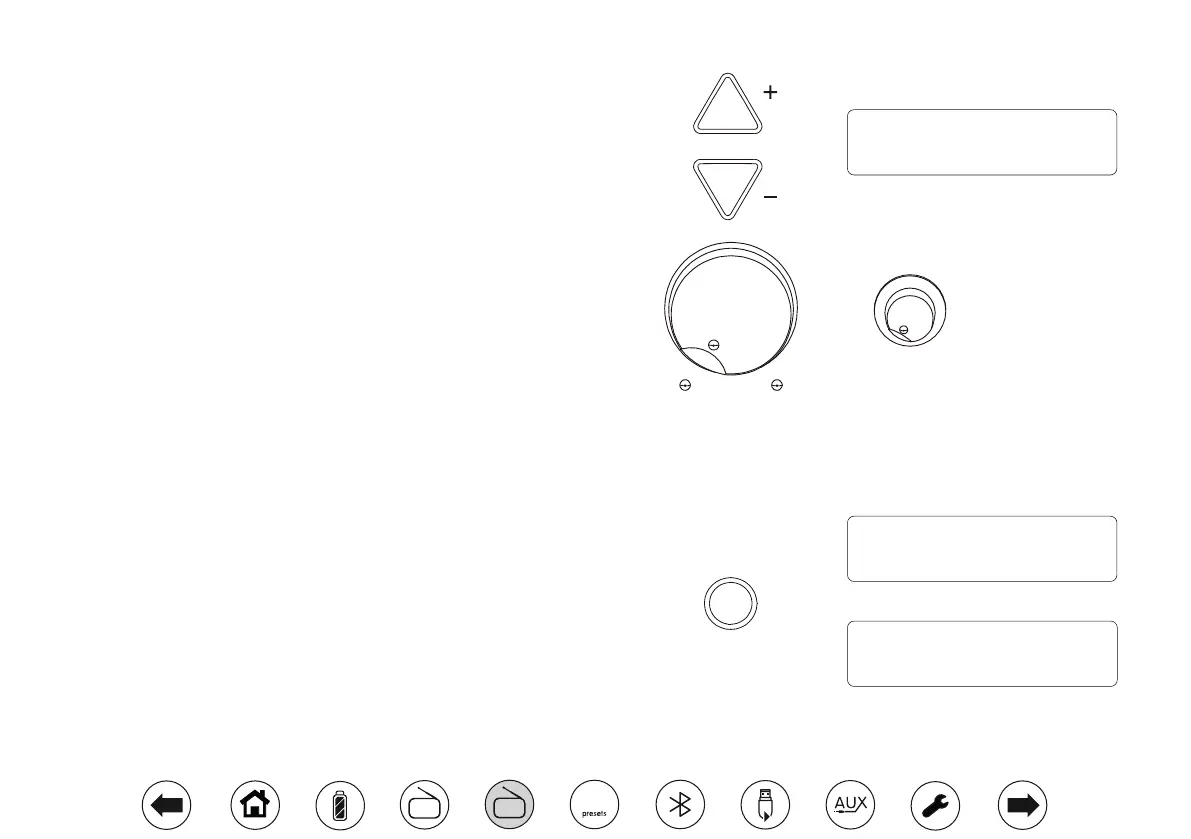
1. Repeatedly, press the Tuning Up or Down buttons to tune to a station.
2. The frequency will change in steps of 50kHz.
3. Adjust the Volume and Tone control.
Stereo / Mono switching - FM
Your radio will play stereo FM broadcasts in stereo provided that the received
signal is of adequate strength. However, as a stereo signal becomes weaker the
audio signal will become poorer. It may be preferable to force the radio to play the
station in mono in order to reduce the level of background hiss.
1. Ensure your radio is in FM mode and tune to the required FM station.
2. To reduce the hiss, apply a long press on the Select/Info button to switch
your Opus radio to mono mode. 'Mono' will show on the display.
3. To return to stereo mode, apply a long press on the Select/Info button to
switch your Opus radio to stereo mode. 'Auto' will show on the display.
Select
Tuning / Album
Tone
Min. Max.
Volume
Min. Max.
87.50MHz
09:30 03-01-2018
FM
90.10MHz
Mono
FM
90.10MHz
Auto
FM
DAB
FM
10


 To Next Page