18
Controlling playback
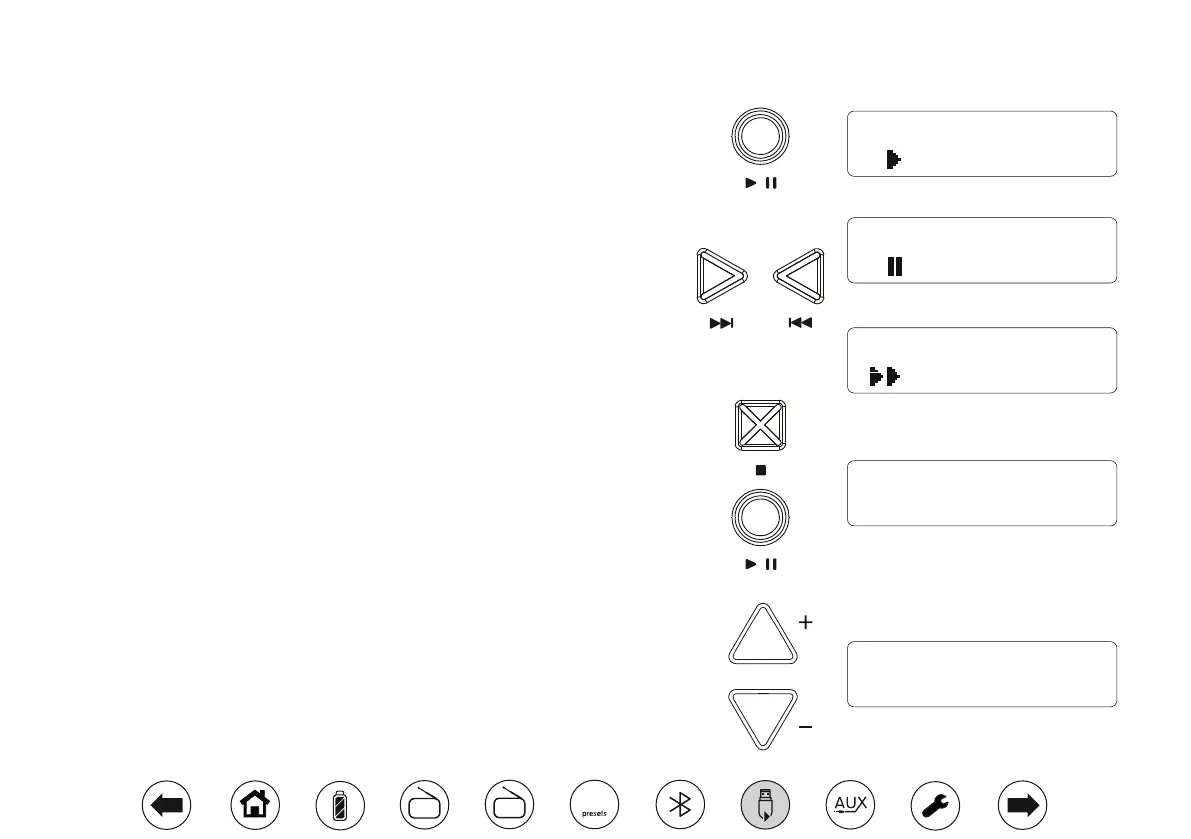
1. Press Play/Pause to start playback. The display will show the current le information
on the upper line and the elapsed play time on the lower line.
2. To pause playback press the Play/Pause button. To resume playback, press the
Play/Pause button again.
3. While the USB device is playing or in stop mode press either the Next or Previous
buttons to change to the desired le. The le number will be updated in the display.
If there is more than one folder when all les in the current folder have been played
the next folder will be played.
4. To search a le apply a long press on the Next or Previous buttons and release
the buttons when the desired part of the current le is reached.
USB Bookmark
The USB Bookmark feature on your Opus radio allows you to stop the playback of
the USB and then to continue playback from the same point at a later time. Even if
you change the mode or put the unit into standby the next USB operation will start
from the point where playback was previously stopped. Note: If the mains power is
removed and restored the Bookmark setting will be cancelled and the USB will then
play from the beginning.
1. To stop playback, press the Stop button once. The current le number and 'Resume'
will show on the display. You can then select an alternative mode. When you return
to USB playback mode, press Play/Pause to resume playback from the point that
the USB was stopped.
2. If you wish to cancel the Bookmark function press the Stop button a second time
when the radio is in USB mode.
To skip to another folder
1. Whether the USB memory device is playing or in stop mode, press the Tuning/
Album Up or Down buttons to skip to the next or previous folder. Press Play/
Pause button if required. The rst le of the next or previous folders on the USB
memory will be played.
Tuning / Album
TITLE: The Magic
00:00:22
TITLE: The Magic
00:00:48
FILE 002
Resume
FILE 035
FOLDER 004
TITLE: The Magic
00:00:22
DAB
FM
10


 To Next Page