20
Recording to USB memory device
Your Opus radio has been designed to allow you to make recordings to USB
memory devices. Recordings are made in MP3 format at 320k bits per second.
USB memory media must use the FAT or FAT32 le system in order to operate
with the Opus radio. Such media is usually supplied already formatted or can
be formatted using a PC with a suitable USB connection.
It is also possible to record onto media which already contains les written by
the radio or your computer. The recorded les will be added to those already
present on the media.
Make a recording
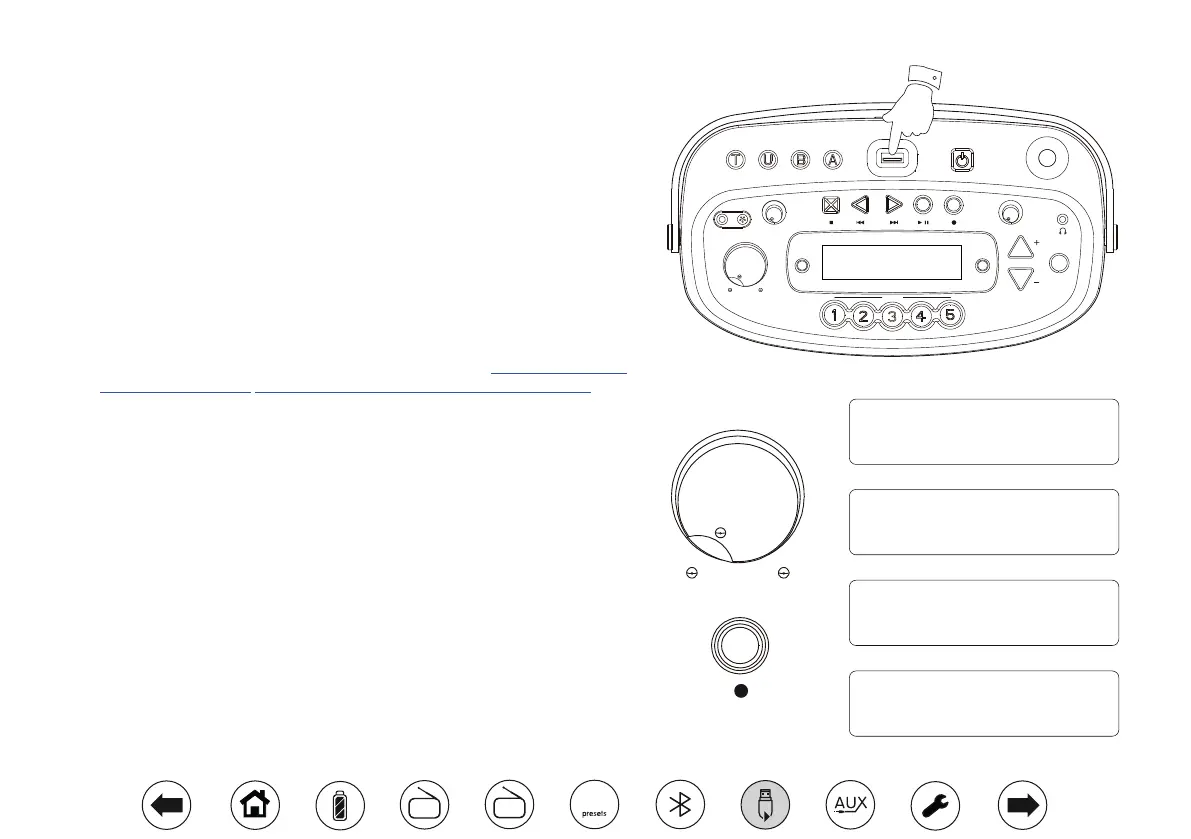
1. Select the desired source for the recording (DAB, FM, Bluetooth, Auxiliary
in (also see page 22), internal MIC or external MIC (also see page 23). DAB
radio is shown in the illustration.
2. Set the volume to the required listening level (the volume of the recording
will not be affected by this).
3. Carefully insert the USB memory device on to which the recording is to be
made into the USB socket on the top of the radio.
4. Apply a long press on the Record button. The display will show 'Record
init...' and a double beep will be heard. Recording will start after a few seconds
and a second double beep will be heard. While recording is in progress the
recording source and elapsed record time will show on the display.
5. To stop the recording press the Record button or the Stop button. Recording
will stop, a long beep will be heard and the recorded le will have been written
to the USB memory device.
BBC Radio 2
REC 00:01:18
Zoom
Volume
MIC
Tone
Preset
Time Set
Repeat
& Intro
Tuning / Album
On/Off
Info.
Tuning Tone
Tuner Aux
Min. Max.
Min. Max.
Min. Max.
BluetoothUSB
Opus
Select
3
BBC Radio 2
Record init...
BBC Radio 2
Record ending...
DAB radio
Volume
Min. Max.
DAB
FM
10


 To Next Page