6
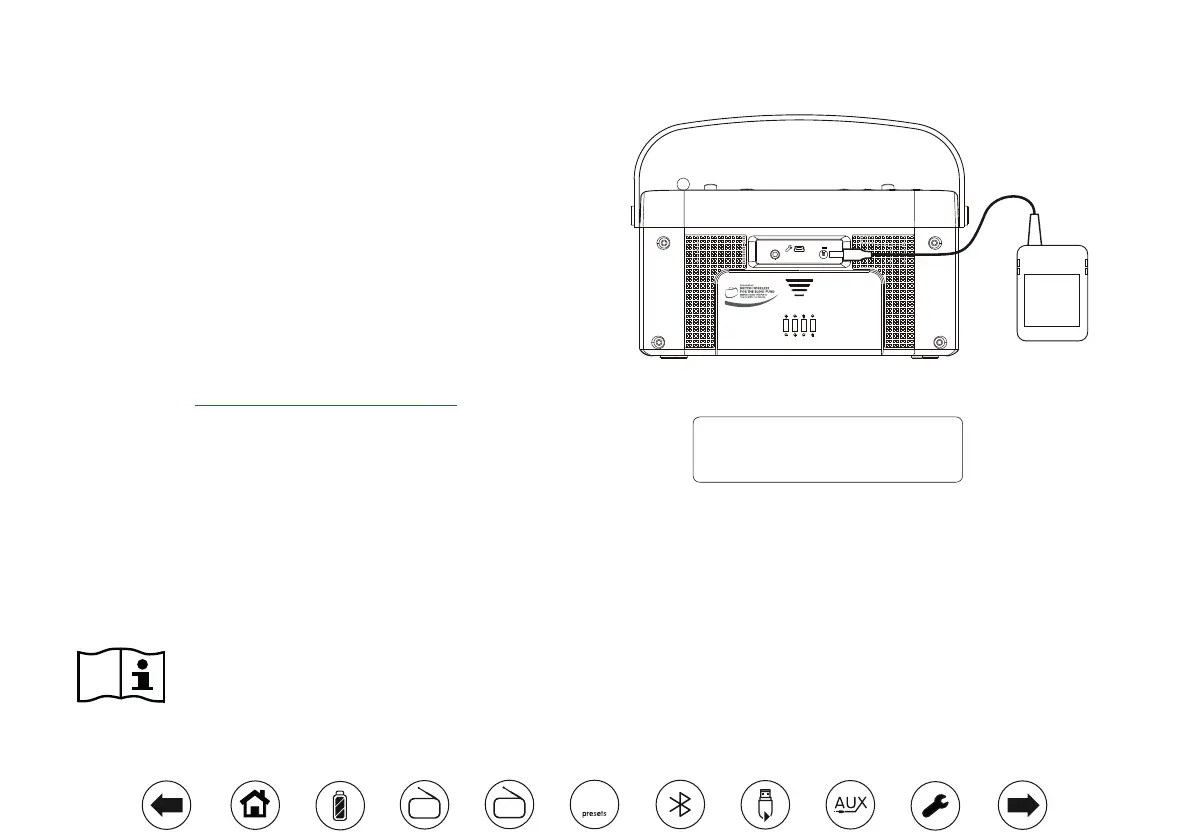
4 x 1.5V LR14 / C Size or Equivalent
Aux In
DC In
7.5V
2A
Email: info@blind.org.uk
Telephone: 01622 754 757
Using the radio for the rst time
1. Place your radio on a at surface.
2. Carefully extend the telescopic aerial. The aerial should be fully
extended and positioned vertically for optimum reception.
3. Plug the mains adaptor into the DC input socket located on the rear
of your radio (marked 'DC In') ensuring that the plug is pushed fully
into the socket.
4. Plug the other end of the mains adaptor into a standard mains socket
outlet and switch on the wall socket.
5. The display on the radio will briey show a start up screen. During
this time the radio is scanning to nd a DAB radio signal. After a short
time the current time and date will appear on the display.
6. If no signal is found, it may be necessary to relocate your radio to a
position giving better reception. You should then carry out a scan to
nd stations, see 'Finding new stations' on page 8.
The AC adaptor should be disconnected from the mains supply and from
the radio when not in use.
IMPORTANT: The mains adaptor is used as the means of connecting the
product to the mains supply. The mains socket and any multi-way mains
block used for the product must remain accessible during normal use. In
order to disconnect the product from the mains, the mains adaptor should
be removed from the mains socket completely.
Use only the mains adaptor provided with the product, or a genuine
replacement provided by Roberts Radio. The use of alternative adaptors
will invalidate the guarantee.
09:30
03-JAN-2018
ATL model: NDBL25DF-075200 / ATL model: NDCL25DF- 075200
Input: 230V - 50Hz / Input 230V - 50/60Hz
Output: 7.5V DC 2A
Using the buttons
Note: In this booklet press always means press and release. If
it is required to give a long press on a button this is described
as apply a long press and the button should be held down
for 2 to 3 seconds until the radio has responded.
DAB
FM
10


 To Next Page