23
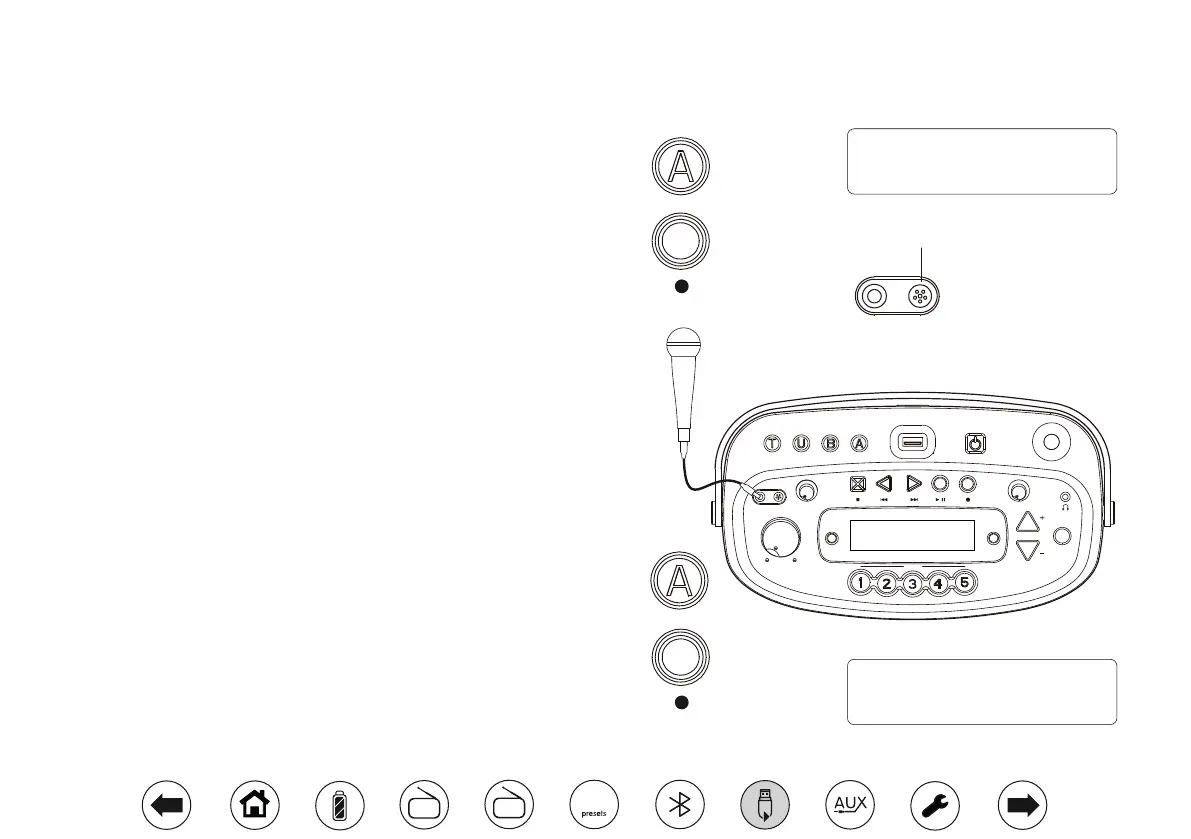
Recording from the internal microphone
1. Press On/Off to switch on your radio.
2. Ensure that nothing is plugged in to the auxiliary input socket.
3. Press the Aux button to enter the Auxiliary in mode.
4. Insert a USB memory device into the USB socket on the top of your radio.
5. Apply a long press on the Record button to start recording from the
internal microphone onto the USB memory device. Two double beeps
will be heard before recording starts.
6. To stop the recording press the Record button or the Stop button.
Recording will stop, a long beep will be heard and the recorded le will
have been written to the USB memory device.
Recording from an external microphone (not included)
The recording level is set automatically and is not affected by setting the
volume control.
1. Press On/Off to switch on your radio.
2. Ensure that nothing is plugged in to the auxiliary input socket.
3. Press the Aux button to enter the Auxiliary in mode.
4. Insert a USB memory device into the USB socket on the top of your radio.
5. Plug the external microphone into the Microphone socket just above the
volume control. The internal microphone will be automatically disconnected.
6. Adjust the volume to your required listening level (the volume of the
recording will not be affected by this).
7. Apply a long press on the Record button to start recording from the
external microphone onto the USB memory device.Two double beeps
will be heard before recording starts.
8. To stop the recording press the Record button or the Stop button.
Recording will stop, a long beep will be heard and the recorded le will
have been written to the USB memory device.
Aux
Int. mic
REC 00:00:58
Ext. mic
REC 00:00:58
Zoom
Volume
MIC
Tone
Preset
Time Set
Repeat
& Intro
Tuning / Album
On/Off
Info.
Tuning Tone
Tuner Aux
Min. Max.
Min. Max.
Min. Max.
BluetoothUSB
Opus
Select
MIC
Internal microphone
Aux
DAB
FM
10


 To Next Page