19
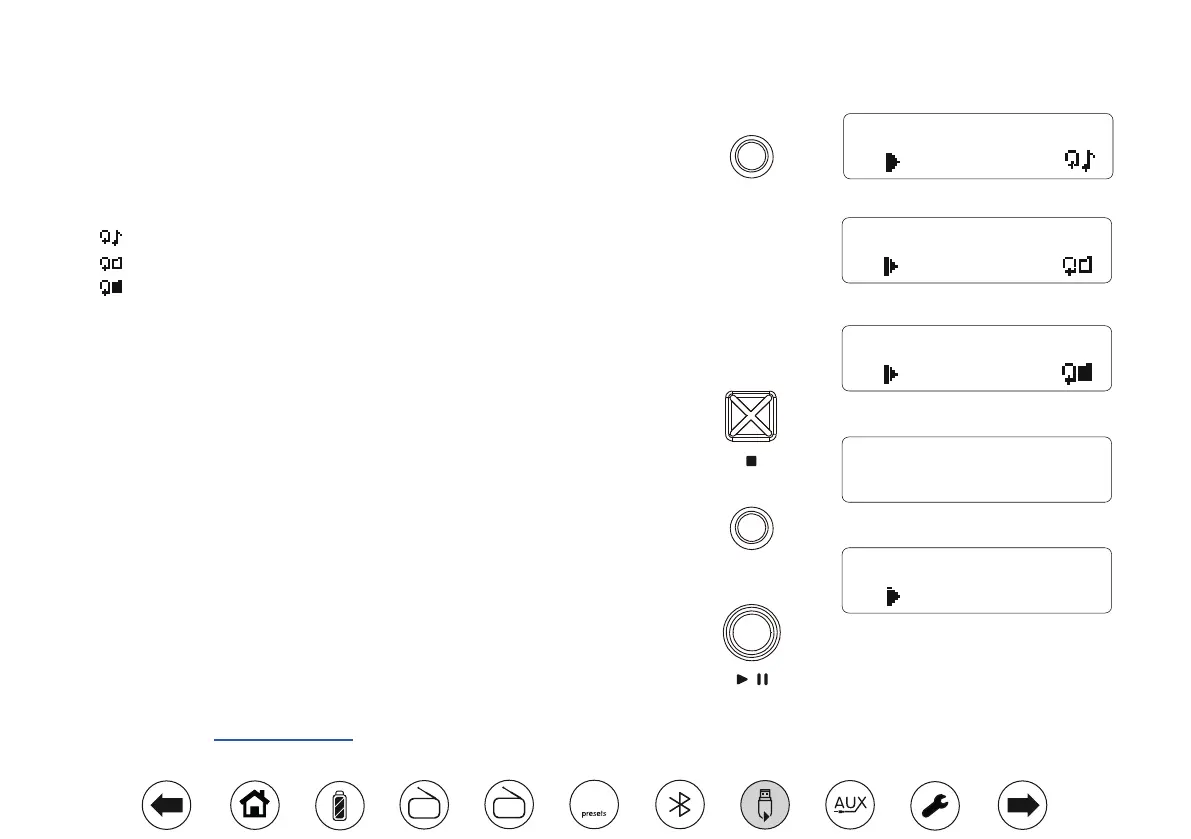
USB Repeat function
Your Opus radio has several repeat options when using the USB mode.
1. Whilst the USB is playing, press the Repeat/Intro button. The radio will step
through the following repeat options.
- Repeat the current le
- Repeat the current folder
- Repeat all les and folders
2. Press the Repeat/Intro button again to cancel the repeat function.
USB Intro function
Your Opus radio has an Intro function when using the USB mode. You may choose to
listen to the rst 10 seconds of each le to help you nd the le that you wish to play.
1. Press the Stop button as needed so that the display shows the number of Files
and Folders on the USB memory device.
2. Press the Repeat/Intro button to play the rst 10 seconds of each of the tracks
on the USB memory device. 'Int' will show on the display.
3. When the radio plays the required le, press the Intro button or the Play/Pause
button once. This will cancel the Intro function. The radio will then play the rest of
the current le and then the remaining les on the USB memory.
USB playback information
If the le contains Title, Album or Artist information you may press the Select/Info
button on the radio, please see page 11.
Time Set
Repeat
& Intro
TITLE: The Magic
00:00:22
TITLE: The Magic
00:00:22
TITLE: The Magic
00:00:22
Time Set
Repeat
& Intro
TITLE: The Magic
Int00:00:09
FILE 177
FOLDER 012
DAB
FM
10


 To Next Page